Cisco Ultra-Reliable Wireless Backhaul Standalone, Software Configuration Guide, Release 26.1.x

PDF

Cisco Ultra-Reliable Wireless Backhaul Standalone, Software Configuration Guide, Release 26.1.x

Configure global gateway using GUI

Want to summarize with AI?

Log in

Configure global gateway MODE to automatically enforce MPLS Layer 3 through the GUI interface.


Configure global gateway MODE to automatically enforce MPLS Layer 3 functionality on your device.

Global gateway MODE automatically enforces the MPLS Layer 3. In this MODE, Radio-off and Radio status cannot be changed.

Procedure

1.

In the GENERAL SETTINGS, click GENERAL MODE.

The GENERAL MODE window appears.

2.

Click gateway from MODE.

Following images shows the GUI configuration of global gateway mode:
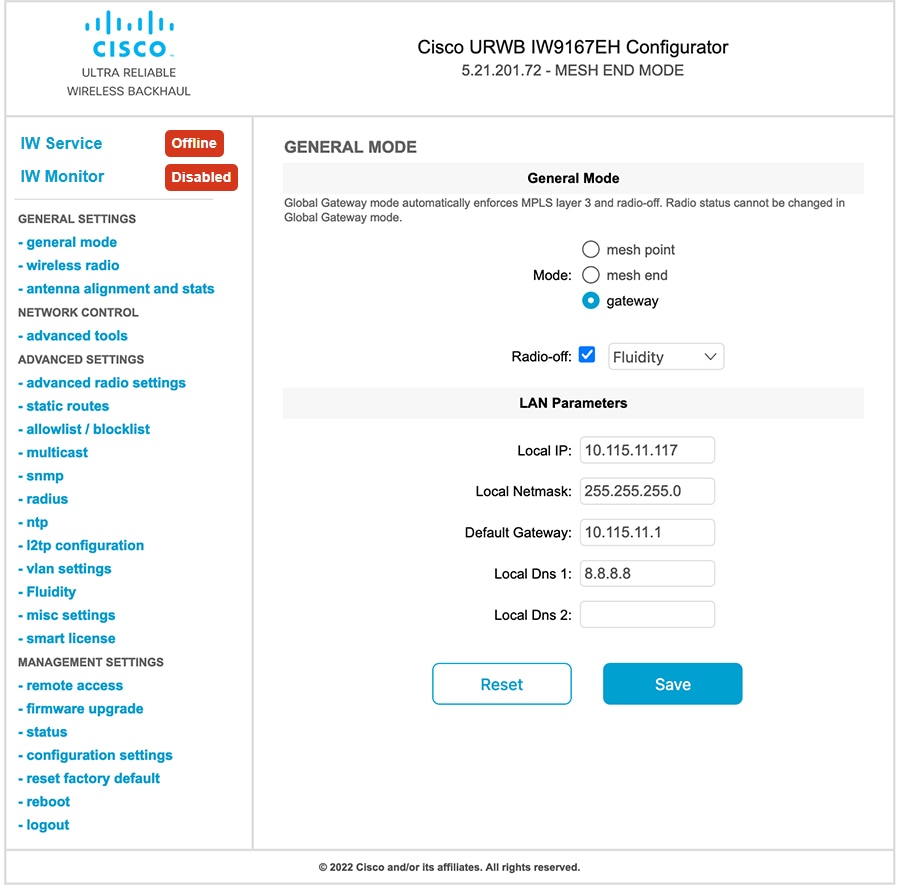
Figure 1. Global gateway mode
The GENERAL MODE window displays the GUI configuration for global gateway mode, indicating that the device is set to global gateway mode with MPLS Layer 3 automatically enforced. The GENERAL MODE window displays the GUI configuration for setting the device to global gateway mode, indicating that MPLS Layer 3 is automatically enforced. The GUI configuration screen displays the global gateway mode settings, indicating that the device is set to global gateway mode with MPLS Layer 3 automatically enforced.