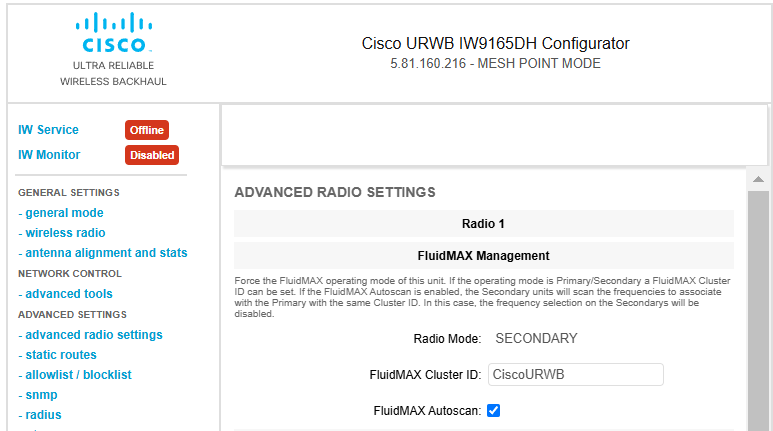
Verify the status of Fluidmax frequency scan through the GUI interface by checking the FluidMAX Autoscan checkbox setting.
This task verifies whether the Fluidmax frequency scan is enabled or disabled by checking the FluidMAX Autoscan checkbox status in the ADVANCED RADIO SETTINGS.
Use this procedure to check the current configuration status of Fluidmax frequency scanning on your URWB device through the web-based GUI interface.
Before you begin
In the wireless RADIO SETTINGS, you can select the Radio role as Fluidmax secondary either for Radio 1 or Radio 2.
Procedure
| 1. | Launch the computer's web browser and enter the URL to open the configurator login page. |
|
| 2. | Enter the username and password in the respective fields. |
|
| 3. | Click Login.
Once you successfully log into the GUI, the URWB configurator displays.
|
|
| 4. | In the ADVANCED SETTINGS, click ADVANCED RADIO SETTINGS to open the ADVANCED RADIO SETTINGS window.
|