Describes a wireless feature that enables mobile devices to search for better available frequencies while maintaining connectivity in high-density mobility environments.
Fluidity frequency scan is designed for scenarios involving high-density mobility environments using multiple frequencies on the infrastructure side to reduce self-interference and improve wireless channel capacity and performance. It helps to ensure continuous and seamless connectivity as these devices move across different network areas, facilitating smooth transitions between APs. When the current signal strength is weak, the device starts searching for a frequency with a better signal to maintain a stable connection. This feature is applicable in all high-density mobility environments, such as train-to-ground, mining, and port terminals.
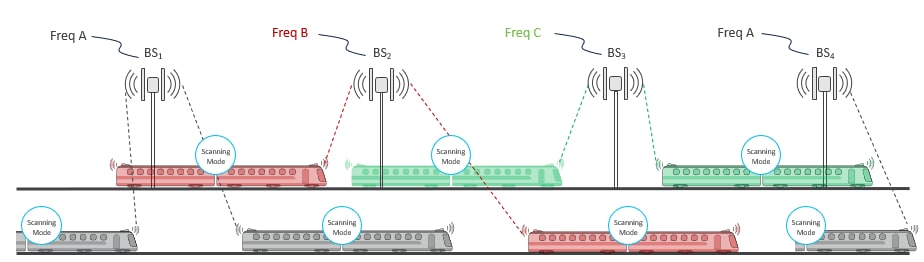
Fluidity frequency scan configurations
For effective frequency scanning, a mobile device typically requires at least two radios:
-
Radio 1: Maintains the current connection with the network.
-
Radio 2: Performs scanning for better available frequencies without disrupting the existing connection on Radio 1.
Scanning can be performed in two modes:
-
Periodic scan: Automatically conducted by the device at regular intervals to find the best available channel frequencies.
-
Signal-triggered (threshold) scan: When the current device's signal strength drops below a specified minimum Signal-to-Noise Ratio (SNR) threshold value, the mobile device begins searching for another device with a stronger signal.
This dual-radio configuration allows continuous connectivity while optimizing connection quality.
Frequency scan is applicable only to fluidity vehicle devices, not to infrastructure devices.
If the scan-periodic and scan-isolation parameters are set to zero, the frequency scan feature is disabled.