Cisco Ultra-Reliable Wireless Backhaul Standalone, Software Configuration Guide, Release 26.1.x

PDF

Cisco Ultra-Reliable Wireless Backhaul Standalone, Software Configuration Guide, Release 26.1.x

Configure GENERAL SETTINGS

Want to summarize with AI?

Log in

Configure GENERAL mode SETTINGS and LAN parameters for mesh network devices.


Configure the operational mode and LAN parameters to establish proper mesh network functionality and device connectivity.

Devices capable of operating in a mesh radio network are shipped in mesh point mode. The GENERAL Mode has operational mode controls that determine how the device functions within the network.

Note

When designing the required network layout, there must be at least one mesh end device. This device performs control and administrative functions, such as license management. This is necessary for correct network operation, even if the network consists of only two devices.

To change the General Mode settings, follow these steps:

Procedure

1.

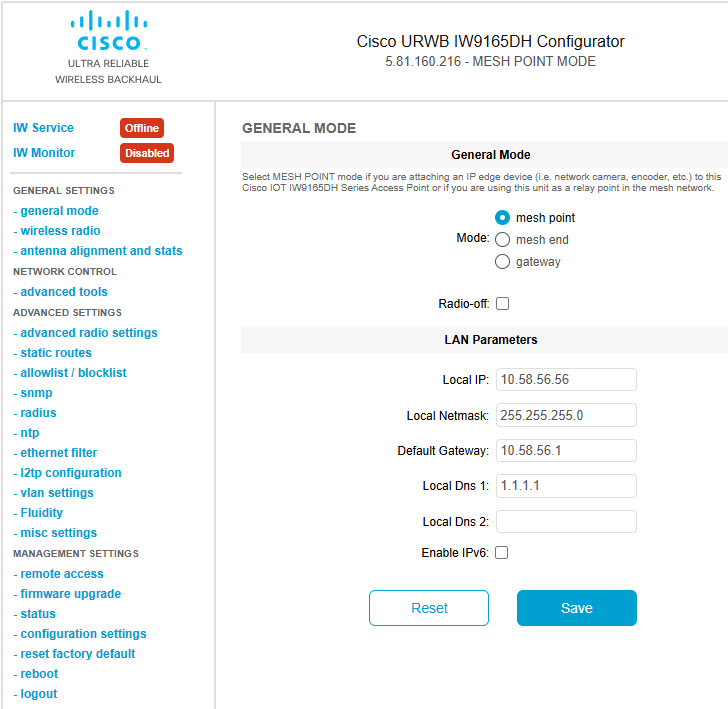
In the GENERAL SETTINGS, click GENERAL mode.

The image illustrates a network layout featuring a mesh end device, which is essential for control and administrative functions, including license management, to ensure proper network operation.

2.

Select the device's operational mode from the following options:

  • Gateway - This mode is applicable for advanced Layer 3 mobility deployments, and it is not used in most networks.
  • Mesh Point - This mode is applicable for the remaining access points in the network. These access points establish links to other access points with the same network passphrase configured as mesh end or mesh point using wireless links or wired links. In this scenario, the access point has Layer 2 visibility of other access points.
  • Mesh End - This mode configures the access point to perform control and administrative network functions. There must be at least one mesh end in each network. This access point is typically installed in the most central point where the wireless and wired networks converge.
3.

Change the LAN parameters by entering the local primary DNS address in the DNS 1 field, and enter the local secondary DNS address in the DNS 2 field if needed.

The Local IP and Local Netmask LAN parameters are shown with factory-set default values when the GENERAL Mode window is opened for the first time.

4.

Click Save to save the LAN SETTINGS.

To clear the SETTINGS, click Reset.

5.

Alternatively, configure GENERAL SETTINGS using CLI commands.

Example:

Device#configure modeconfig mode
  gateway    layer 3 global gateway mode
  meshend    mesh end mode
  meshpoint  mesh point mode
Device#configure modeconfig mode meshend
  mpls       MPLS support
  radio-off  disable radio interfaces
6.

Configure LAN parameters using CLI commands.

Example:

device#configure ip address ipv4 static 
192.168.10.2 255.255.255.0 192.168.10.1 192.168.10.200 192.168.10.201