ACI border gateways connect Cisco ACI fabrics to remote VXLAN EVPN fabrics and provide the components required to extend VRFs, bridge domains, policies, and services across the fabrics.
An ACI border gateway is a service that provides the following functions:
-
Connects to remote VXLAN EVPN fabrics.
-
Supports a unique external anycast tunnel endpoint (TEP) for each pod.
-
Supports the configuration of one border gateway set.
Cisco ACI implements ACI border gateways by using the Cisco APIC components described in the following sections.
VXLAN site ID
Beginning with Cisco ACI Release 6.1(2), you must configure a site ID before you configure the border gateway set policy.
For information about creating a site ID for your VXLAN site, see Configure a VXLAN site ID.
If you configured the ACI border gateway feature in Cisco APIC Release 6.1(1) and upgrade to Cisco APIC Release 6.1(2) without creating a VXLAN site ID, Cisco APIC generates a fault for all stretched VRFs and bridge domains.
ACI border gateway set
An ACI border gateway set consists of border gateway nodes that connect to remote VXLAN EVPN fabrics. The border gateway nodes can be part of a single ACI pod or distributed across different pods in a Multi-Pod fabric. All border gateways within a pod use the same unique external anycast TEP for that pod to attract traffic from the remote fabric for endpoints within the pod.
Cisco APIC assigns a unique internal anycast TEP to the border gateway set. All border gateway nodes in the set use this internal anycast TEP, including nodes that are deployed across different pods. You can configure only one border gateway set.
For more information, see Create border gateway sets by using the GUI.
VXLAN remote fabric
In the remote fabric configuration, specify the loopback IP address of the remote site's border gateway. Cisco ACI uses this address to establish the MP-BGP EVPN adjacency. You can associate multiple VXLAN remote fabric policies with the same border gateway set. Configure one policy for each remote site.
For more information, see Create remote VXLAN fabrics by using the GUI.
VXLAN Infra L3Out
The VXLAN Infra L3Out defines the border gateway nodes and associated interfaces that provide underlay connectivity to the external intersite network (ISN) infrastructure. Only eBGP is supported as the underlay protocol between Cisco ACI border gateway nodes and directly connected ISN devices.
You can optionally enable Bidirectional Forwarding Detection (BFD) between the border gateway nodes and ISN devices. BFD protects against failure scenarios in which traffic forwarding is affected without a link-down event on the point-to-point interfaces between the devices.
For more information, see Configure a VXLAN Infra L3Out by using the GUI.
VXLAN VRF stretch
In Cisco ACI Release 6.1(1), configure a user VXLAN L3Out and associate it with a border gateway set to stretch a user VRF. Associate the remote fabrics with the L3Out to stretch the VRF to the corresponding sites. A VRF that is stretched to the VXLAN fabric must be in unenforced mode.
Beginning with Cisco ACI Release 6.1(4), ACI border gateways support a normalization function. This function translates the virtual network identifier (VNID) that Cisco APIC assigns to a VRF in the local ACI fabric to the VNID assigned to the same VRF in the VXLAN EVPN domain.
For information about stretching a VRF to a VXLAN remote fabric, see Configure a VXLAN VRF stretch by using the GUI.
VXLAN bridge domain stretch
In Cisco ACI Release 6.1(1), use VXLAN bridge domain stretch to extend a bridge domain to a remote VXLAN EVPN fabric. You can associate multiple remote fabrics to extend the bridge domain to the corresponding remote VXLAN EVPN sites.
Beginning with Cisco ACI Release 6.1(4), ACI border gateways support a normalization function. This function translates the VNID that Cisco APIC assigns to a bridge domain in the local ACI fabric to the VNID assigned to the same bridge domain in the VXLAN EVPN domain.
For information about stretching a bridge domain to a VXLAN remote fabric, see Configure a VXLAN bridge domain stretch by using the GUI.
Local Proxy ARP on ACI border gateways
Beginning with Cisco ACI Release 6.2(3), you can enable proxy ARP independently on a bridge domain by using the Local Proxy ARP option.
Enable local proxy ARP on border gateways (BGWs) when proxy ARP is required for IP addresses in the local site and behind remote BGWs. This configuration applies proxy ARP consistently across sites.
Proxy ARP enables Cisco ACI switches to treat same-subnet traffic as routed traffic. This behavior supports IP-based security policies, such as contracts for endpoint security groups (ESGs) that use IP-based selectors.
For more information about local proxy ARP and its interaction with ESGs, see the Cisco APIC Layer 2 Networking Configuration Guide.
When a bridge domain with local proxy ARP enabled is stretched to a remote VXLAN EVPN fabric, the ACI border gateway acts as the proxy for endpoints learned behind the remote fabric:
-
If the destination endpoint is already known, the ACI border gateway responds to the ARP request with the bridge domain anycast MAC address.
-
If the destination endpoint is not known, the ACI border gateway forwards the ARP request to the remote VXLAN EVPN fabric using the bridge domain anycast MAC address as the source. After the remote endpoint is learned through the BGP EVPN Type-2 route, a subsequent ARP request receives a response with the bridge domain MAC address.
When local proxy ARP is enabled on a bridge domain that is stretched across ACI and a VXLAN EVPN fabric, an ARP request from an endpoint behind the VXLAN fabric is answered with the router MAC address when the destination endpoint is behind an ACI leaf switch. This behavior applies regardless of whether local proxy ARP is enabled on the VXLAN fabric side.
VXLAN QoS policy
The Cisco ACI quality of service (QoS) feature enables you to classify, prioritize, and police network traffic to help prevent congestion. When Cisco ACI classifies traffic within the fabric, it assigns the traffic a QoS priority level. The fabric uses this priority level to control packet flow through the network.
Use custom VXLAN QoS policies to control how the ACI fabric prioritizes traffic received from the VXLAN EVPN domain. You can also use these policies to remark traffic when the traffic leaves the ACI fabric through an ACI border gateway and enters the VXLAN EVPN domain. A custom QoS policy consists of ingress and egress QoS policies.
-
Ingress rules: Use the ingress VXLAN policy to control how the ACI fabric queues traffic received from the VXLAN EVPN domain. You can match the inner Differentiated Services Code Point (DSCP) value of incoming VXLAN traffic and set the QoS priority and the inner class of service (CoS) and DSCP values for that traffic within the ACI fabric.
Figure 1. Ingress VXLAN QoS policy example 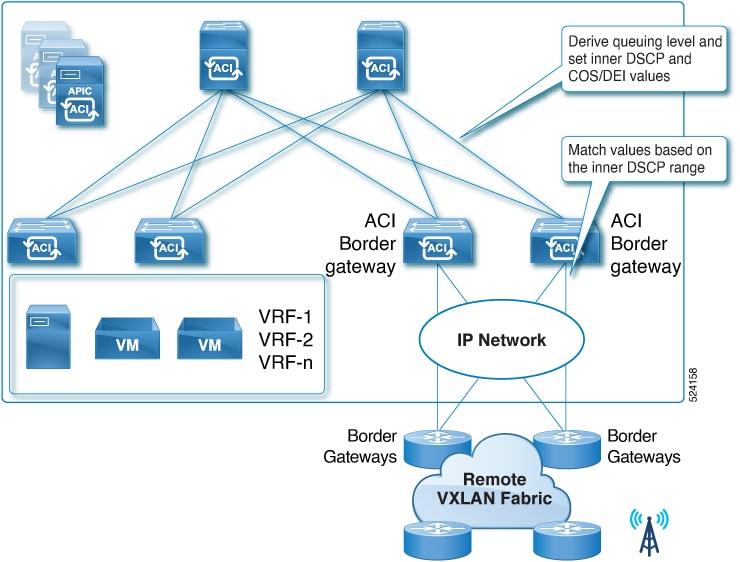
-
Egress rules: Use the egress VXLAN policy to control the values marked in the outer DSCP and CoS fields. ACI border gateways match the inner DSCP value of iVXLAN-encapsulated traffic received from ACI leaf nodes. Based on this match, the border gateways set the outer CoS and DSCP values of the VXLAN traffic sent to the remote VXLAN EVPN domain. If you do not specify values, Cisco ACI sets the outer DSCP and CoS values to zero.
Figure 2. Egress VXLAN QoS policy example 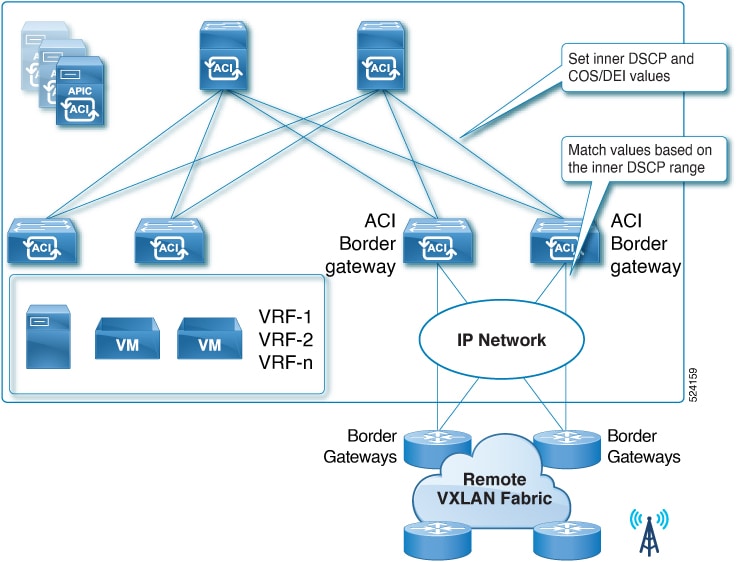
VRF in enforced mode
Beginning with Cisco ACI Release 6.1(2), you can configure VRFs in enforced mode. You can classify endpoints and prefixes advertised by remote VXLAN EVPN fabrics into endpoint security groups (ESGs). To enable communication between endpoints that belong to different ESGs, configure contracts between the ESGs.
The following sections describe the components required to configure a VRF in enforced mode.
Beginning with Cisco ACI Release 6.1(4), remote security group tag (SGT) values are carried across domains. Therefore, you do not need to classify endpoints and external prefixes advertised by remote VXLAN EVPN fabrics on the Cisco ACI border gateway.
An endpoint security group (ESG) is a Cisco ACI network security component that contains a collection of physical or virtual network endpoints. Match criteria determine which endpoints belong to an ESG. Contracts and policies define the security criteria for communication between ESGs. Use contracts to specify the types of traffic, protocols, and ports that are permitted between ESGs.
Contracts are the Cisco ACI equivalent of access control lists (ACLs). ESGs communicate with other ESGs according to contract rules. An ESG can provide or consume a contract, perform both roles, and consume multiple contracts simultaneously. ESGs can also belong to a preferred group. ESGs within the same preferred group can communicate freely with one another.
ESG match criteria are called selectors. Selectors can use attributes such as an IPv4 or IPv6 address that spans bridge domains in the associated VRF or a tag associated with an endpoint MAC address. To enable communication between endpoints in different ESGs, configure contracts between the ESGs. To communicate with devices outside the Cisco ACI fabric, configure a contract between the L3Out external EPG (l3extInstP) and the ESG. You can classify endpoints within the ACI fabric and external network prefixes learned through L3Out connections by using selectors such as an EPG selector, IP subnet selector, or tag selector.
For information about the selectors available in Cisco APIC, see the Endpoint Security Groups section of the Cisco APIC Security Configuration Guide, Release 6.1(x).
Cisco ACI classifies incoming traffic into an ESG based on the selectors configured for that ESG. Each selector provides specific matching criteria.
Beginning with Cisco ACI Release 6.1(2), two additional selectors classify endpoints and external destinations learned from remote VXLAN EVPN fabrics.
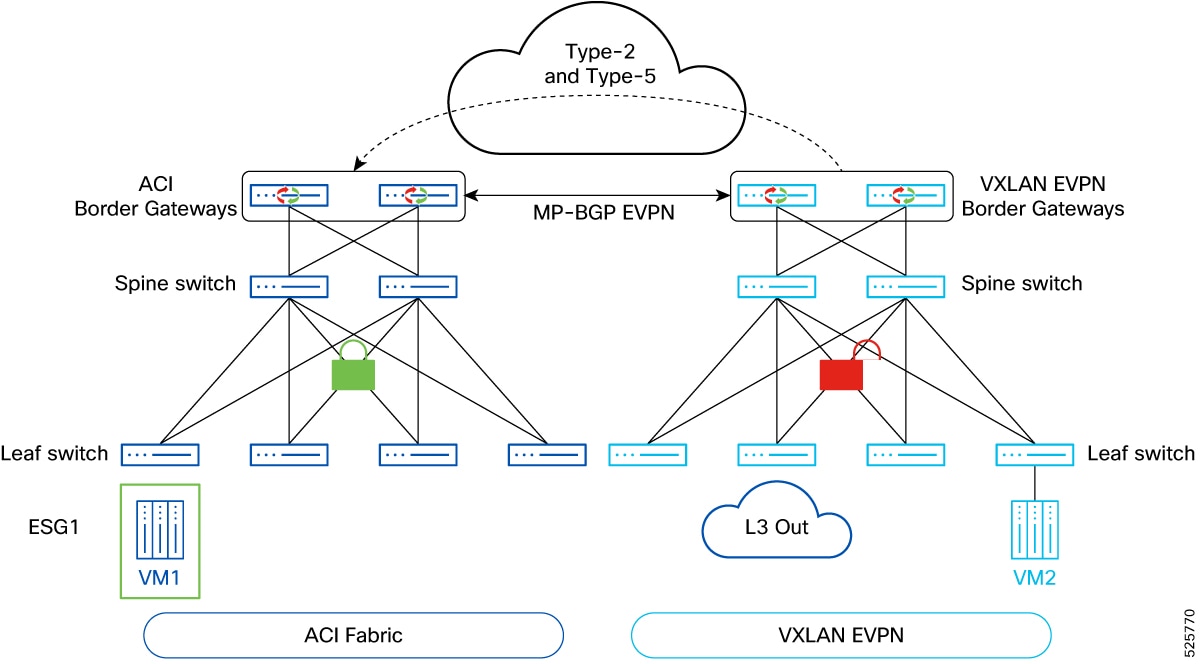
In Cisco APIC Releases 6.1(2) and 6.1(3), this selector is called the VXLAN External Subnet Selector for ACI VXLAN Border Gateway (BGW). Beginning with Cisco APIC Release 6.1(4), the selector is enhanced as a generic External Subnet Selector that you can use for regular L3Out subnets.
The selector matches EVPN Type-5 routes received by ACI border gateway nodes from another fabric. The selector uses longest prefix match (LPM).
Beginning with Cisco APIC Release 6.1(4), the selector can also match external prefixes learned through regular L3Outs without a border gateway. You can use the selector instead of L3Out external subnets that have the External Subnets for the External EPG scope under L3Out external EPGs.Use the Shared flag under the External Subnet Selector to leak the ESG-to-prefix mapping to other VRFs that are connected through contracts. This flag is equivalent to the Shared Import Security Subnet scope for an L3Out external subnet. The flag leaks only the security information. You must configure route leaking separately at the VRF level.
Before Cisco ACI Release 6.2(1), you cannot configure the default route (
0.0.0.0/0or0::0/0) as an External Subnet Selector. To match all routes, use0.0.0.0/1and128.0.0.0/1for IPv4, or use0::0/1and8000::/1for IPv6.Beginning with Cisco ACI Release 6.2(1), this limitation does not apply. You can configure the default route (
0.0.0.0/0or0::0/0) as an External Subnet Selector.
For more information, see Create an external subnet selector.
Use this selector to classify all Layer 2 MAC addresses associated with a specific stretched bridge domain and learned from remote VXLAN fabrics into the corresponding ESG. You can configure this selector only for VXLAN-stretched bridge domains. Endpoints in this bridge domain from all remote fabrics are classified into the same ESG.
For more information, see Create a VXLAN stretched bridge domain selector.
For policy-unaware VXLAN EVPN fabrics, use existing IP subnet selectors to classify connected endpoints that belong to IP subnets defined only in the remote VXLAN EVPN fabrics. These subnets are not stretched across the Cisco ACI and VXLAN EVPN domains.
This behavior differs from VXLAN External Subnet Selectors. Only exact matching prefixes can classify remote data center subnets. You cannot use a prefix that covers a supernet.
Use the existing MAC tag selector or IP tag selector to classify specific Layer 2 MAC addresses and Layer 3 IP addresses from the remote VXLAN fabric into an ESG.
Beginning with Cisco ACI Release 6.1(4) and Cisco NX-OS Release 10.5(3), you can connect the Cisco ACI domain to a policy-aware remote VXLAN EVPN domain. The EVPN control plane between ACI border gateways and remote VXLAN EVPN border gateways carries tags that identify the security groups defined in each domain. Therefore, each domain independently classifies its internal and external resources.
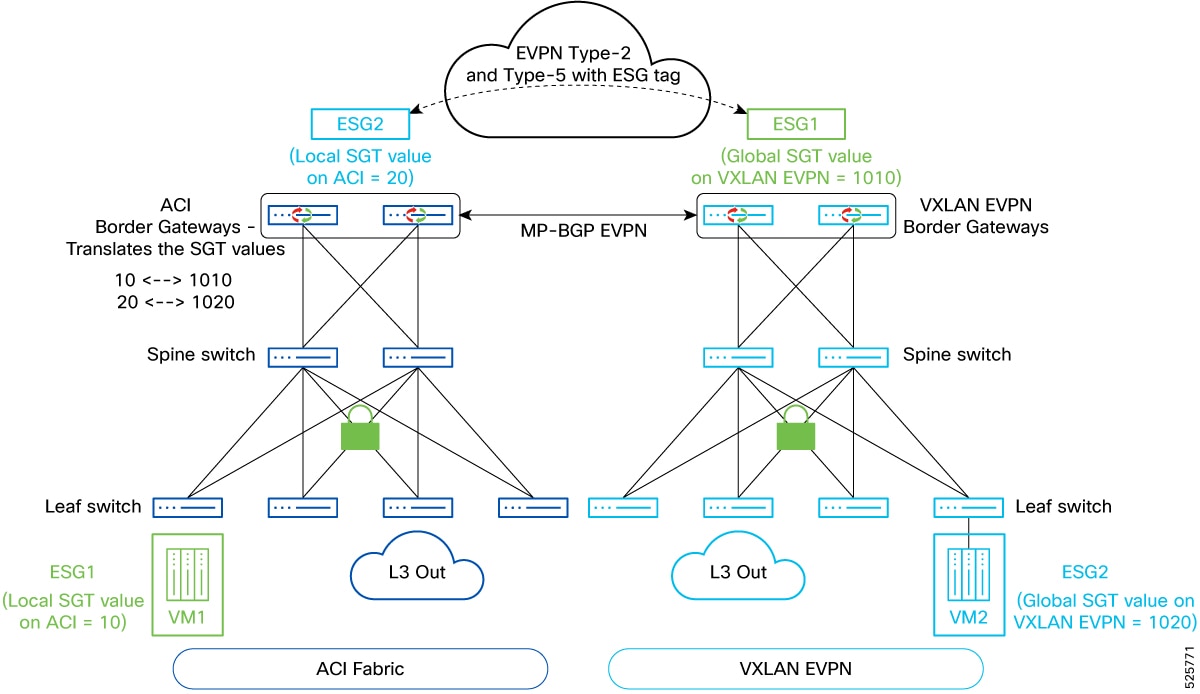
A security group tag (SGT) identifies a logical entity, called a security group, that contains physical or virtual network endpoints and external resources classified by using attributes or selectors. Beginning with Cisco ACI Release 6.1(4), the EVPN control plane can carry SGT values between Cisco ACI and VXLAN EVPN domains. You must configure a remote SGT when the remote EVPN fabric is policy-aware.
When the remote VXLAN EVPN domain is policy-aware, the EVPN control plane between ACI border gateways and remote VXLAN EVPN border gateways carries policy information. In Cisco APIC, associate a remote SGT value with every ESG defined locally in the Cisco ACI fabric. The remote VXLAN EVPN domain uses this SGT to identify the corresponding security group.
The preceding figure, Cisco ACI-to-policy-aware VXLAN EVPN options, shows how remote SGTs are used. ESG1 is defined locally in the ACI fabric to classify internal or external resources. Cisco APIC assigns ESG1 a locally significant SGT value of 10. When the ACI border gateways advertise prefixes that belong to ESG1 to the remote VXLAN EVPN domain, the border gateways translate the local SGT value of 10 to the globally significant remote SGT value of 1010. The remote VXLAN EVPN domain uses the remote SGT value to identify ESG1.
Similarly, ESG2 is defined in the VXLAN EVPN domain to classify internal or external resources. The VXLAN EVPN domain assigns ESG2 a global SGT value of 1020. VXLAN EVPN border gateways use this value when they advertise ESG2 prefixes to the ACI domain. When ACI border gateways receive the prefixes, they translate the remote SGT value to the local SGT value of 20, which identifies ESG2 within the ACI domain. Configure a global security policy to control communication between ESG1 and ESG2.
The example in Cisco ACI-to-policy-aware VXLAN EVPN options shows different security groups defined in each domain. You can also functionally stretch a security group across the two domains. In this configuration, use the same ESG name to identify the group and classify resources in both the Cisco ACI and VXLAN EVPN domains. The ACI border gateways perform a single translation between the local ACI SGT and the remote SGT.
For a remote EVPN fabric, Cisco ACI classifies SGTs that are not mapped to an ESG in the ACI fabric by using the value 12, which is the default drop class. This value applies to both endpoints and prefixes from the remote EVPN fabric. For endpoints and prefixes that belong to ESGs without a remote SGT, Cisco ACI advertises a tag value of 0 to the remote EVPN fabric. In an NX-OS-based EVPN fabric, 0 is the default value for the drop SGT.
Beginning with Cisco ACI Release 6.1(2), the ACI border gateway feature supports VRF-level route maps on stretched VRFs. These route maps apply to all remote fabrics associated with the border gateway set. Configure route map set rules by using route control profile policies and action rule profiles. Specify Permit or Deny statements based on the match criteria.
Use route maps to control the routes that Cisco ACI imports from or exports to remote EVPN fabrics. Inbound route maps apply to Type-5 routes and to the IP portion of Type-2 routes. Type-2 MAC routes are not affected and are imported regardless of the IP import status.
Outbound route maps apply only to Type-5 routes.
Use Configure a VXLAN VRF stretch by using the GUI to specify the inbound and outbound route maps.
For information about configuring a route map, see Configuring Route Control Policy in VRF Using the GUI.
Route maps are optional. If you do not configure import route maps, Cisco ACI accepts all routes received from remote VXLAN EVPN fabrics. If you do not configure export route maps, Cisco ACI advertises all local bridge domain subnets and external routes to the remote VXLAN EVPN fabrics. To advertise bridge domain subnets, enable Advertised Externally on those subnets.
Inbound and outbound route maps support the following match and set clauses:
-
Supported match clauses
-
IP prefix list
-
AS path
-
Community
-
Extended community. Matching the color extended community is not supported.
-
Regular expression community
-
Regular expression extended community
-
-
Supported set clauses
-
Community
-
Extended community
-
Weight
-
Preference
-
Metric
-
Switched Port Analyzer (SPAN) is a high-performance traffic-monitoring system that mirrors traffic from a source port or VLAN to a destination port. Encapsulated Remote SPAN (ERSPAN) uses Generic Routing Encapsulation (GRE) for captured traffic, which enables you to extend the monitoring session across Layer 3 domains.
ACI border gateways support the following SPAN features:
-
Configure a local SPAN session on the border gateway. Configure the Infra L3Out interface as the source and another port on the border gateway as the destination.
-
An ERSPAN monitoring session for an Infra L3Out interface can monitor ingress and egress traffic. Port-level monitoring does not support filtering.
-
An ERSPAN monitoring session for a fabric interface on a border gateway can monitor ingress and egress traffic. Port-level monitoring does not support filtering.
On-drop SPAN is supported.
Beginning with Cisco ACI Release 6.1(4), ERSPAN supports a destination deployed in the remote VXLAN fabric. The local ERSPAN source is in Cisco ACI, and the ERSPAN destination is in the remote VXLAN fabric.
The following guidelines apply to ERSPAN sessions on an ACI border gateway:
-
Configure the ERSPAN destination IP address in a Cisco ACI bridge domain EPG that maps the connected endpoints in the remote VXLAN EVPN fabric.
-
An ERSPAN destination IP address behind a remote VXLAN fabric L3Out is not supported if the destination is inaccessible through the prefix subnets of the remote VXLAN fabric.
-
You cannot configure an ESG endpoint prefix as the ERSPAN destination.
-
The ERSPAN source IP address must be present on the remote VXLAN border gateway and have a tag.
-
Configure a contract between the ERSPAN source and destination IP addresses on the remote VXLAN site to permit ERSPAN traffic to the VXLAN prefix destination.
-
To use an EPG bridge domain as the ERSPAN destination, stretch the bridge domain from the remote VXLAN fabric to the ACI fabric.
-
Verify that the endpoint move completes successfully before you check the ERSPAN traffic.
Migration from existing L3Out connectivity to an ACI border gateway
Beginning with Cisco ACI Release 6.2(1), you can use the ACI VXLAN border gateway (BGW) path to connect ACI sites. If your environment uses L3Out connections for inter-fabric Layer 3 connectivity, you can migrate to the ACI VXLAN border gateway interconnect.
Assign each ACI site a unique VXLAN site ID and a unique ACI Multi-Site ID. For each extended VRF and bridge domain (BD), configure identical remote L3VNI and L2VNI values on all ACI sites. Cisco ACI Release 6.2(1) supports only eBGP L3Out connectivity between ACI sites.
The migration might cause minor traffic loss.
Complete the following steps to migrate multiple ACI fabrics from existing L3Out connectivity to an ACI VXLAN border gateway:
-
Deploy the border gateway and configure the VXLAN Infra L3Out. For detailed instructions, see the following topics:
-
Migrate the existing EPGs and external EPGs, except for site-to-site L3Out external EPGs, to the endpoint security groups (ESGs) that you plan to use with the VXLAN border gateway. Assign a normalized pcTag value to each ESG. For more information, see Configure a remote security group tag for an endpoint security group.
Configure the same normalized pcTag value on both sites.
-
Stretch the tenant VRFs that you plan to migrate between the ACI sites. Specify the normalized VNI for each VRF. For detailed instructions, see Configure a VXLAN VRF stretch by using the GUI.
When a VRF is stretched across both the L3Out path and the ACI border gateway path, Cisco ACI might learn the same route from both connections. If you do not configure a route policy, the BGP best-path selection algorithm determines the preferred path.
-
Configure a route policy to ensure that all nodes prefer the ACI border gateway path. Apply inbound L3Out peer route maps on the border leaf switches that connect the ACI sites.
After you stretch the VRF, remote sites advertise prefixes through VXLAN EVPN. The local site then has two paths: an L3Out path and a VXLAN border gateway path. To prefer the VXLAN path, apply route maps to the site-to-site L3Out and assign a lower local preference to the prefixes received through the L3Out. Set the route map direction to import.
Aggregated BUM storm control on an ACI border gateway
Aggregated broadcast, unknown unicast, and multicast (BUM) storm control protects network stability by rate-limiting BUM traffic on ACI border gateways. Preventing traffic storms helps maintain consistent network performance and availability.
Cisco ACI monitors incoming BUM traffic during a one-second interval. You can define traffic thresholds as a percentage of the total aggregated data center interconnect (DCI) link bandwidth. If the incoming traffic exceeds the configured threshold, Cisco ACI drops the excess traffic for the remainder of the interval.
Standard storm control applies to individual interfaces. Cisco APIC also provides the node-level BgwStormCtrlPol policy. When you apply this policy to a border gateway, the policy controls all DCI links on that node that connect to peer VXLAN EVPN fabrics.
The BgwStormCtrlPol policy applies only to ingress traffic on DCI border gateway links. Interface-level storm control is not supported on border gateway DCI ports. If you apply an interface-level storm control configuration to a DCI port, Cisco ACI generates a fault.
To configure and apply the aggregated BUM storm control policy to an ACI border gateway, see Configure aggregated BUM storm control on an ACI border gateway.
DCI border gateway link-side policer rates
In Cisco ACI, the storm control policer rate for DCI links is calculated for each hardware slice, not for each physical port.
The switch hardware is divided into slices, such as slice 0 and slice 1. Cisco ACI applies the policer independently to each slice. If DCI links are distributed across multiple slices, the total permitted storm control traffic is the sum of the limits calculated for each slice.
When you configure storm control, account for the total bandwidth of each slice. If the DCI links are distributed across different slices, the effective storm control limit is the aggregate of the limits enforced on those slices.
To verify the mapping between ports and hardware slices, enter the vsh_lc command and then enter the show platform internal hal l2 port gpd command. In the output, review the Sl column to identify the slice-to-port mapping.
ACI border gateway route server
Beginning with Cisco APIC Release 6.2(2), you can configure a route server between fabrics to optimize the BGP overlay control plane. A route server reduces the required number of BGP overlay sessions and the control-plane route-scale footprint. These benefits are most significant when the number of border gateways in each pod at each site exceeds the number of route servers. When the number of border gateways in each pod at each site equals the number of route servers, the primary benefit is a reduction in EVPN control-plane sessions.
Route servers can operate as dedicated nodes or be colocated with ISN forwarding nodes. For redundancy, configure more than one route server between the fabrics. A route server cluster can reside in a single autonomous system or span multiple autonomous systems. The route servers do not require BGP overlay sessions with one another.
A deployed route server establishes eBGP sessions with the border gateways across the connected fabrics.
The route server receives routes from the border gateways and consolidates each route as a single route with multiple paths because all border gateways advertise routes with the same external anycast next-hop address. The route server selects the best path and advertises it to the border gateways at the remote site. Border gateways at the same site as the originating border gateway reject the path based on the AS-path check. Border gateways at the remote site accept the path.
This behavior ensures that remote border gateways maintain a consistent path count regardless of the number of border gateways at the source site. The optimization reduces the control-plane scale footprint and applies to Type-2 and Type-5 routes. Type-2 dummy routes and Type-3 routes are not affected because they are advertised with unique route distinguishers (RDs) and next hops. If a border gateway or link fails, the route server dynamically updates the best path to maintain reachability without affecting the data plane.
Migration considerations
To migrate from an existing full-mesh BGP topology between fabric border gateways to a route-server-based topology, complete the following steps:
-
Configure overlay neighbor relationships between the border gateways and route servers so that the route servers can learn routes through the new path.
-
Verify route propagation through the route server sessions, and then decommission the existing full-mesh EVPN sessions.
-
Monitor BGP memory use during the migration. Running both session types concurrently temporarily increases memory use.
Configuration guidelines
On the route server, configure eBGP sessions with the border gateways to preserve the original next-hop address. Standard eBGP behavior changes the next hop to the advertising peer. Therefore, apply a route map that leaves the next hop unchanged. Do not configure AS-path ignore on sessions between border gateways and route servers.
The following example shows the required BGP configuration on the route server:
router bgp <>
  address-family l2vpn evpn
    retain route-target all
neighbor <border_gateway_peer_address>
    remote-as 65001
    update-source loopback0
    ebgp-multihop 8
    address-family l2vpn evpn
      send-community
      send-community extended
      route-map rs_nh_unchange out
      rewrite-evpn-rt-asn
route-map rs_nh_unchange, permit, sequence 10
  set ip next-hop unchanged
  set ipv6 next-hop unchanged
For information about BGP configuration parameters and command syntax in a Cisco NX-OS environment, see the Cisco Nexus 9000 Series NX-OS BGP Configuration Guide.