Cisco APIC Layer 3 Networking Configuration Guide, Release 6.2(x)

PDF

Cisco APIC Layer 3 Networking Configuration Guide, Release 6.2(x)

Cisco ACI IP SLAs

Want to summarize with AI?

Log in

Cisco ACI IP service-level agreement (SLA) tracking uses Internet Control Message Protocol (ICMP) and Transmission Control Protocol (TCP) probes to monitor reachability and influence routing and policy-based redirect decisions.


Cisco ACI IP SLA tracks IP addresses by using ICMP and TCP probes and provides real-time network-performance information.

  • Collects real-time network-performance information.

  • Influences route-table entries and next-hop availability.

  • Supports automated network actions based on probe results.

Organizations rely on online services, and service outages can affect profitability. Internet service providers (ISPs) and internal IT departments use SLAs to define service levels and provide customers with predictable service.

IP SLA tracking is a common network requirement. It enables you to collect network-performance information in real time. With Cisco ACI IP SLA, you can track an IP address by using ICMP and TCP probes. Tracking results can influence route tables. The system can remove a route when a probe fails and restore the route when the probe succeeds again.

Cisco ACI IP SLA is available for the following features:

  • Static routes:

    • Supported beginning with Cisco ACI Release 4.1

    • Automatically adds a static route to or removes it from a route table

    • Tracks the route by using ICMP and TCP probes

  • Policy-based redirect (PBR) tracking:

    • Supported beginning with Cisco ACI Release 3.1

    • Automatically adds or removes a next hop

    • Tracks the next-hop IP address by using ICMP or TCP probes, or a combination that uses L2Ping

    • Redirects traffic to the PBR node based on next-hop reachability

For more information about PBR tracking, see Configuring Policy-Based Redirect in the Cisco APIC Layer 4 to Layer 7 Services Deployment Guide.

Note

For either feature, you can use APIs or scripts to perform network actions, including configuration changes, based on the probe results.

Cisco ACI IP SLA supported topologies

The following Cisco ACI fabric topologies support IP SLA:

  • Single Fabric: IP SLA tracking supports IP addresses that are reachable through either an L3Out or an endpoint group (EPG) and bridge domain (BD).

  • Multi-Pod

    • You can define one object-tracking policy across multiple pods.

    • A workload can move from one pod to another. The IP SLA policy continues to monitor reachability and detects when an endpoint moves.

    • When an endpoint moves to another pod, IP SLA tracking also moves to that pod. This behavior prevents tracking information from traversing the IP network.

  • Remote Leaf

    • You can define one object-tracking policy across the Cisco ACI main data center and remote leaf switches.

    • IP SLA probes on remote leaf switches track IP addresses locally without using the IP network.

    • A workload can move from a local leaf switch to a remote leaf switch. The IP SLA policy continues to monitor reachability and detects when an endpoint moves.

    • Based on the endpoint location, IP SLA policies move to the remote leaf switches or the Cisco ACI main data center for local tracking. This behavior prevents tracking traffic from traversing the IP network.

Note

Cisco ACI does not support IP SLA for static routes in a virtual port channel (vPC) topology.

Cisco ACI IP SLA operation

Cisco ACI IP SLA monitors reachability across the data center network and external networks. An IP SLA monitoring policy defines the probe type. You associate the monitoring policy with monitoring probe profiles, which are called track members. Each track member defines an endpoint or next hop by its IP address, the associated monitoring policy, and the scope, which can be a bridge domain or an L3Out. You can assign one or more track members to a track list. The thresholds configured for the track list determine whether the track list is available (up) or unavailable (down).

The following examples show the supported Cisco ACI IP SLA use cases for static routes.

Example 1: Static route availability by tracking the next hop

The following figure shows the topology and operation for tracking static-route availability by monitoring a router next hop.

Figure 1. Static route availability by tracking the next hop

The following behaviors apply to this use case:

  • The next hop can be direct or indirect. An indirect next hop can be a router loopback IP address.

  • The next hop can be reached through a physical interface, subinterface, port channel (PC), port-channel subinterface, or switched virtual interface (SVI).

  • The static route is configured under the L3Out external network. The system adds the route to or removes it from the route table based on next-hop reachability.

Example 2: Static route availability by tracking an IP address through an L3Out

The following figure shows the topology and operation for tracking static-route availability by monitoring a server through an L3Out external route.

Figure 2. Static route availability by tracking an IP address through an L3Out

The following behaviors apply to this use case:

  • The Cisco ACI border leaf switch tracks the server IP address connected to the router. The system adds or removes the static route based on server reachability.

  • The L3Out can use a port channel, port-channel subinterface, SVI, Layer 3 interface, or Layer 3 subinterface.

  • The static route is configured under the L3Out and is added or removed based on the reachability of the IP address.

Example 3: Static route removal by tracking an IP address through an L3Out

The following figure shows the topology and operation for tracking static-route availability by monitoring a server through an L3Out external route. The system removes the route if the server is not reachable through the L3Out and VRF instance.

Figure 3. Static route removal by tracking an IP address through an L3Out

The following behaviors apply to this use case:

  • The L3Out uses a VLAN and SVI, and the SVI is extended across multiple leaf switches.

  • The server IP address that is reachable through the L3Out can move between leaf switches.

  • The system tracks one or more server IP addresses and removes the static route from the route table if the addresses are not reachable through the L3Out and VRF instance.

  • The system restores the static route to the route table when the server becomes reachable again.

Example 4: Static route removal by tracking an IP address in the Cisco ACI fabric

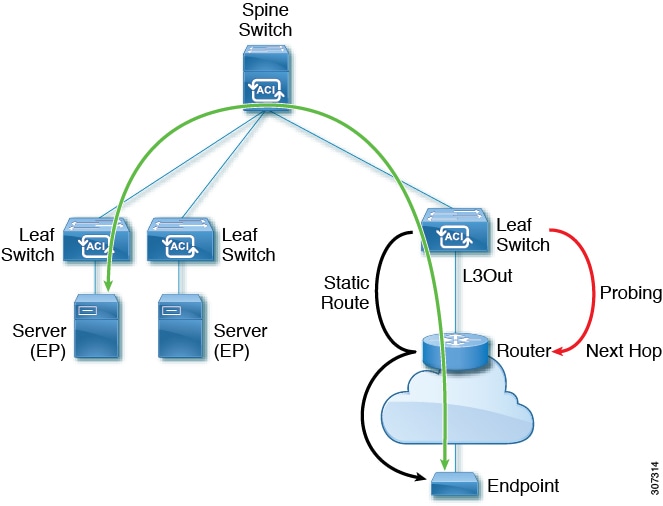
The probe IP address for a route is typically the route next hop or an external IP address that must be reachable through the route. You can also use the IP address of an endpoint in a Cisco ACI bridge domain as the probe IP address, even if the endpoint is not located behind the route that the IP SLA targets. This configuration is useful when only specific endpoints in the Cisco ACI fabric use the static route. If those endpoints are not available, the route is not required.

The following figure shows the topology and operation for tracking an IP address in the Cisco ACI fabric.
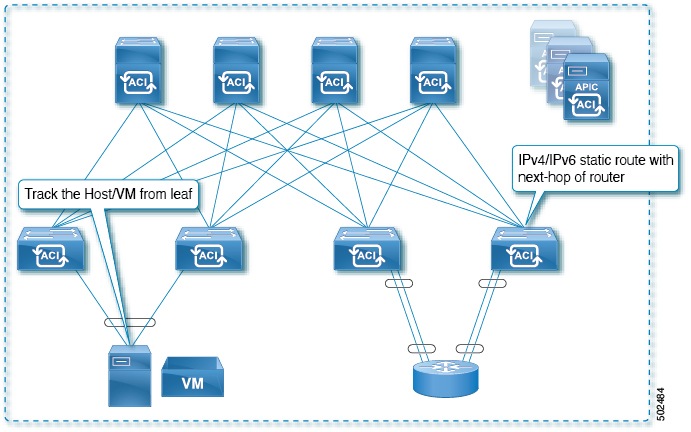
Figure 4. Static route availability by tracking an IP address in the Cisco ACI fabric

The following behaviors apply to this use case:

  • The system tracks the reachability of endpoints connected through the EPG and BD.

  • The system adds or removes the static route in the L3Out based on endpoint reachability.

  • If an endpoint moves within the fabric but remains reachable from the same bridge domain, IP SLA monitoring considers the endpoint reachable, and the static route remains valid.
IP SLA monitoring policy

IP SLAs use active traffic monitoring to generate and analyze traffic continuously and predictably. Statistics collected by IP SLA monitoring operations support troubleshooting, problem analysis, and network-topology design.

In Cisco ACI, you can associate an IP SLA monitoring policy with the following objects:

  • Service redirect policies: The monitoring policy monitors all destinations under a service redirect policy by using the configured parameters.

  • Static routes: Adding an IP SLA monitoring policy to a track list or track member and associating it with a static route enables monitoring of the route next-hop segments.

An IP SLA monitoring policy defines the probe frequency and probe type.

IP SLA monitoring probe types

Cisco ACI IP SLAs can monitor performance in the core, distribution, and edge areas of a network without requiring a physical probe. An IP SLA operation generates traffic to measure performance between two network devices, such as switches. The following probe types are supported:

  • Internet Control Message Protocol (ICMP) echo probes

  • Transmission Control Protocol (TCP) connect probes


TCP connect operation

A TCP connect operation is an IP service-level agreement (SLA) function that measures the time required to complete a TCP probe between a source switch and a destination IP device.

  • Operates at the transport layer (Layer 4) of the IP stack.

  • Provides reliable, full-duplex data transmission.

  • Can target any IP-capable destination device that accepts TCP connections.

TCP connect operation process

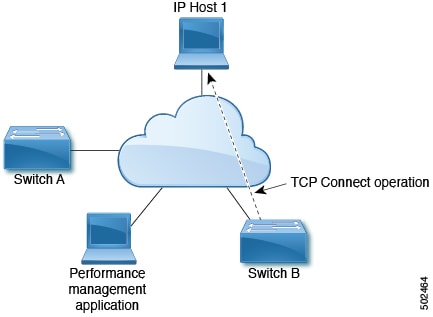
In the following example, Switch B is the source IP SLA device for the configured static route. The IP SLA monitoring policy associated with the static route defines a TCP connect operation that uses IP Host 1 as the destination device.

Figure 5. TCP connect operation example

The operation calculates the connection response time from the interval between sending a TCP request from Switch B to IP Host 1 and receiving the response from IP Host 1.


ICMP echo operation

An ICMP echo operation measures the response time between two IPv4 or IPv6 devices. It calculates the interval between sending an ICMP echo request to the destination and receiving a reply. You can use the operation results to troubleshoot connectivity and analyze the performance of IP connections.

  • Supports IPv4 and IPv6.

  • Uses ping-based probes to measure response time.

  • Conforms to applicable Internet Engineering Task Force (IETF) specifications for ICMP ping testing.

ICMP echo operation process

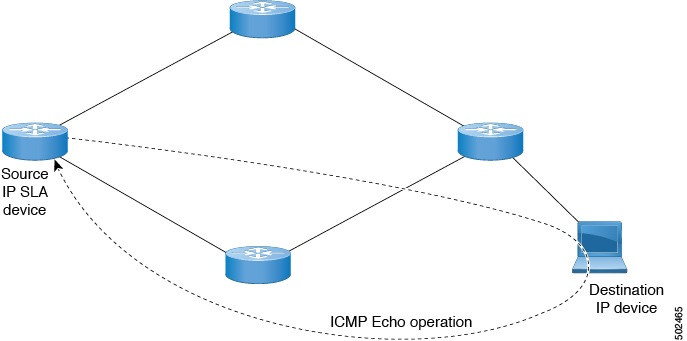
The ICMP echo operation calculates response time by measuring the interval between sending an ICMP echo request to a destination and receiving the corresponding reply.

In the following example, the ICMP echo operation uses a ping-based probe to measure the response time between the IP SLA source device and the destination IP device. Organizations can use IP SLA ICMP operations, internal ping testing, or dedicated ping-based probes to measure response time.

Figure 6. ICMP echo operation example

The IP SLA ICMP echo operation conforms to the same IETF specifications as standard ICMP ping testing. Both methods produce the same response-time measurements.


IP SLA track members

An IP SLA track member is a configuration object that defines the following network-reachability monitoring parameters:

  • IP address to monitor

  • IP SLA monitoring policy that defines the probe frequency and type

  • Monitoring scope, which can be a bridge domain or an L3Out


IP SLA track lists

An IP SLA track list aggregates one or more IP SLA track members that represent a monitored network segment. Configurable percentage or weight thresholds determine whether the track list is available (up) or unavailable (down). When the track list is up, the associated static route remains in the routing table. When the track list is down, the system removes the static route until the track list recovers.

  • Aggregates track members into one logical entity.

  • Evaluates availability by using configured percentage or weight thresholds.

  • Controls the presence of an associated static route in the routing table based on the aggregate state.

IP SLA track-list threshold configuration

The following example configures four track members in a track list by using percentage thresholds.

Configure the thresholds as follows:

  • Set the Percentage Up parameter to 100 percent.

  • Set the Percentage Down parameter to 50 percent.

Each of the four track members represents 25 percent of the track list. The track list becomes unavailable when two of the four members are unavailable, which meets the 50-percent down threshold. The track list becomes available again when all four members are available, which meets the 100-percent up threshold.

Note

When a track list associated with a static route becomes unavailable, the system removes the static route from the routing table until the track list becomes available again.


Example IP SLA component associations

A Cisco ACI IP SLA configuration uses track members and track lists to define probe destinations and determine whether static routes and next hops are reachable.

  • Configures static routes for the target prefixes.

  • Associates track members with specific router next-hop IP addresses.

  • Groups track members into track lists that determine static-route reachability.

IP SLA configuration components

Cisco ACI IP SLA L3Out example

The following figure shows a Cisco ACI IP SLA configuration that monitors a static route in the Cisco ACI fabric and its connectivity to an external endpoint.

Figure 7. Example Cisco ACI L3Out IP SLA

The following figure shows a static route for the endpoint prefix 192.168.13.1/24. The route has two router next hops between an L3Out leaf switch and a consumer endpoint.

Figure 8. Example static route

To configure the Cisco ACI IP SLA shown in the figures, monitor the routers to verify connectivity to the consumer endpoint. Create the following static route, track members, and track lists:

  • A static route for 192.168.13.1/24 with next hops 10.10.10.1 and 11.11.11.1

  • Track member 1 (TM-1), which uses router IP address 10.10.10.1 as the next-hop probe

  • Track member 2 (TM-2), which uses router IP address 11.11.11.1 as the next-hop probe

  • Track list 1 (TL-1), which contains TM-1 and TM-2 and is associated with the static route. The track list contains the next hops through which endpoints in the configured prefix are reachable. Configured thresholds determine whether the track list is reachable or unreachable.

  • Track list 2 (TL-2), which contains TM-1 and is associated with the 10.10.10.1 next-hop entry in the static route

  • Track list 3 (TL-3), which contains TM-2 and is associated with the 11.11.11.1 next-hop entry in the static route

For a generic static route, associate TL-1 with the static route, TL-2 with next hop 10.10.10.1, and TL-3 with next hop 11.11.11.1. For two specific static routes that both use prefix 192.168.13.1/24, associate TL-2 with one route and TL-3 with the other route. Also associate TL-2 and TL-3 with their corresponding router next hops.

These associations allow one router to fail while the other router provides a backup route. See the following sections for more information about track members and track lists.