Cisco APIC Layer 3 Networking Configuration Guide, Release 6.2(x)

PDF

Cisco APIC Layer 3 Networking Configuration Guide, Release 6.2(x)

Create SR-MPLS custom QoS policy using the GUI

Want to summarize with AI?

Log in

Configure an SR-MPLS Custom QoS policy to define packet priority based on MPLS EXP values and mark CoS and MPLS EXP values for traffic leaving the ACI fabric.


Enable SR-MPLS Custom QoS policy to control packet priority within the ACI fabric and mark appropriate values for egressing traffic.

SR-MPLS Custom QoS policy defines the priority of the packets coming from an SR-MPLS network while they are inside the ACI fabric based on the incoming MPLS EXP values defined in the MPLS QoS ingress policy. It also marks the CoS and MPLS EXP values of the packets leaving the ACI fabric through an MPLS interface based on IPv4 DSCP values defined in MPLS QoS egress policy.

If no custom ingress policy is defined, the default QoS Level (Level3) is assigned to packets inside the fabric. If no custom egress policy is defined, the default EXP value of 0 will be marked on packets leaving the fabric.

Procedure

1.

From the top menu bar, navigate to Tenants > infra.

2.

In the left pane, select infra > Policies > Protocol > MPLS Custom QoS.

3.

Right click the MPLS Custom QoS folder and choose Create MPLS Custom QoS Policy.

4.

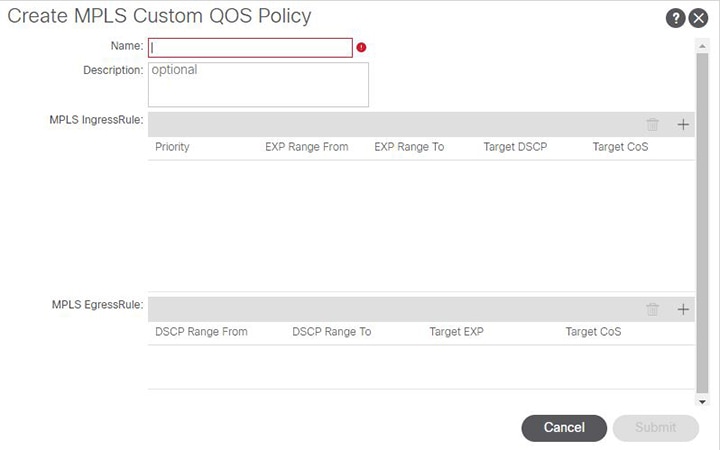
In the Create MPLS Custom QoS Policy window that opens, provide the name and description of the policy you're creating.
5.

In the MPLS Ingress Rule area, click + to add an ingress QoS translation rule.

Any traffic coming into the border leaf (BL) connected to the MPLS network will be checked for the MPLS EXP value and if a match is found, the traffic is classified into an ACI QoS Level and marked with appropriate CoS and DSCP values.

  1. In the Priority field, select the priority for the ingress rule.

    This is the QoS Level you want to assign for the traffic within ACI fabric, which ACI uses to prioritize the traffic within the fabric.. The options range from Level1 to Level6. The default value is Level3. If you do not make a selection in this field, the traffic will automatically be assigned a Level3 priority.

  2. In the EXP Range From and EXP Range To fields, specify the EXP range of the ingressing MPLS packet you want to match.

  3. In the Target DSCP field, select the DSCP value to assign to the packet when it's inside the ACI fabric.

    The DSCP value specified is set in the original traffic received from the external network, so it will be re-exposed only when the traffic is VXLAN decapsulated on the destination ACI leaf node.

    The default is Unspecified, which means that the original DSCP value of the packet will be retained.

  4. In the Target CoS field, select the CoS value to assign to the packet when it's inside the ACI fabric.

    The CoS value specified is set in the original traffic received from the external network, so it will be re-exposed only when the traffic is VXLAN decapsulated on the destination ACI leaf node.

    The default is Unspecified, which means that the original CoS value of the packet will be retained, but only if the CoS preservation option is enabled in the fabric.

  5. Click Update to save the ingress rule.

  6. Repeat this step for any additional ingress QoS policy rules.

6.

In the MPLS Egress Rule area, click + to add an egress QoS translation rule.

When the traffic is leaving the fabric out of the border leaf's MPLS interface, it will be matched based on the DSCP value of the packet and if a match is found, the MPLS EXP and CoS values will be set based on the policy.

  1. Using the DSCP Range From and DSCP Range To dropdowns, specify the DSCP range of the ACI fabric packet you want to match for assigning the egressing MPLS packet's priority.

  2. From the Target EXP dropdown, select the EXP value you want to assign to the egressing MPLS packet.

  3. From the Target CoS dropdown, select the CoS value you want to assign to the egressing MPLS packet.

  4. Click Update to save the ingress rule.

  5. Repeat this step for any additional egress QoS policy rules.

7.

Click OK to complete the creation of the MPLS custom QoS Policy.

The SR-MPLS Custom QoS policy is created and can now be applied to control packet priority and marking for traffic entering and leaving the ACI fabric through MPLS interfaces.