Explains the BGP multicast address-family feature that supports IPv4 and IPv6 for BGP peers towards external routers in tenant VRF on border leaf switches.
BGP IPv4/IPv6 multicast address-family is a BGP feature that
adds support for IPv6 for BGP peers towards external routers in the tenant VRF on the border leaf switch
allows specification of whether the peer will be used separately to carry multicast routes in the IPv4/IPv6 multicast address-family, and
was initially available for IPv4 in Cisco APIC Release 4.1 and extended to IPv6 beginning with Cisco APIC release 4.2(1).
The IPv4 version of the BGP IPv4/IPv6 multicast address-family feature was available as part of Cisco APIC Release 4.1.
The following figure shows how this feature might be implemented.
Guidelines and limitations for BGP IPv4/IPv6 multicast address-family
Guidelines and restrictions for the BGP multicast address-family feature for IPv6
The multicast source is within the Cisco ACI fabric, and the receivers are outside of the fabric.
The Rendezvous Point (RP) is an IP address that is external the Cisco ACI fabric. Fabric RP is not supported for IPv6 multicast.
Transit L3Out is not supported for BGPv4/v6 address-family.
Guidelines and restrictions for the BGP multicast Address-Family feature for both IPv4 and IPv6
There is no support for BGPv4/v6 multicast address-family within the Cisco ACI fabric.
RP reachability should be present in the unicast address-family, if that is being used. For PIM Source-Specific Multicast (SSM), there is no need for RP.
Configure BGP IPv4/IPv6 multicast address-family using the GUI
This task enables BGP IPv4/IPv6 multicast address-family functionality to support multicast routing in your L3Out configuration. This allows BGP peers to exchange multicast routing information and enables multicast traffic forwarding between external networks and the ACI fabric.
The BGP IPv4/IPv6 multicast address-family feature enables BGP to carry multicast routing information, allowing multicast traffic to be routed between external networks and the ACI fabric. This configuration is performed after setting up the basic L3Out and BGP connectivity.
Before you begin
Complete the standard prerequisites before configuring an L3Out, such as:
Configure the tenant, node, port, functional profile, AEP, and Layer 3 domain.
Configure a BGP Route Reflector policy to propagate the routes within the fabric.
Follow these steps to configure the BGP IPv4/IPv6 multicast address-family using the GUI:
Procedure
Locate the VRF that you will be using with the L3Out, or create the VRF, if necessary.
Tenants > tenant > Networking > VRFs
Enable PIMv4 or PIMv6 under the VRF.
To enable PIMv4 under the VRF, on the menu bar, navigate to Tenants > Tenant_name > Networking > VRFs > VRF_name > Multicast.
If you see the message PIM is not enabled on this VRF. Would you like to enable PIM?, then click Yes, enable Multicast.
If you see the main Multicast window, check the Enable box, if it is not already checked.
To enable PIMv6 under the VRF, on the menu bar, navigate to Tenants > Tenant_name > Networking > VRFs > VRF_name > Multicast IPv6.
If you see the message PIMv6 is not enabled on this VRF. Would you like to enable PIMv6?, then click Yes, enable multicast IPv6.
If you see the main Multicast IPv6 window, check the Enable box, if it is not already checked.
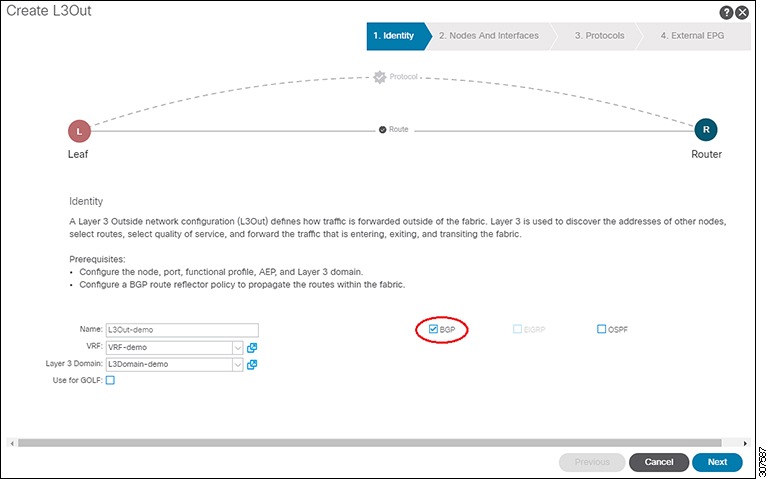
Create the L3Out and configure the BGP for the L3Out:
On the Navigation pane, expand Tenant and Networking.
Right-click L3Outs and choose Create L3Out.
Enter the necessary information to configure BGP for the L3Out.
In the Identity page:
Select the VRF that you configured in the previous step.
Select BGP in the Identity page in the L3Out creation wizard to configure the BGP protocol for this L3Out.
Continue through the remaining pages (Nodes and Interfaces, Protocols, and External EPG) to complete the configuration for the L3Out.
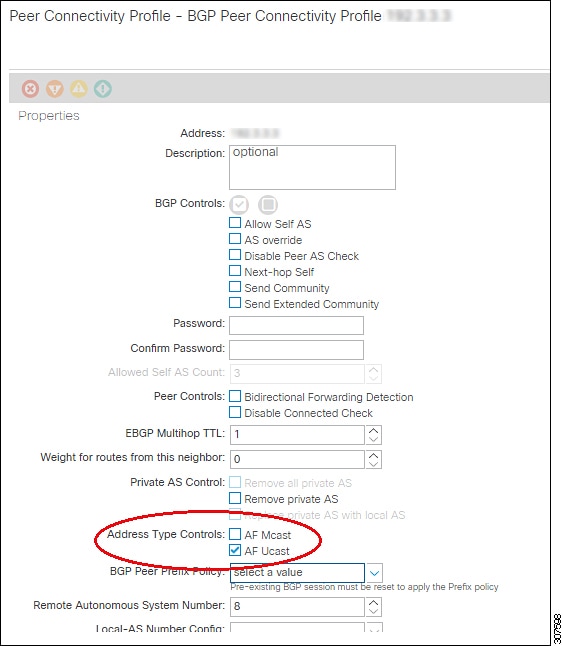
After you have completed the L3Out configuration, configure the BGP IPv4/IPv6 multicast address-family feature:
Navigate to the BGP Peer Connectivity Profile screen:
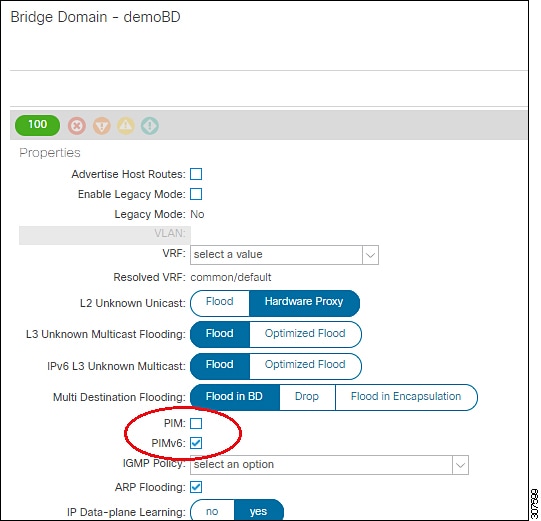
To enable PIMv4 on the bridge domain, scroll down to the PIM field and check the box next to that field to enable it.
To enable PIMv6 on the bridge domain, scroll down to the PIMv6 field and check the box next to that field to enable it.
Click Submit.
BGP IPv4/IPv6 multicast address-family is now configured and enabled. The BGP peer can now exchange multicast routing information, and multicast traffic can be forwarded between external networks and the ACI fabric through the configured L3Out.