Use this procedure to verify endpoint-to-endpoint communication by checking local and remote endpoint entries in the system components. This verification confirms endpoint learning and reachability in a stretched EPG environment.
On Switch1, 209.166.0.1 in EPG-1 is a locally learned endpoint, and 209.165.0.1 in EPG-2 is a remote endpoint. On Switch6, 209.165.0.1 is a locally learned endpoint, and 209.166.0.1 is a remote endpoint. The endpoints are in different subnets, and both EPGs are stretched across Switch1 and Switch6. The examples show the CLI output captured on Switch1 for the local and remote endpoints in each system component.
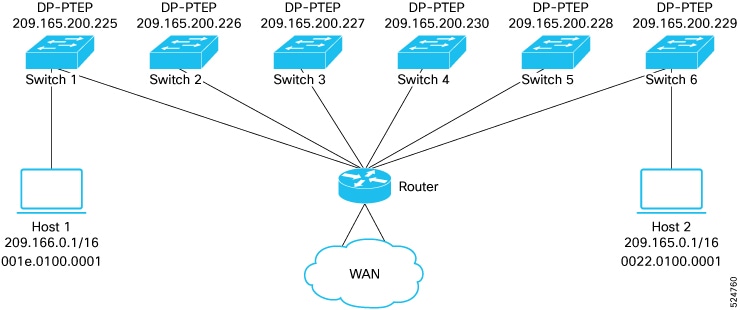
Procedure
-
Run the show system internal epm endpoint ip command to verify the local and remote endpoint entries in EPM on Switch1.
Example:
Switch1# show system internal epm endpoint ip 209.166.0.1 MAC : 001e.0100.0001 ::: Num IPs : 1 IP# 0 : 209.166.0.1 ::: IP# 0 flags : ::: l3-sw-hit: No Vlan id : 124 ::: Vlan vnid : 19003 ::: VRF name : ARL_Scale:ctx-1 BD vnid : 16023537 ::: VRF vnid : 2490424 Phy If : 0x1a014000 ::: Tunnel If : 0 Interface : Ethernet1/21 Flags : 0x80004c04 ::: sclass : 16388 ::: Ref count : 5 EP Create Timestamp : 02/05/2025 08:01:55.278575 EP Update Timestamp : 02/05/2025 09:21:27.898869 EP Flags : local|IP|MAC|sclass|timer| Switch1# show system internal epm endpoint ip 209.165.0.1 MAC : 0000.0000.0000 ::: Num IPs : 1 IP# 0 : 209.165.0.1 ::: IP# 0 flags : ::: l3-sw-hit: No Vlan id : 0 ::: Vlan vnid : 0 ::: VRF name : ARL_Scale:ctx-1 BD vnid : 0 ::: VRF vnid : 2490424 Phy If : 0 ::: Tunnel If : 0x1801000b Interface : Tunnel11 Flags : 0x80004410 ::: sclass : 16388 ::: Ref count : 3 EP Create Timestamp : 02/05/2025 08:17:38.279265 EP Update Timestamp : 02/05/2025 09:28:53.848534 EP Flags : locally-aged|IP|sclass|timer| -
Run the show interface tunnel command to verify the tunnel status and destination.
Example:
Switch1# show interface tunnel 11 Tunnel11 is up MTU 9000 bytes, BW 0 Kbit Transport protocol is in VRF "overlay-1" Tunnel protocol/transport is ivxlan Tunnel source 209.165.200.225/32 (lo2) Tunnel destination 209.165.200.229 Tunnel is pointing to Switch6 dp-ptep IP. -
Run the show system internal tglean endpoint ip command to verify the local and remote endpoint entries in Tglean on Switch1.
Example:
Switch1# show system internal tglean endpoint ip 209.166.0.1
                        ----------------------------------------------------------
                        TGLEAN Oper Endpoint Information
                        ----------------------------------------------------------
                        MAC : 001e.0100.0001 ::: Num IPs : 1
                        IP# 0 : 209.166.0.1
                        Vlan id : 123 ::: BD vnid : 16023537 ::: VRF vnid : 2490424
                        Sclass : 16388 ::: Interface : Ethernet1/21
                        EPM EP Flags : local|IP|MAC|
                        LRN SRC : EPM|
                        CFG Flags :
                        Switch1# show system internal tglean endpoint ip 209.165.0.1
                        ----------------------------------------------------------
                        TGLEAN Oper Endpoint Information
                        ----------------------------------------------------------
                        MAC : 0000.0000.0000 ::: Num IPs : 1
                        IP# 0 : 209.165.0.1
                        Vlan id : 0 ::: BD vnid : 0 ::: VRF vnid : 2490424
                        Sclass : 16388 ::: EP NH : 209.165.200.229
                        EPM EP Flags : IP|
                        LRN SRC : EPM|UXRIB|
                        CFG Flags :
In the output, the next hop for the remote endpoint 209.165.0.1 points to the DP-PTEP IP address of Switch6.
-
Run the show l2route mac-ip all command to verify the local and remote endpoint entries in L2RIB on Switch1.
Example:
Switch1# show l2route mac-ip all | grep 209.166.0.1 123 001e.0100.0001 209.166.0.1 Local PS,Orp 0 Eth1/21 (SGT - IP:16388) Switch1# show l2route mac-ip all | grep 209.165.0.1 123 0022.0100.0001 209.165.0.1 BGP -- 0 209.165.200.229 (Label: 16023537) (SGT - IP:16388) -
Run the show bgp l2vpn evpn vrf overlay command to verify that BGP advertises the local endpoint to the other peers.
Example:
Switch1# show bgp l2vpn evpn 209.166.0.1 vrf overlay-1 Route Distinguisher: 105:16023537 (L2VNI 16023537) BGP routing table entry for [2]:[0]:[0]:[48]:[001e.0100.0001]:[32]:[209.166.0.1]/272, version 59832 dest ptr 0x8b0825e0 Paths: (1 available, best #1) Flags: (0x0000000000000102 0000000000) on xmit-list, is not in rib/evpn Multipath: eBGP iBGP Advertised path-id 1 Path type (0x8b45d1a8): local 0x4000008c 0x4000000 ref 0 adv path ref 1, path is valid, is best path, orphan host AS-Path: NONE, path locally originated 0.0.0.0 (metric 0) from 0.0.0.0 (105.1.1.1) Origin IGP, MED not set, localpref 100, weight 32768 tag 0, propagate 0, floating svi 0, tunnel resolved 0 Received label 16023537 2490424 Extcommunity: RT:100:2490424 RT:100:16023537 PCTAG:00:0:0:16388 Path-id 1 advertised to peers: 209.165.200.230 209.165.200.226 209.165.200.229 209.165.200.227 -
Run the show bgp l2vpn evpn vrf overlay command to verify the remote endpoint entry learned through the BGP L2VPN EVPN session.
Example:
Switch1# show bgp l2vpn evpn 209.165.0.1 vrf overlay-1 Route Distinguisher: 105:16023537 (L2VNI 16023537) BGP routing table entry for [2]:[0]:[0]:[48]:[0022.0100.0001]:[32]:[209.165.0.1]/272, version 211779 dest ptr 0x192c7d44 Paths: (1 available, best #1) Flags: (0x0000000000000212 0000000000) on xmit-list, is in rib/evpn, is not in HW Multipath: eBGP iBGP Advertised path-id 1 Path type (0x8998b550): internal 0xc0000018 0x400 ref 0 adv path ref 1, path is valid, is best path, remote nh not installed, in rib Imported from (0x16757068) 108:16023537:[2]:[0]:[0]:[48]:[0022.0100.0001]:[32]:[209.165.0.1]/144 AS-Path: NONE, path sourced internal to AS 209.165.200.229 (metric 3) from 209.165.200.229 (108.1.1.1) Origin IGP, MED not set, localpref 100, weight 0 tag 0, propagate 0, floating svi 0, tunnel resolved 0 Received label 16023537 2490424 Extcommunity: RT:100:2490424 RT:100:16023537 ENCAP:8 PCTAG:00:0:0:16388 Router MAC:000c.0c0c.0c0c Path-id 1 not advertised to any peer Route Distinguisher: 108:16023537 BGP routing table entry for [2]:[0]:[0]:[48]:[0022.0100.0001]:[32]:[209.165.0.1]/272, version 210701 dest ptr 0x899cc898 Paths: (1 available, best #1) Flags: (0x0000000000000202 0000000000) on xmit-list, is not in rib/evpn, is not in HW, is locked Multipath: eBGP iBGP Advertised path-id 1 Path type (0x16757068): internal 0x40000018 0x4002000 ref 2 adv path ref 1, path is valid, is best path, remote nh not installed Imported to 2 destination(s) AS-Path: NONE, path sourced internal to AS 209.165.200.229 (metric 3) from 209.165.200.229 (108.1.1.1) Origin IGP, MED not set, localpref 100, weight 0 tag 0, propagate 0, floating svi 0, tunnel resolved 0 Received label 16023537 2490424 Extcommunity: RT:100:2490424 RT:100:16023537 ENCAP:8 PCTAG:00:0:0:16388 Router MAC:000c.0c0c.0c0c Path-id 1 not advertised to any peer -
Run the show ip route command to verify that the remote endpoint appears as a /32 route in URIB. A local endpoint does not appear as a /32 route in URIB.
Example:
Switch1# show ip route 209.165.0.1/32 vrf ARL_Scale:ctx-1
                        IP Route Table for VRF "ARL_Scale:ctx-1"
                        '*' denotes best ucast next-hop
                        '**' denotes best mcast next-hop
                        '[x/y]' denotes [preference/metric]
                        '%<string>' in via output denotes VRF <string>
                        209.165.0.1/32, ubest/mbest: 1/0, pervasive
                        *via 209.165.200.229%overlay-1, [200/0], 01:37:08, bgp-100, internal, tag 100, redist-only, rwVnid: vxlan-2490424, pc-tag: 16388
                        recursive next hop: 209.165.200.229/32%overlay-1
                        Next hop is pointing to Switch6 dp-ptep IP.
If you do not stretch EPG-1 to Switch6 and EPG-2 to Switch1, the CLI output remains the same except that L2RIB entries for the remote endpoints do not appear on either switch.