Cisco APIC Layer 3 Networking Configuration Guide, Release 6.2(x)

PDF

Cisco APIC Layer 3 Networking Configuration Guide, Release 6.2(x)

Microsoft NLB

Want to summarize with AI?

Log in

Describes a load-balancing feature that distributes client traffic across multiple servers in a cluster configuration.


Microsoft Network Load Balancing (NLB) is a load-balancing feature that

  • distributes client traffic across many servers, with each server running its individual copy of the application

  • uses Layer 2 unknown unicast or multicast to simultaneously distribute incoming network traffic to all cluster hosts, and

  • operates as a group of nodes collectively known as an NLB cluster that serves one or more virtual IP (VIP) addresses.

Microsoft NLB operational modes

Nodes in the NLB cluster use a load-balancing algorithm to decide which individual node will service the particular traffic flow that is destined for the NLB VIP. Every node within the cluster receives every packet of traffic, but only one node services a request.

Microsoft NLB functions in three different operational modes:

  • Unicast Mode: In this mode, each NLB cluster VIP is assigned a unicast MAC address. This mode relies on unknown unicast flooding to deliver traffic to the cluster.

  • Multicast Mode: In this mode, each NLB cluster VIP is assigned a non-Internet Assigned Numbers Authority (IANA) multicast MAC address (03xx.xxxx.xxxx).

  • IGMP Mode: In this mode, an NLB cluster VIP is assigned a unique IPv4 multicast group address. The multicast MAC address for this is derived from the standard MAC derivation for IPv4 multicast addresses.

This figure shows a graphical representation of how Microsoft NLB is implemented with Cisco APIC.

The figure illustrates the implementation of Microsoft Network Load Balancing (NLB) with two servers, Server 1 and Server 2, functioning as a single-host server to external clients. It highlights the use of multicast MAC addresses and unique IPv4 multicast group addresses in the NLB cluster.

In this figure, Server 1 and Server 2 are in the MS NLB cluster. These servers appear as a single-host server to outside clients. All servers in the MS NLB cluster receive all incoming requests, then MS NLB distributes the load between the servers.
Understand unicast mode

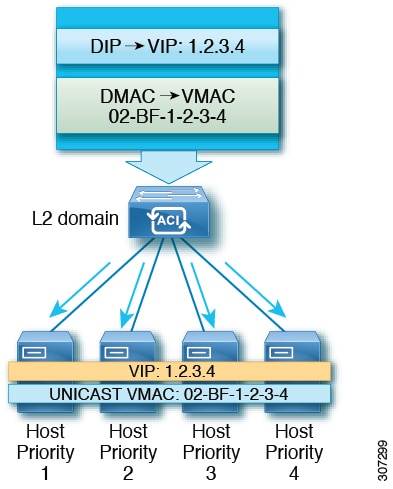
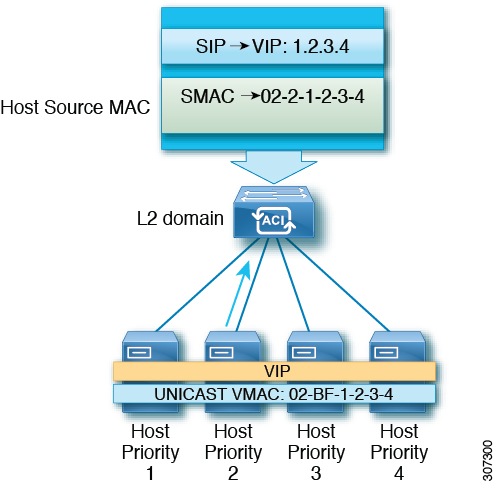
Unicast mode is a Network Load Balancing operation where all cluster hosts are assigned the same MAC address derived from the cluster's primary IP address.

  • Reassigns the MAC address of the cluster adapter.

  • Induces switch flooding to deliver incoming traffic to all hosts simultaneously.

  • Modifies source MAC addresses for outgoing packets to avoid Layer 2 switch conflicts.

Unicast Mode Traffic Handling

The following figures illustrate how unicast mode manages incoming traffic and outgoing packet source addresses.

Figure 1. Incoming traffic delivery via switch flooding
Figure 2. Outgoing packet source MAC address modification

Understand multicast mode

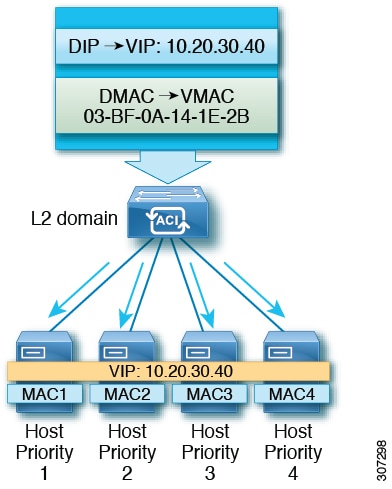
Multicast mode is a Network Load Balancing feature that distributes incoming network traffic to all cluster hosts by assigning a Layer 2 multicast address to the cluster adapter.

  • Assigns a Layer 2 multicast address to the cluster adapter.

  • Avoids changing the adapter's MAC address.

  • Eliminates the requirement for a separate adapter for cluster communication.

Multicast mode configuration details

The following example illustrates the address assignment:

  • Multicast MAC address: 03-BF-0A-14-1E-28

  • Primary IP address: 10.20.30.40


Understand IGMP mode

IGMP mode is a configuration for Microsoft NLB servers that enables them to join a multicast group to optimize the scope of multicast message flooding.

  • Uses a querier on a switch and IGMP snooping.

  • Maps the last two octets of the multicast address to the cluster IP.

  • Eliminates the requirement for a separate adapter for cluster communication.

IGMP Mode Operation

Microsoft NLB servers send IGMP joins to a multicast group address where the last two octets correspond to the cluster IP. For example, when servers send IGMP joins to 239.255.x.x, the following mapping occurs:

  • Cluster IP: 10.20. 30.40

  • IGMP sent to 239.255. 30.40

  • MAC used in client-to-server direction: 0100.5E7F. 1E28