Configure a device's IP address in Security Cloud Control Firewall Management when the device's network address changes.
Update the IP address stored in Security Cloud Control Firewall Management to match a device's new IP address without changing the device's configuration.
When you onboard an device to Security Cloud Control Firewall Management using an IP address, Security Cloud Control Firewall Management stores that IP address in its database and communicates with the device using that IP address. If the IP address of the device changes, you can update the IP address stored in Security Cloud Control Firewall Management to match the new address. Changing the device's IP address on Security Cloud Control Firewall Management does not change device's configuration.
To change the IP address, Security Cloud Control uses to communicate with a device, follow this procedure:
Procedure
-
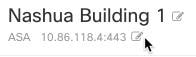
Above the Device Details pane, click the edit button next to the device's IP address.
The IP address stored in Security Cloud Control Firewall Management is updated to the new address, and Security Cloud Control will communicate with the device using the new IP address.