Cisco Security Cloud Control: Secure Firewall Management

PDF

Cisco Security Cloud Control: Secure Firewall Management

Capacity and traffic insights

Want to summarize with AI?

Log in

Describes visibility into resource utilization and capacity trends across your environment to identify potential constraints, track growth patterns, and support proactive planning and operational decision-making.


Capacity and traffic insights are analytical capabilities that

  • provide visibility into resource utilization across devices and highlight emerging risks

  • predict when risks may lead to performance issues by combining historical trends with predictive insights

  • enable proactive capacity planning by identifying future risks before they impact system performance, and

  • anticipate problems and support action before they affect users.

How AgenticOps generates capacity insights

Forecasted insights predict future resource utilization based on historical trends and patterns. AgenticOps continuously analyzes historical data and runs periodic forecasts to identify when resources are likely to reach configured thresholds.

AgenticOps uses multiple analytical approaches to identify and predict issues. AgenticOps runs forecasts on a recurring weekly basis to identify potential capacity risks in advance, including:

  • Detect threshold breaches: Identifies when CPU or memory usage exceeds configured limits in real time.

  • Detect anomalies: Identifies unusual deviations from expected behavior based on historical patterns.

  • Detect elephant flows: Detects large traffic flows that can impact system performance and resource utilization.

  • Detect Remote Access VPN session limits: Detects or predicts when VPN session capacity limits are reached.

  • Forecast capacity risks: Predicts future threshold breaches using historical trends, enabling proactive planning.
The image illustrates capacity and traffic insights, highlighting key features such as anomaly detection, elephant flow identification, VPN session limit monitoring, and capacity risk forecasting based on historical data trends.
Note
  • The accuracy of insights depends on the availability and quality of historical data. Limited or inconsistent data may delay or reduce insight accuracy.

  • In environments with limited activity or newly onboarded devices, insights and forecasts may take time to appear.

This table shows key features of Capacity and Trend Analyzer:

Table 1. Key features of capacity and trend analyzer

Feature

Description

Capacity insights dashboard

Provides a fleet-level view of device capacity status, displaying past, current, and predicted capacity insights across all monitored devices.

Capacity insights

Generates insights based on CPU, memory, connection, throughput, and VPN session activity to highlight potential resource constraints.

Device capacity analysis

Displays detailed capacity insights for an individual device, including resource metrics, AI-generated summaries, and forecast information.

Predictive capacity forecasting

Uses historical resource utilization data to predict future usage trends and identify potential capacity risks before thresholds are reached.

Timeline-based analysis

Allows you to analyze capacity insights across different time windows, including past events, current conditions, and predicted future risks.

Device health indicators

Displays device health status based on active and predicted capacity insights, helping you quickly identify devices that require attention.

The Capacity and Trend Analyzer supports:

  • Secure Firewall Threat Defense devices

  • Secure Firewall Threat Defense High Availability (HA) deployments

  • Secure Firewall Threat Defense cluster deployments

Note

For High Availability (HA) and cluster deployments:

  • Capacity analysis runs at the system level.

  • Individual member devices are not displayed separately.


This task enables you to analyze historical data, identify growth patterns, and understand how resource consumption changes over time to support capacity planning and operational decision-making.

Use Capacity and Trend Analyzer to evaluate resource utilization trends across your environment. The analyzer helps you move from reactive troubleshooting to proactive capacity management by enabling you to identify risks early and take informed action.

Before you begin

Ensure that Capacity and Trend Analyzer is enabled under Settings. For more information, see enable Capacity and Trend Analyzer.

Follow these steps to analyze capacity trends and forecast resource usage:

Procedure

  1. From the Security Cloud Control Home page, click Firewall.

  2. In the left pane, click Insights & Reports > Capacity and Trend Analyzer.

    This opens the dashboard where you can view capacity insights across your environment.

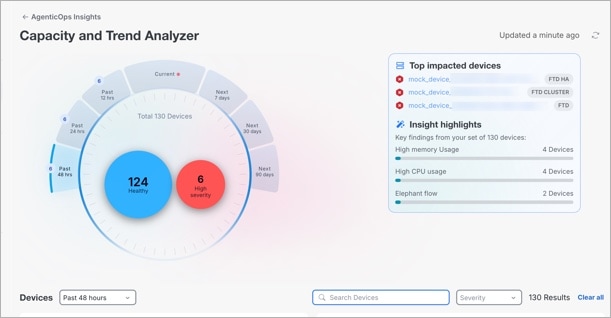
  3. Use the circular timeline to select a timeframe, such as Current, Past (12 hours, 24 hours, or 48 hours), Next (7 days, 30 days, or 90 days).

    • Current shows active capacity insights.

    • Past 12, 24, or 48 hours show insights from the selected past period.

    • Next 7, 30, or 90 days show predicted capacity risks.

    The timeline also displays the total number of devices and their health status, such as Healthy, Needs attention, and High severity.

  4. Review the summary panel.

    • Use the Top impacted devices section to identify devices with the most critical capacity issues.

    • Use the Insight highlights section to understand the most common capacity risks across your organization.

  5. Review device insights in the Devices section.

    • Search for a device or use filters such as timeframe and severity to locate devices that require attention.

    • Each device displays a summary of detected or predicted issues, along with associated insight tags.

  6. Select a device to view detailed insights.

    This view provides summaries and detailed insights for the selected device.

  7. On the device details page, review the AI summary, Resolved insights, Active insights, and Future insights.

  8. In the Device metrics section, select a metric to view historical trends and forecast data.

  9. Use the insights and forecasts to determine appropriate actions, such as redistributing traffic, scaling resources, or planning capacity upgrades. After taking action, use the Current view to monitor whether the issue has been resolved.

    The Capacity and Trend Analyzer helps you move from reactive troubleshooting to proactive capacity management by enabling you to identify risks early and take informed action.

You can now analyze capacity trends and forecast resource usage across your environment. The Capacity and Trend Analyzer provides insights into historical data, growth patterns, and resource consumption changes to support proactive capacity planning and operational decision-making.