Cisco Security Cloud Control: Secure Firewall Management

PDF

Cisco Security Cloud Control: Secure Firewall Management

Overview of Cloud-Delivered Firewall Management Center

Want to summarize with AI?

Log in

Explains Cloud-Delivered Firewall Management Center, including Threat Defense management, migration, onboarding, high availability, security analytics, and licensing.


Cloud-Delivered Firewall Management Center is a software-as-a-service product that

  • manages Secure Firewall Threat Defense devices through Security Cloud Control Firewall Management

  • provides many of the same functions as an On-Premises Firewall Management Center, and

  • has the same appearance and behavior as an On-Premises Firewall Management Center and uses the same FMC API.

Migration and onboarding details

A migration wizard is available to help you migrate Threat Defense devices from an On-Premises Firewall Management Center to Cloud-Delivered Firewall Management Center.

Devices must run one of these Threat Defense software releases before you migrate them:

  • Minimum On-Premises Firewall Management Center: 7.2

  • Minimum Threat Defense: 7.2.x (not supported for Version 7.1)

Threat Defense 7.1 releases are not supported for migration.

You onboard Threat Defense devices in Security Cloud Control Firewall Management by using familiar methods, such as entering the serial number or using a CLI command that includes a registration key.

After onboarding:

  • The device appears in both Security Cloud Control Firewall Management and Cloud-Delivered Firewall Management Center.

  • You configure the device in Cloud-Delivered Firewall Management Center.

  • In Security Cloud Control Firewall Management, you can review device information such as version, configuration status, connectivity, health status, and node status.

  • When you click the health status in Security Cloud Control Firewall Management, the platform opens the device health monitoring page in the Cloud-Delivered Firewall Management Center user interface.

Because it is a SaaS product, the Security Cloud Control Firewall Management operations team deploys and maintains the Cloud-Delivered Firewall Management Center software. As new features are introduced, the operations team updates the Cloud-Delivered Firewall Management Center in your Security Cloud Control Firewall Management organization.

Availability and security analytics

Security Cloud Control Firewall Management supports high availability for the Threat Defense devices that it manages through the data interface. This feature is supported for devices that run software version 7.2 or later.

You can analyze security events from onboarded threat defense devices by using either Security Analytics and Logging (SaaS) or Security Analytics and Logging (On-Premises):

  • Security Analytics and Logging (SaaS) stores events in the cloud, and you view those events in Security Cloud Control Firewall Management.

  • Security Analytics and Logging (On-Premises) stores events on an on-premises Secure Network Analytics appliance, and analysis occurs in the On-Premises Firewall Management Center.

In both cases, you can still send logs directly from firewalls to a log collector of your choice.

Licenses

The license for Cloud-Delivered Firewall Management Center is a per-device-managed license and there is no license required for the Cloud-Delivered Firewall Management Center itself. Existing Secure Firewall Threat Defense devices re-use their existing smart licenses and new Secure Firewall Threat Defense devices provision new smart licenses for each feature implemented on the Secure Firewall Threat Defense For more information, see Cloud-Delivered Firewall Management Center license.

Existing customers can continue to use Security Cloud Control for managing other device types like, the Secure Firewall ASA, Meraki, Cisco IOS devices, Umbrella, and AWS virtual private clouds. If you use Security Cloud Control to manage a Secure Firewall Threat Defense device configured for local management with Firepower Device Manager, you can continue to manage them with Security Cloud Control as well.

To learn how to have a Cloud-Delivered Firewall Management Center provisioned on your tenant, see Enable Cloud-delivered Firewall Management Center on Your Security Cloud Control Tenant.
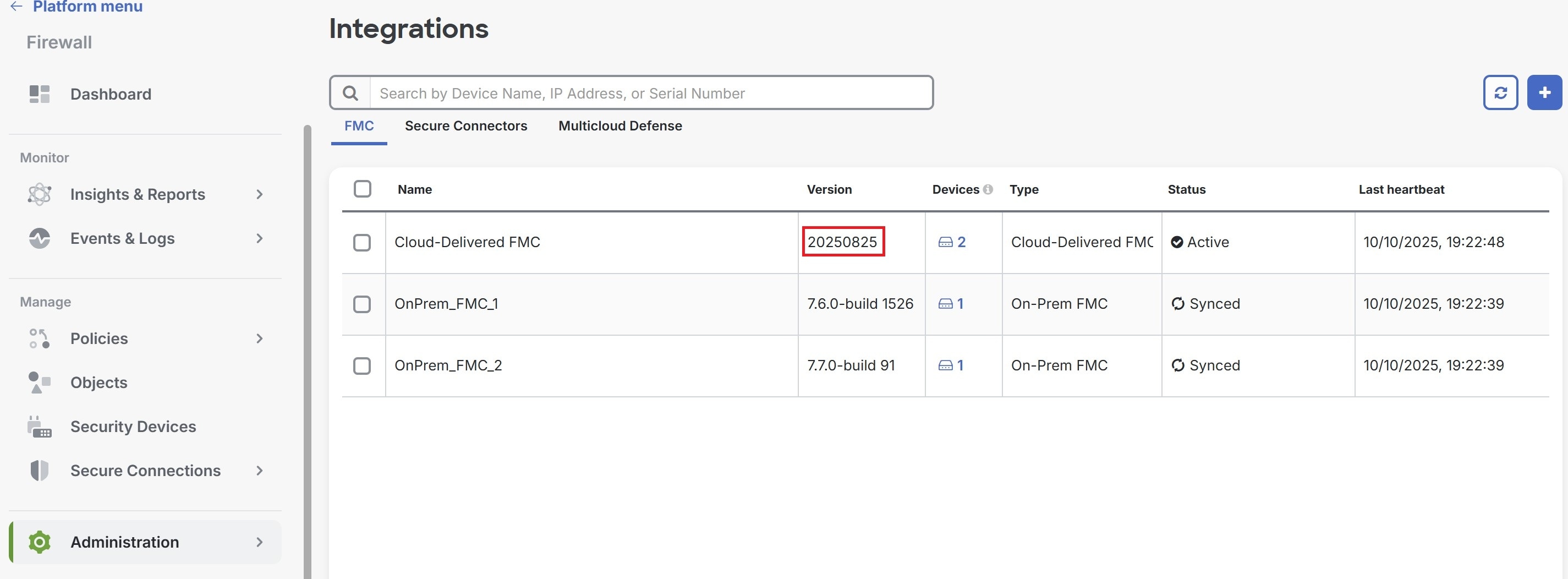

Determine the Cloud-Delivered Firewall Management Center Version in Security Cloud Control Firewall Management

Information about the Cloud-Delivered Firewall Management Center version is required primarily for migration planning, feature support verification, troubleshooting, licensing, and operational management.

Use this procedure to determine the current version of your Cloud-Delivered Firewall Management Center in Security Cloud Control Firewall Management.

Before you begin

Enable Enable Cloud-Delivered Firewall Management Center in your organzation.

Procedure

  1. From the Security Cloud Control Home page, click Firewall.

  2. In the left pane, click Administration > Integrations > Firewall Management Center.

  3. Under the FMC tab, the version is displayed under the Version column.

    The image illustrates the steps to determine the version in the Cloud-Delivered Firewall Management Center, highlighting key interface elements and navigation paths.

    For more information about Cloud-Delivered Firewall Management Center versions, see Release Notes for Cloud-Delivered Firewall Management Center.

The Cloud-Delivered Firewall Management Center version information is now visible in the Version column under the FMC tab.


Register Cloud-Delivered Firewall Management Center with Cisco Smart Software Manager

Register Cloud-Delivered Firewall Management Center with Cisco Smart Software Manager to:

  • Enable export-controlled features such as Remote access VPN and SSL VPN

  • Prevent deployment interruptions after the 90-day evaluation period

  • Ensure compliance and access to all licensed features

Cloud-Delivered Firewall Management Center is included with the base subscription and trial for Security Cloud Control Firewall Management and is provisioned with a 90-day evaluation license upon deployment. Features requiring export encryption remain disabled until registration with Cisco Smart Software Manager (CSSM) is completed. After the evaluation period ends, manually triggered or scheduled deployments are blocked until registration is completed.

Before you begin

  • Ensure you have a Cisco Smart Software Manager account

  • Access to Cloud-Delivered Firewall Management Center interface

Follow these steps to register Cloud-Delivered Firewall Management Center with Cisco Smart Software Manager:

Procedure

  1. Create or access your Smart Account.

    Ensure you have a Cisco Smart Software Manager account. If you do not have one, create it at Smart Software Manager.

  2. Generate a registration token or use an existing valid registration token.

    In the Smart Software Manager, use an existing valid registration token or generate a registration token for the virtual account to which you want to register the Cloud-Delivered Firewall Management Center.

    1. Navigate to Inventory > New Token.
    2. Check the Enable Export Compliance check box.
    3. Enter a description and set an expiration (Cisco recommends 30 days).
    4. Create and copy the token.
  3. Register Cloud-Delivered Firewall Management Center with the token.

    1. Log in to the Cloud-Delivered Firewall Management Center interface.
    2. Navigate to System > Licenses > Smart Licenses.
    3. Click Register and paste the registration token into the Product Instance Registration Token field.
    4. Ensure there are no extra spaces or blank lines before or after the token.
    5. Click Apply Changes.
  4. Verify registration status.

    After registration, verify the license status under System > Licenses > Smart Licenses to confirm successful registration, license application, and that "Export-Controlled Features" are enabled.

Cloud-Delivered Firewall Management Center is successfully registered with Cisco Smart Software Manager, enabling all licensed features including export-controlled features such as Remote Access VPN and SSL VPN. The license is automatically applied upon registration and deployment restrictions are removed.


Cloud-Delivered Firewall Management Center maintenance schedule

Customers who have a Cloud-Delivered Firewall Management Center deployed on their organization are notified approximately 1 week before Security Cloud Control updates the Cloud-Delivered Firewall Management Center environment.

Super Admin and Admin users of the tenant are notified by email. Security Cloud Control also displays a banner on its home page notifying all users of upcoming updates.

Note
  • During the maintenance period of the Cloud-Delivered Firewall Management Center, refrain from creating or deploying configurations to the devices it manages.

  • If there is any issue that stops Security Cloud Control or Cloud-Delivered Firewall Management Center from communicating, that failure is addressed on all affected tenants as quickly as possible, even if it is outside the maintenance window.