Configure access control rules or DNS rules using dynamic attributes filters.
Create access control rules using dynamic objects that are based on dynamic attributes filters you have previously configured.
This topic discusses how to create access control rules using dynamic objects.
To add dynamic attributes filters to DNS policies, see Creating Basic DNS Policies.
Before you begin
Create dynamic attributes filters as discussed in Create dynamic attributes filters.
You cannot create dynamic attributes filters for Azure Service Tags, Cisco Multicloud Defense, Generic Text, GitHub, Outlook 365, Tenable, Webex, and Zoom. These types of cloud objects provide their own IP addresses.
Follow these steps to create access control rules or DNS rules using dynamic attributes filters:
Procedure
-
Click Edit (
 ) next to an access control policy.
-
In the Available Attributes section, from the list, click Dynamic Objects.
The following figure shows an example.
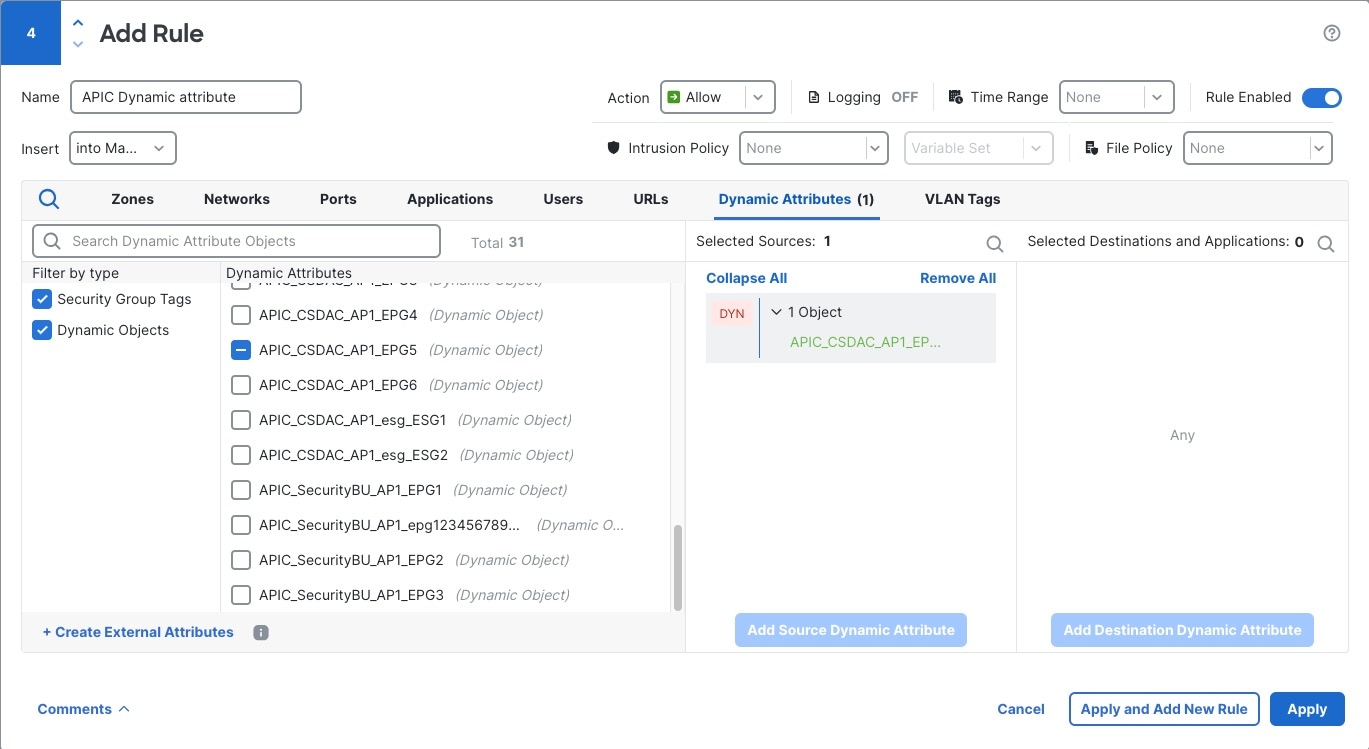 This example shows a dynamic object named
APIC Dynamic Attributethat corresponds to the dynamic attribute filter created in the dynamic attributes connector.