Provides instructions to configure an extended access control list (ACL) to match DNS and web traffic and steer Threat Defense (FTD) internet-bound traffic through the intended egress path.
The access list is configured for DNS and web traffic to be steered towards the internet from the egress interface with the help of policy based routing.
Procedure
-
Configure the following access control properties:
-
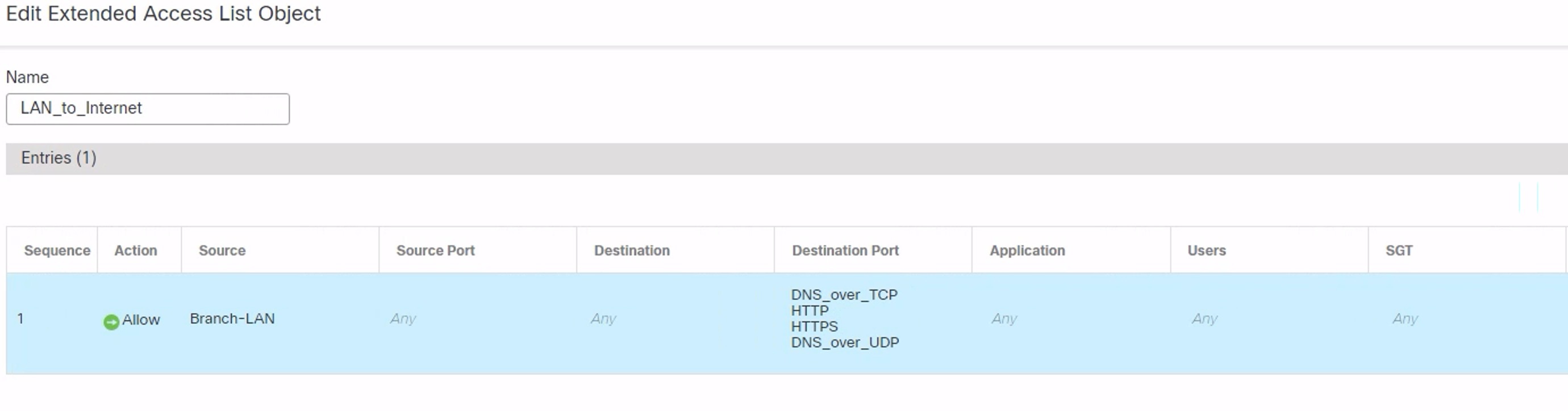
Select the Action to Allow (match) the traffic criteria.
-
Click the Port tab and search for HTTP, HTTPS, DNS_over_UDP, DNS_over_TCP in the Available Ports list.
-
Select the ports and click Add to Destination.
-
Click the Network tab and search for the branch LAN in the Available Networks list.
In our example, the network is Branch-LAN.
-
Select Branch-LAN and click Add to Source.
-
Click Add to add the entry to the object.
-
Click Save.
The ACL object is created as seen in the figure below.
-