Use Cases for SD-WAN Capabilities in Cisco Secure Firewall

PDF

Scenario 1: Direct Internet Access

Updated: February 5, 2026

Overview

Explains a scenario where Direct Internet Access (DIA) with policy-based routing (PBR) improves performance and lowers latency by routing traffic directly to the internet.

Bob is an account manager and Ann is a help desk specialist. Both work at a branch office of a large corporation. Recently, they have been experiencing latency issues while using web conferencing tools like Webex and streaming platforms like YouTube.

What is at risk?

Network latency and network congestion results in reduced performance and user experience of web conferencing and streaming sessions. This may impact the productivity and efficiency of employees at the branch office, potentially leading to a negative impact on the overall business operations.

How does DIA with PBR solve the problem?

Alice, the IT administrator, used policy based routing in conjunction with DIA to reduce latency in the network.

Direct Internet Access allowed branch offices to access the internet directly, without routing traffic through a central site or data center. This reduced latency by providing a more direct and optimized internet connection for branch users.

Policy based routing separated Webex and YouTube traffic on different egress interfaces. This ensured that the traffic was directed through different paths, reducing the burden on a single interface and improving application performance.
Network Topology for DIA

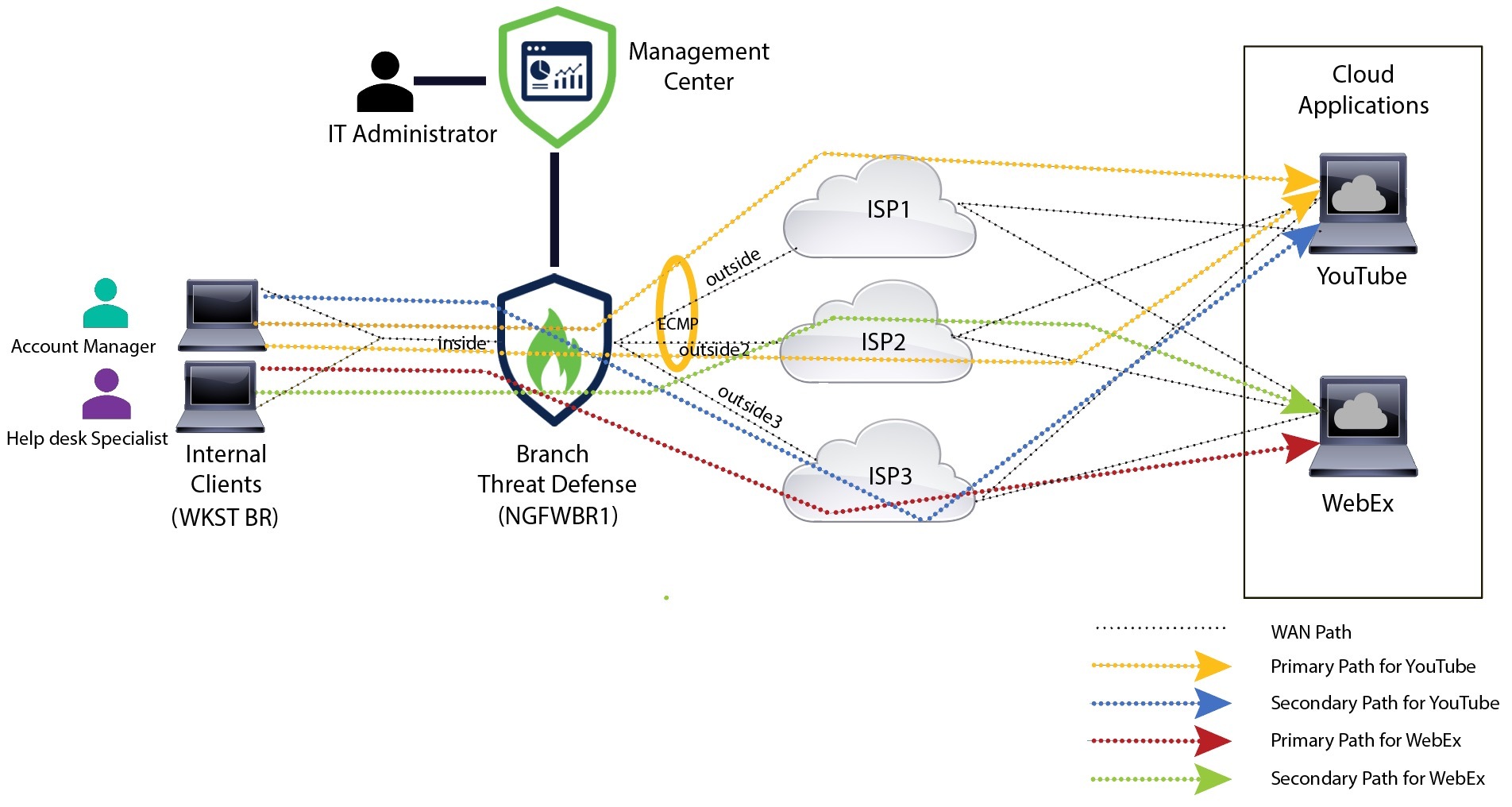
In this topology, a threat defense device is deployed at a branch location with three egress interfaces. The device is configured for DIA using PBR.

In the figure below, the internal client or branch workstation is labelled WKST BR and the branch threat defense is labeled NGFWBR1. The ingress interface of NGFWBR1 is named inside and the egress interfaces are named outside, outside2, and outside3 respectively.

Load balancing between the outside and outside2 interfaces is achieved by configuring an ECMP zone and static routes.

Figure 1. Direct Internet Access Topology
The image depicts the topology for Direct Internet Access

With DIA, users behind the branch firewall are allowed to access:

  1. Social media application traffic (for example, YouTube) that is load balanced using two egress interfaces (outside and outside2). If both the interfaces fail, then traffic falls back to the third egress interface (outside3).
  2. Collaboration application traffic (for example, WebEx) is forwarded through the outside3 interface and if this link fails, traffic is forwarded through the outside2 interface.

Workflow for Configuring DIA

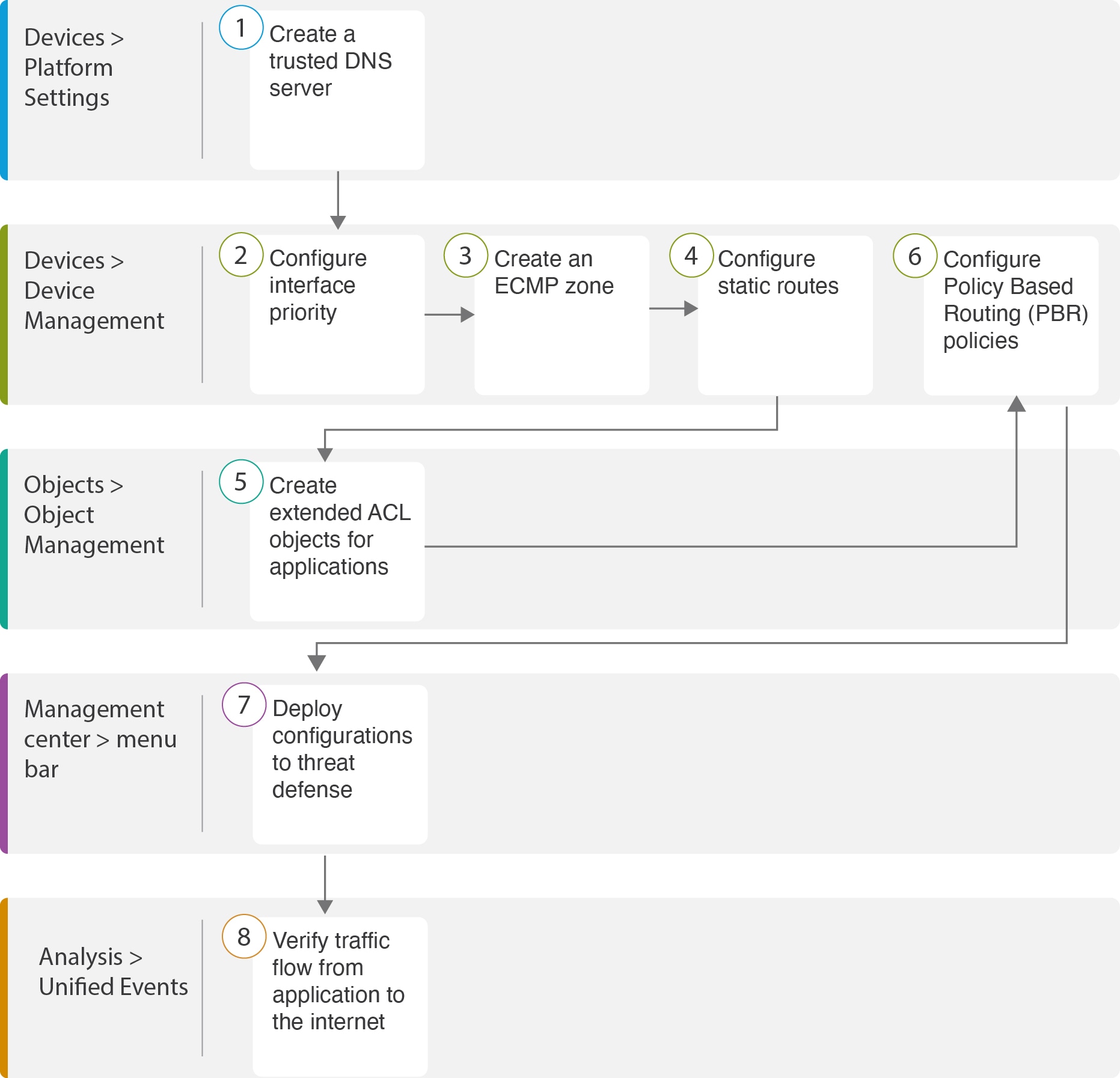
The following flowchart illustrates the workflow for configuring DIA in Firewall Management Center.

Workflow for configuring DIA in Firewall Management Center

Step

Description

(Prerequisite) Configure a Trusted DNS server. See Configure a Trusted DNS Server.

(Prerequisite) Configure interface priority. See Configure Interface Priority.

(Prerequisite) Create an ECMP zone. See Create an ECMP Zone.

(Prerequisite) Configure static routes. See Configure an Equal Cost Static Route.

Configure extended ACL objects for applications. See

Configure PBR policies for applications. See

Deploy the configuration on threat defense. See Deploy Configuration.

Verify YouTube and WebEx traffic flow. See Verify Application Traffic Flow.