Use Cases for SD-WAN Capabilities in Cisco Secure Firewall

PDF

Scenario 2: Direct Internet Access With Path Monitoring

Updated: February 5, 2026

Overview

Explains a branch office scenario where policy-based routing with path monitoring directs WebEx traffic to minimize packet loss, reduce lag, and improve meeting quality.

Ann is a help desk specialist and works at a branch office of a large corporation. Ann has been experiencing connection drops and lags while using WebEx.

What is at risk?

WebEx meetings rely on real-time data transmission, including audio and video streams, between the meeting host and attendees. This real-time data is sensitive to network latency and packet loss. If the network experiences high packet loss, it can lead to audio and video quality issues such as freezing, lagging, or delays, which can negatively impact the meeting experience.

How PBR with path monitoring resolve the problem?

Alice, the IT administrator, used policy based routing with path monitoring to steer WebEx application traffic to the internet through the egress interface with minimal packet loss ensuring the best possible meeting experience for attendees.
Network Topology-DIA With Path Monitoring

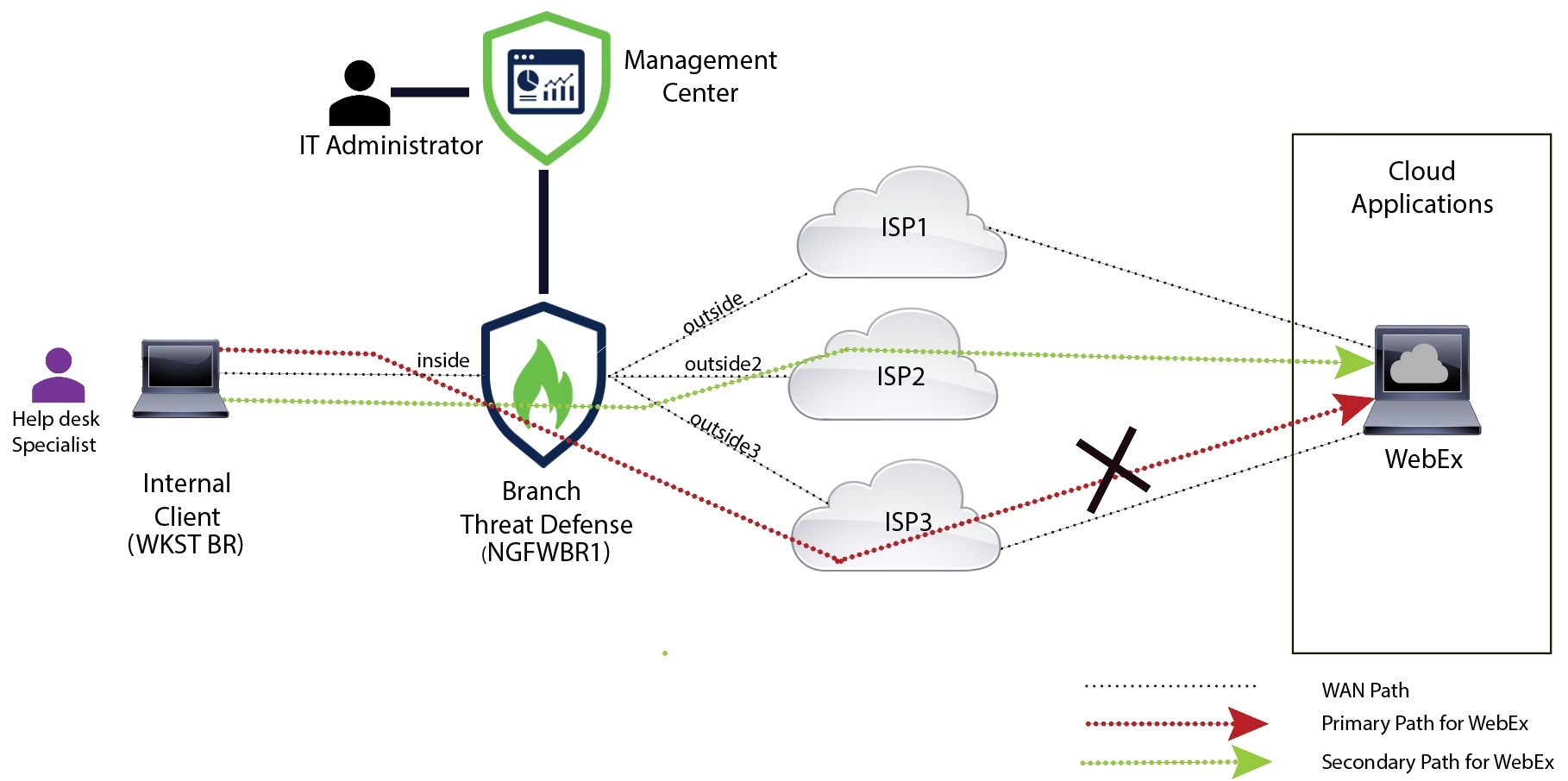
In this topology, a threat defense device is deployed at a branch location with three egress interfaces. The device is configured for Direct Internet Access using Policy Based Routing.

In the figure below, the internal client or branch workstation is labeled WKST BR and the branch threat defense is labeled NGFWBR1. The ingress interface of NGFWBR1 is named inside and the egress interfaces are named outside, outside2, and outside3 respectively.

Figure 1. Direct Internet Access Topology (With Path Monitoring)
The image depicts the topology for Direct Internet Access with path monitoring

The outside2, and outside3 egress interfaces are enabled with path monitoring. The PBR policy for WebEx is configured so that traffic is routed to the egress interface with minimal packet loss.

In this scenario, to validate path monitoring, packet loss can be induced by restricting outbound traffic that is sourced from the outside3 interface going to internet either through an access control list on the upstream device or by shutting down the outside3 interface for Secure Firewall Threat Defense from Firewall Management Center.

Note

Shutting down an interface is network intrusive and must not be tried in a production network.

As a result of packet loss, the link that is associated with the outside3 interface goes down. Collaboration application traffic is forwarded through the outside2 interface instead of the outside3 interface.


Workflow for Configuring DIA With Path Monitoring

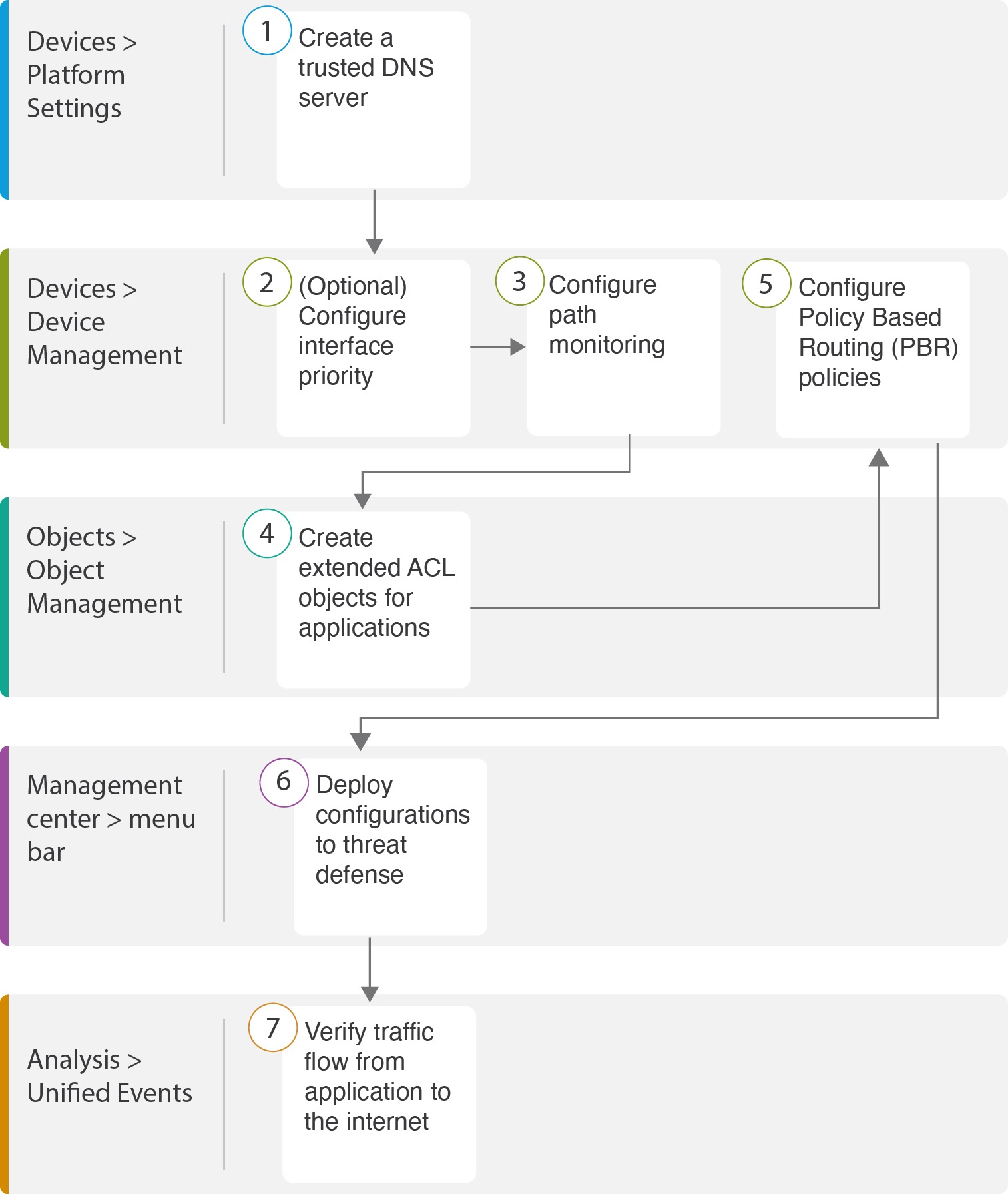
The following flowchart illustrates the workflow for configuring DIA with path monitoring in Firewall Management Center.

Step

Description

(Prerequisite) Configure a Trusted DNS server. See Configure a Trusted DNS Server.

[Prerequisite (Optional)] Configure interface priority. See Configure Interface Priority.

Configure path monitoring. See Configure Path Monitoring Settings.

Configure an extended ACL object for the application. See Configure an Extended ACL Object for WebEx.

Configure a PBR policy for the application. See Configure a Policy Based Routing Policy With Path Monitoring for Webex.

Deploy the configuration on threat defense. See Deploy Configuration.

Verify WebEx traffic flow. See Verify Application Traffic Flow.