Provides instructions to verify correct forwarding of traffic to Cisco Umbrella and if SIG tunnels are active.
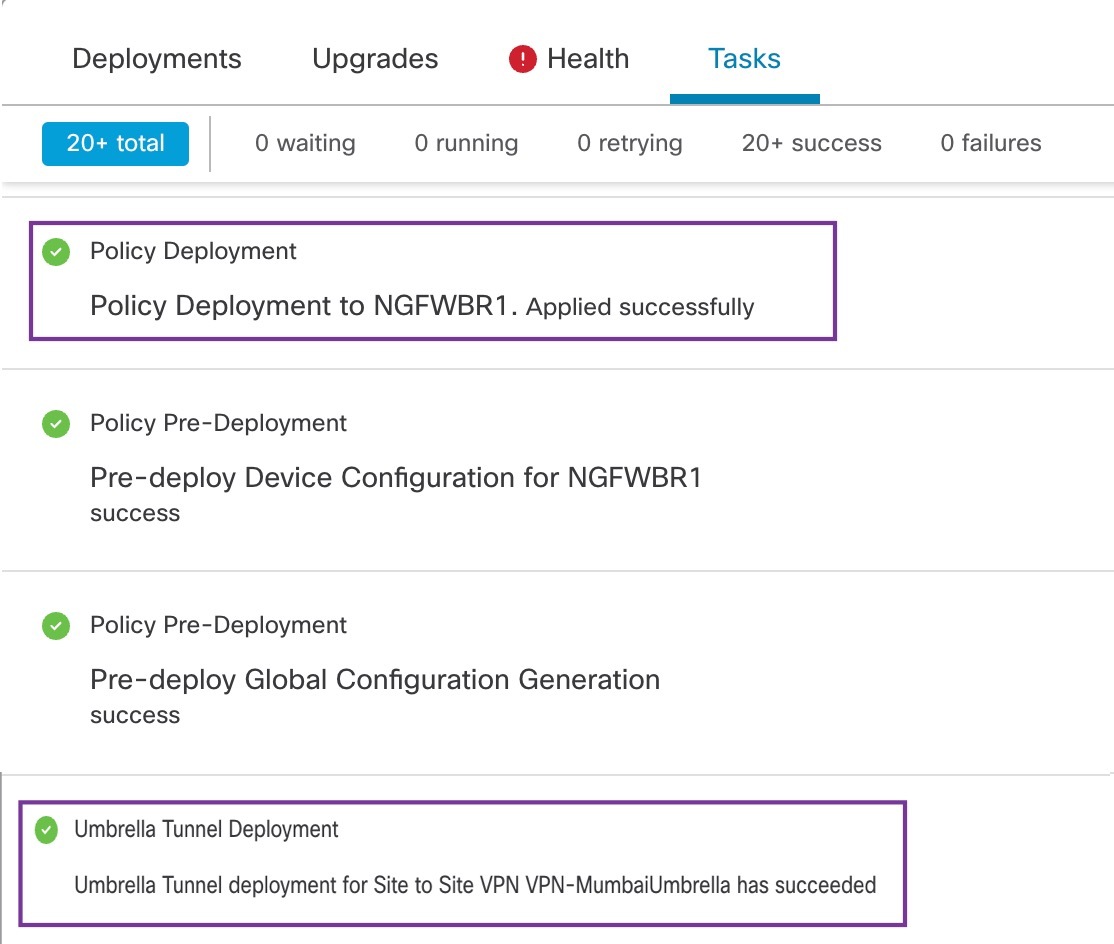
In the Management Center, choose Notifications > Tasks to view the status of the Umbrella tunnel deployment and policy deployment on the Threat Defense device (NGFWBR1).
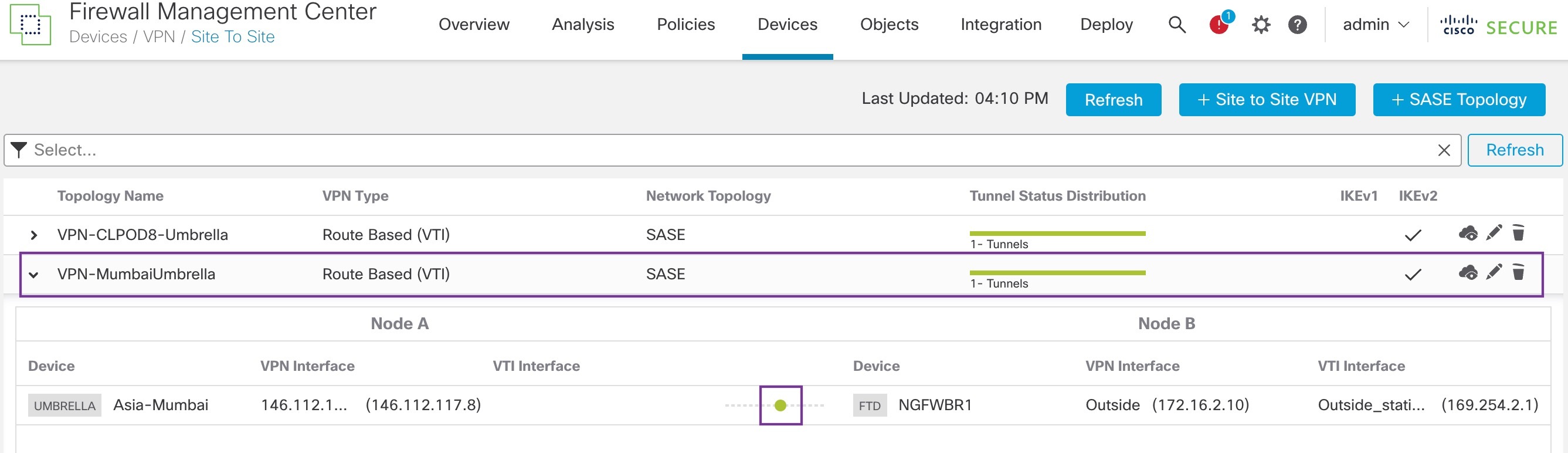
To check the SASE auto tunnel status in the Management Center, choose Devices > VPN > Site To Site.
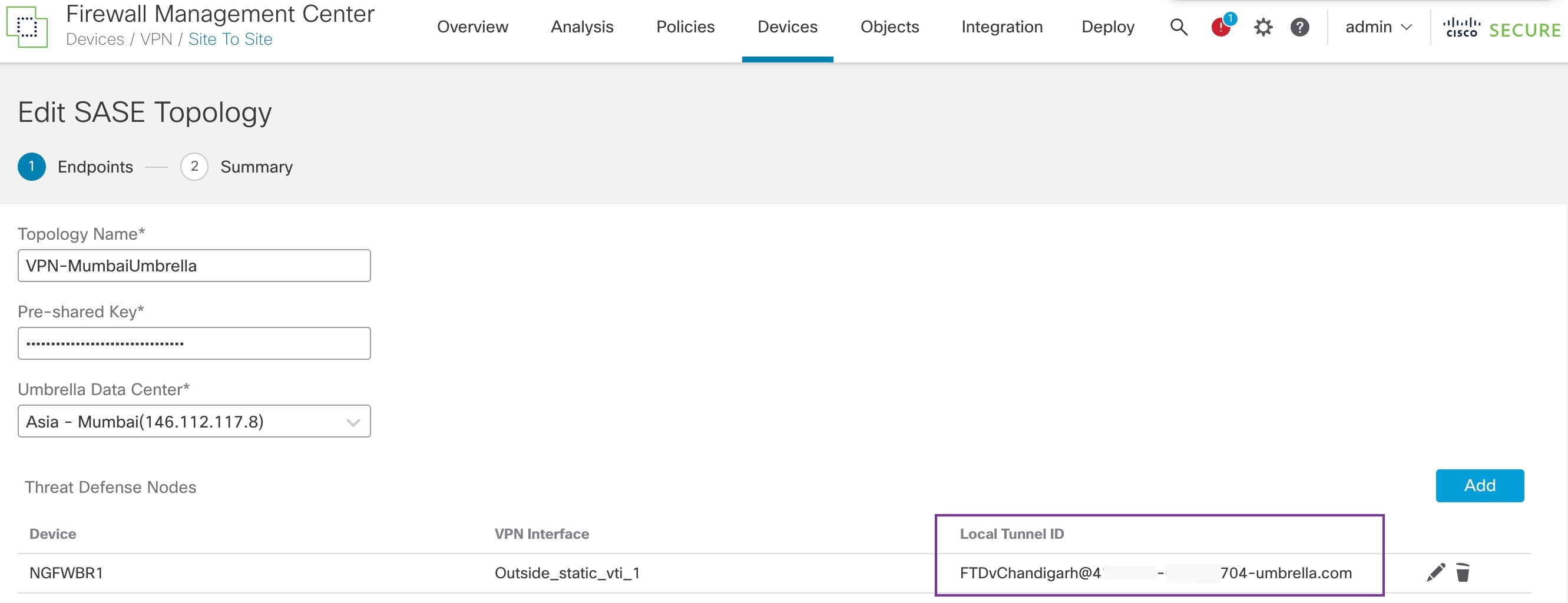
To check the updated SASE topology in the Management Center, choose Devices > VPN > Site To Site > Edit SASE Topology. The local Tunnel ID is updated after the deployment to Umbrella.
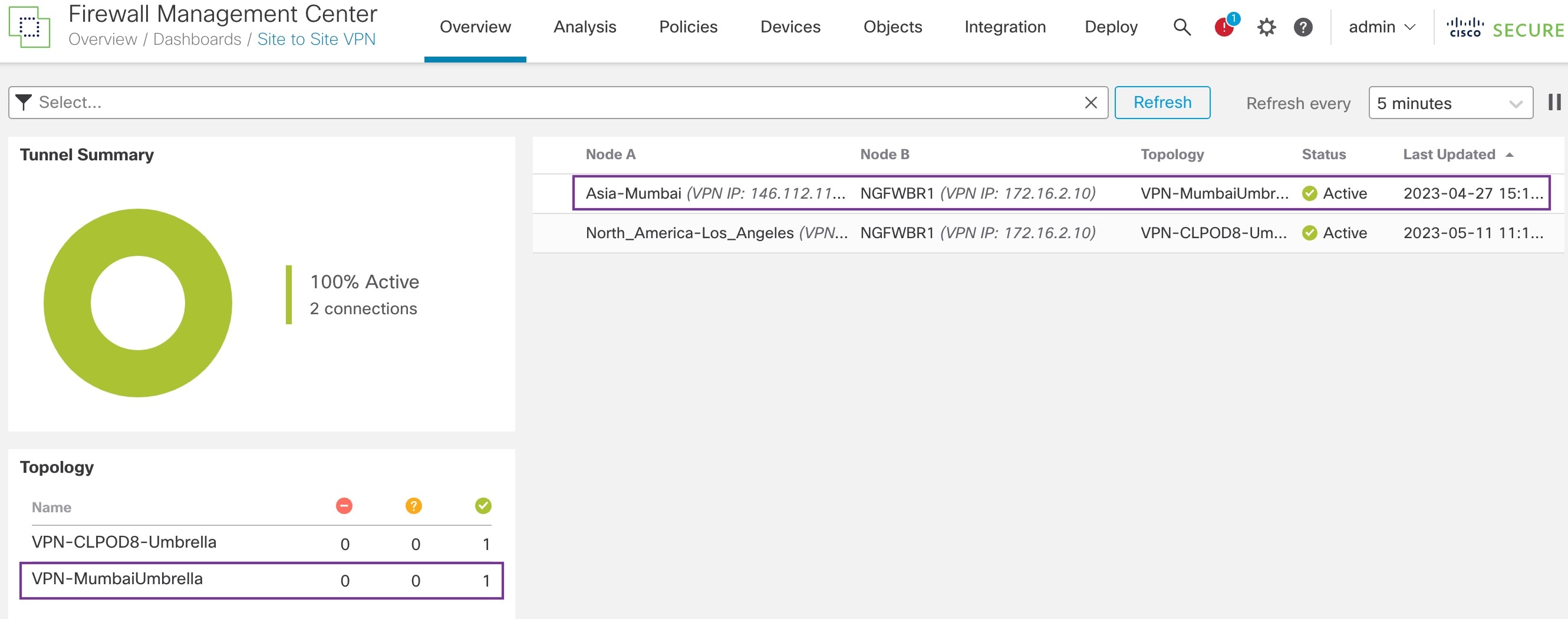
To view the Site To Site VPN dashboard in the Management Center, choose Overview > Dashboard > Site to Site VPN.
Use the following CLI commands to verify SASE Umbrella Tunnel on threat defense:
-
To verify the details of the SASE tunnel, use the following command:
> show running-config interface tunnel 1 ! interface Tunnel1 nameif Outside_static_vti_1 ip address 169.254.2.1 255.255.255.252 tunnel source interface Outside tunnel destination 146.112.117.8 tunnel mode ipsec ipv4 tunnel protection ipsec profile FMC_IPSEC_PROFILE_1 -
To verify the IPSec profile and the associated proposal, use the following command:
> show running-config crypto ipsec crypto ipsec ikev2 ipsec-proposal CSM_IP_1 protocol esp encryption aes-gcm-256 protocol esp integrity sha-256 crypto ipsec profile FMC_IPSEC_PROFILE_1 set ikev2 ipsec-proposal CSM_IP_1 set ikev2 local-identity email-id FTDvChandigarh@41xxxxx-xxxxxxxxx-umbrella.com set reverse-route crypto ipsec security-association pmtu-aging infinite -
To verify the IKeV2 policy set, use the following command:
> show running-config crypto ikev2 crypto ikev2 policy 15 encryption aes-gcm-256 integrity null group 20 19 prf sha256 lifetime seconds 86400 crypto ikev2 enable Outside -
To verify the tunnel statistics including Tx and Rx data, use the following command:
> show vpn-sessiondb l2l Session Type: LAN-to-LAN Connection : 146.112.117.8 Index : 19 IP Addr : 146.112.117.8 Protocol : IKEv2 IPsecOverNatT Encryption : IKEv2: (1)AES-GCM-256 IPsecOverNatT: (1)AES-GCM-256 Hashing : IKEv2: (1)none IPsecOverNatT: (1)none Bytes Tx : 234 Bytes Rx : 446 Login Time : 19:14:51 UTC Thu Apr 27 2023 Duration : 0h:55m:16s Tunnel Zone : 0 -
To check the tunnel status, use the following command:
> show interface ip brief Interface IP-Address OK? Method Status Protocol Internal-Control0/0 127.0.1.1 YES unset up up Internal-Control0/1 unassigned YES unset up up Internal-Data0/0 unassigned YES unset down up Internal-Data0/0 unassigned YES unset up up Internal-Data0/1 169.254.1.1 YES unset up up Internal-Data0/2 unassigned YES unset up up Management0/0 203.0.113.130 YES unset up up TenGigabitEthernet0/0 172.16.2.10 YES manual up up TenGigabitEthernet0/1 172.16.3.10 YES manual up up TenGigabitEthernet0/2 unassigned YES unset administratively down up Tunnel1 169.254.2.1 YES manual up up -
To check the IPSec SA associated to the VTI tunnel, use the following command:
> show crypto ipsec sa
interface: outside_static_vti_1
    Crypto map tag: __vti-crypto-map-Tunnel1-0-1, seq num: 65280, local addr: 198.18.128.81

      Protected vrf (ivrf): Global
      local ident (addr/mask/prot/port): (0.0.0.0/0.0.0.0/0/0)
      remote ident (addr/mask/prot/port): (0.0.0.0/0.0.0.0/0/0)
      current_peer: 146.112.117.8


      #pkts encaps: 705, #pkts encrypt: 705, #pkts digest: 705
      #pkts decaps: 743, #pkts decrypt: 743, #pkts verify: 743
      #pkts compressed: 0, #pkts decompressed: 0
      #pkts not compressed: 705, #pkts comp failed: 0, #pkts decomp failed: 0
      #pre-frag successes: 0, #pre-frag failures: 0, #fragments created: 0
      #PMTUs sent: 0, #PMTUs rcvd: 0, #decapsulated frgs needing reassembly: 0
      #TFC rcvd: 0, #TFC sent: 0
      #Valid ICMP Errors rcvd: 0, #Invalid ICMP Errors rcvd: 0
      #send errors: 0, #recv errors: 0

      local crypto endpt.: 198.18.128.81/4500, remote crypto endpt.: 146.112.117.8/4500
      path mtu 1500, ipsec overhead 63(44), media mtu 1500
      PMTU time remaining (sec): 0, DF policy: copy-df
      ICMP error validation: disabled, TFC packets: disabled
      current outbound spi: C76F91B4
      current inbound spi : 64907273

    inbound esp sas:
      spi: 0x2BF92601 (737748481)
         SA State: active
         transform: esp-aes-gcm-256 esp-null-hmac no compression
         in use settings ={L2L, Tunnel,  NAT-T-Encaps, IKEv2, VTI, }
         slot: 0, conn_id: 32, crypto-map: __vti-crypto-map-Tunnel1-0-1
         sa timing: remaining key lifetime (kB/sec): (4331520/27987)
         IV size: 8 bytes
         replay detection support: Y
         Anti replay bitmap:
          0x00000000 0x00000001
    outbound esp sas:
      spi: 0xCA2DC006 (3391995910)
         SA State: active
         transform: esp-aes-gcm-256 esp-null-hmac no compression
         in use settings ={L2L, Tunnel,  NAT-T-Encaps, IKEv2, VTI, }
         slot: 0, conn_id: 32, crypto-map: __vti-crypto-map-Tunnel1-0-1
         sa timing: remaining key lifetime (kB/sec): (4101072/27987)
         IV size: 8 bytes
         replay detection support: Y
         Anti replay bitmap:
          0x00000000 0x00000001
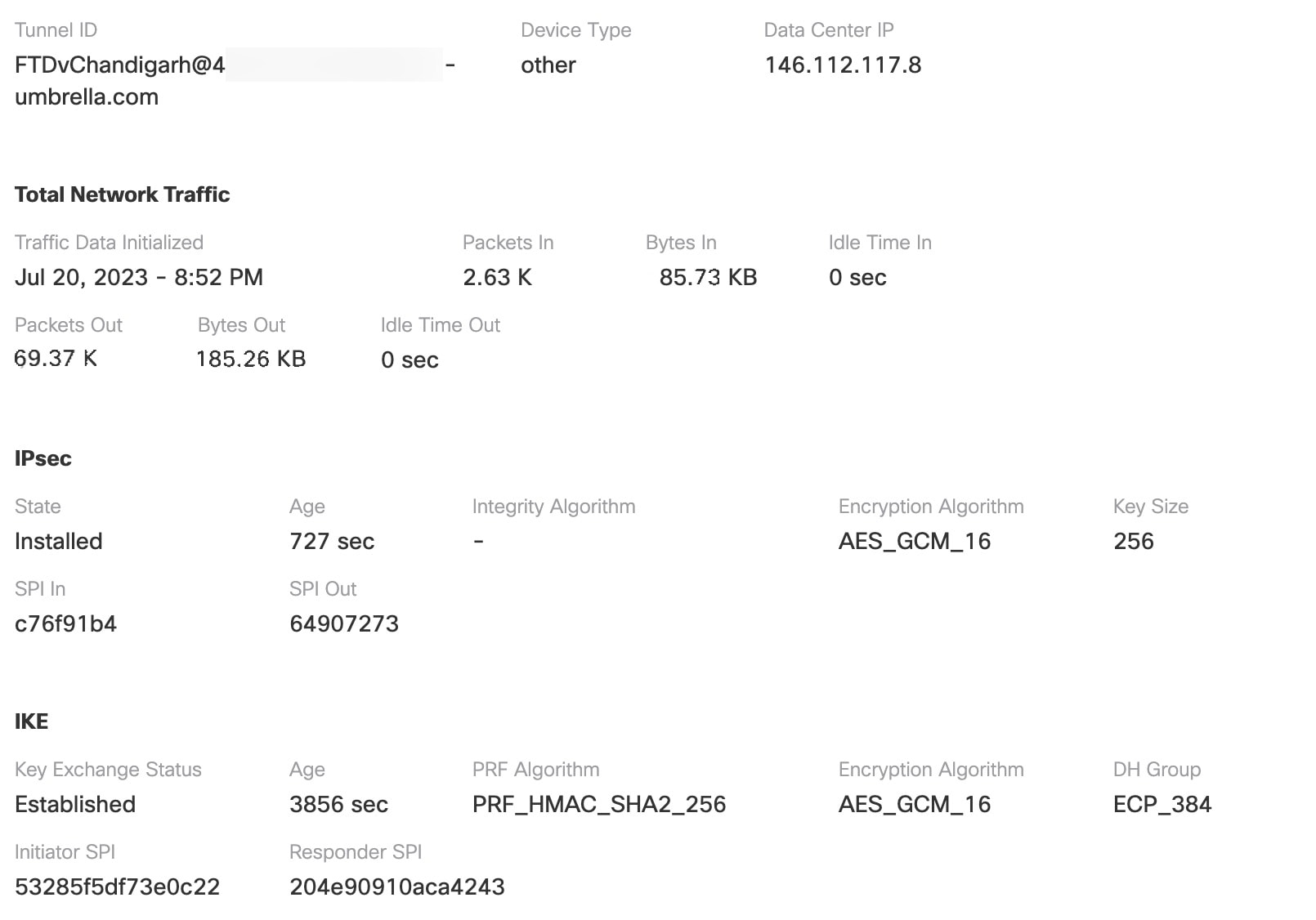
To view the SASE tunnel in Umbrella, log in to Cisco Umbrella and navigate to Deployments > Core Identities > Network Tunnels. The network tunnel from the threat defense to Umbrella is displayed as shown in the figure below.
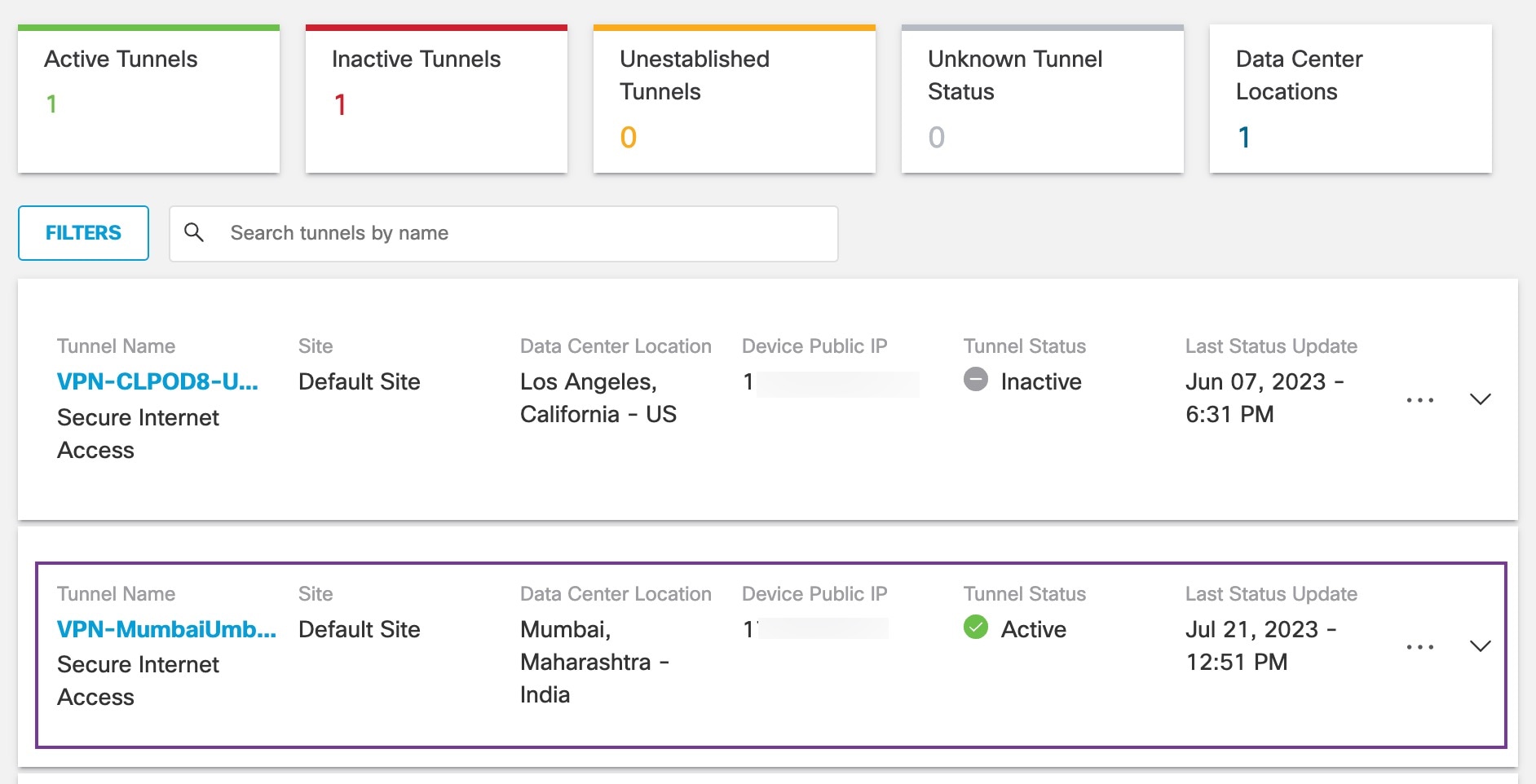
Expand the section to view the details of the tunnel.