Provides instructions for configuring a Threat Defense (FTD) device as a branch site spoke in a route-based site-to-site VPN using Firewall Management Center (FMC).
Procedure
-
Click OK.
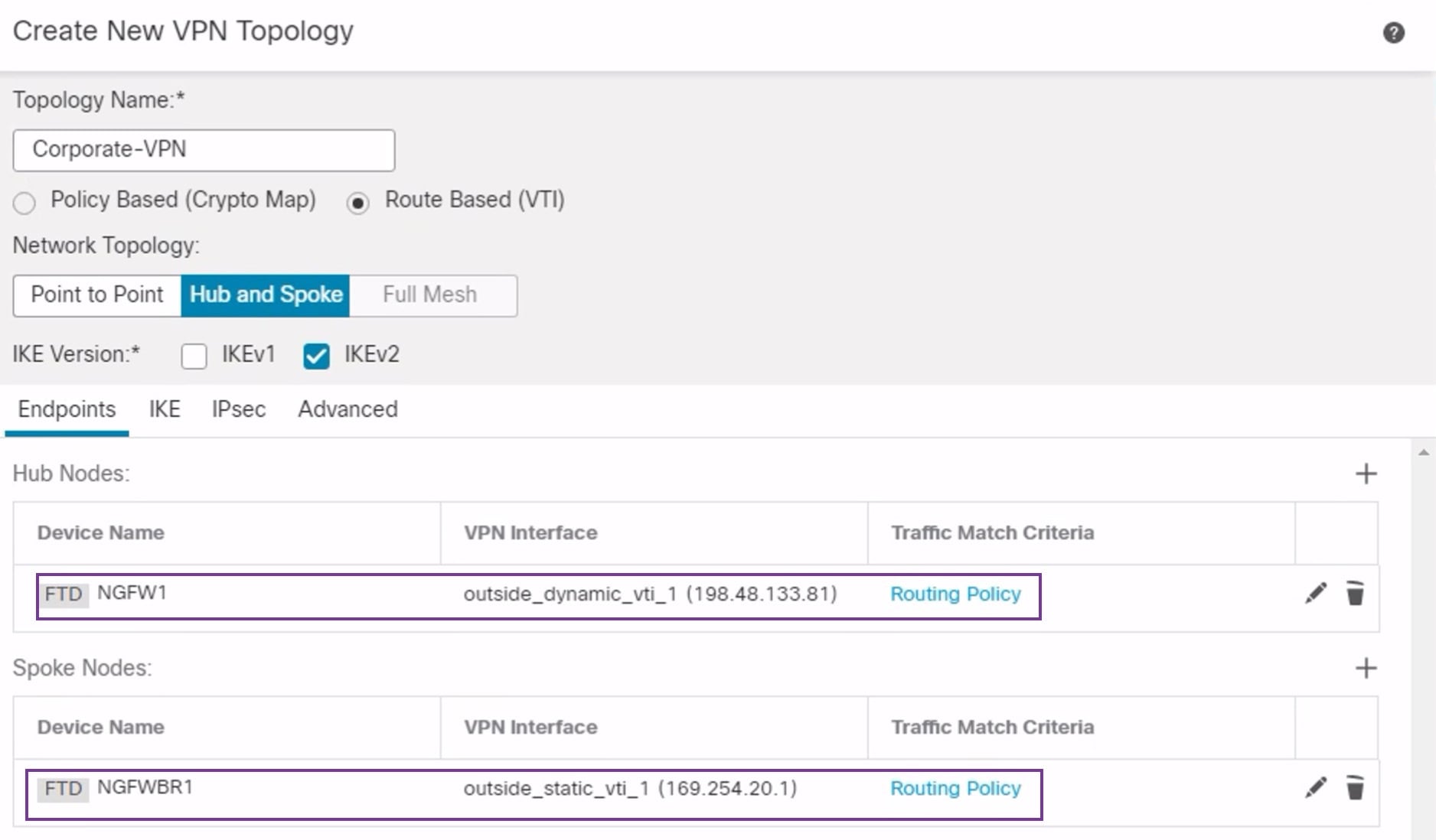
NGFWBR1 is successfully configured as the spoke node.
Use Cases for SD-WAN Capabilities in Cisco Secure Firewall
Is this content helpful?
Thank you for your feedback. Your response has been recorded.
AI responses are currently only available to logged in users. Log in
Only ask questions about this document. To ask questions about this product as a whole, go to Technical Documentation .
Suggestions
Sorry, we couldn't generate a response for this query.
Use Cases for SD-WAN Capabilities in Cisco Secure Firewall
Updated: February 5, 2026
Want to summarize with AI?
Log inProvides instructions for configuring a Threat Defense (FTD) device as a branch site spoke in a route-based site-to-site VPN using Firewall Management Center (FMC).
In the Spoke Nodes section, click +. The Add Endpoint dialog box is displayed.
Choose NGFWBR1 as the hub from the Device drop-down list.
NoteThe device must be running on software version 7.3 or later.
Click + next to the Static Virtual Tunnel Interface drop-down list to add a new static VTI.
The Add Virtual Tunnel Interface dialog box appears with the following pre-populated default configurations.
Tunnel Type is auto-populated with Static.
Name is auto-populated as <tunnel_source interface logical name>+ static_vti +<tunnel ID>. For example, outside_static_vti_1 .
The Enabled checkbox is checked by default.
Select Tunnel_Zone from the Security Zone drop-down list.
Tunnel ID is auto-populated with a value as 1.
Select GigabitEthernet0/4 (outside3) from the Tunnel Source drop-down list. Select the IP address of the outside 3 interface as 198.19.30.4 from the drop-down list next to it.
IPsec Tunnel Mode is set to IPv4, by default.
IP address can either be a static IP address or a borrow IP. We recommend that you configure the Borrow IP for the static interface from a loopback interface. To add a loopback interface, click + next to the Borrow IP (IP unnumbered) drop-down list. In the Add Loopback Interface dialog box:
In the General tab, enter the Name as Spoke_Tunnel_IP and Loopback ID as 1.
In the IPv4 tab, enter the IP address as 169.254.20.1/32 .
Click OK to save the loopback interface.
The Borrow IP is set to Loopback 1(Spoke_Tunnel_IP).
Click OK to save the SVTI. A message is displayed that confirms the VTI is created successfully. Click OK.
The Static Virtual Tunnel Interface is set to outside_static_vti_1(169.254.20.1).
Expand Advanced Settings to view the default settings. Both checkboxes must be checked.
Click OK.
NGFWBR1 is successfully configured as the spoke node.
Need help?
(Requires a Cisco Service Contract)
The documentation set for this product strives to use bias-free language. For the purposes of this documentation set, bias-free is defined as language that does not imply discrimination based on age, disability, gender, racial identity, ethnic identity, sexual orientation, socioeconomic status, and intersectionality. Exceptions may be present in the documentation due to language that is hardcoded in the user interfaces of the product software, language used based on RFP documentation, or language that is used by a referenced third-party product. Learn more about how Cisco is using Inclusive Language.