Illustrates the end‑to‑end workflow for deploying Cisco Umbrella SASE auto tunnel with Secure Firewall.
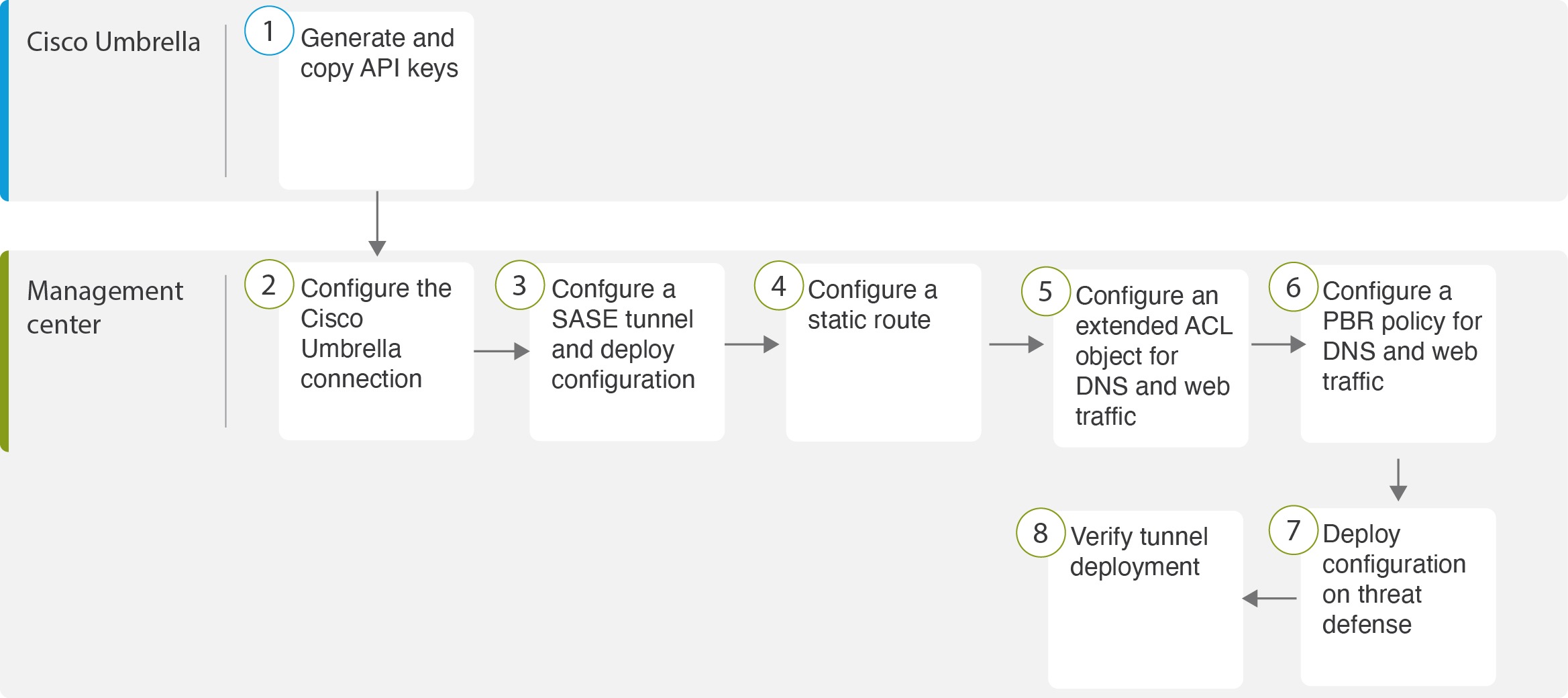
The following flowchart illustrates the workflow for configuring the SASE tunnel in Firewall Management Center.
|
Step |
Description |
|---|---|
 |
(Prerequisite) Generate and copy the API keys in Cisco Umbrella. See Map Management Center Umbrella Parameters and Cisco Umbrella API Keys . |
 |
(Prerequisite) Configure the Cisco Umbrella connection. See Configure Cisco Umbrella Connection Settings. |
 |
Create the SASE tunnel and deploy the configuration on threat defense. See Configure a SASE Tunnel for Umbrella. |
 |
Configure a static route. See Configure a Static Route. |
 |
Configure an extended ACL object for DNS and web traffic. See Configure an Extended ACL for DNS and Web Traffic |
 |
Configure a PBR policy for DNS and web traffic. See Configure a PBR Policy for DNS and Web Traffic |
 |
Deploy configuration on the threat Defense device. See Deploy Configuration. |
 |
Verify tunnel deployment. See Verify SASE Umbrella Tunnel Deployment. |