Configuration Guide for Cisco NCS 1014, IOS XR Releases 26.x.x

PDF

Configuration Guide for Cisco NCS 1014, IOS XR Releases 26.x.x

Configure OSPF on the nodes for automatic topology discovery

Want to summarize with AI?

Log in

Use this procedure to configure OSPFv2 on the near end and far end nodes to enable automatic topology discovery.


Use this task to configure OSPFv2 on the near end and far end nodes of the topology shown in this image.
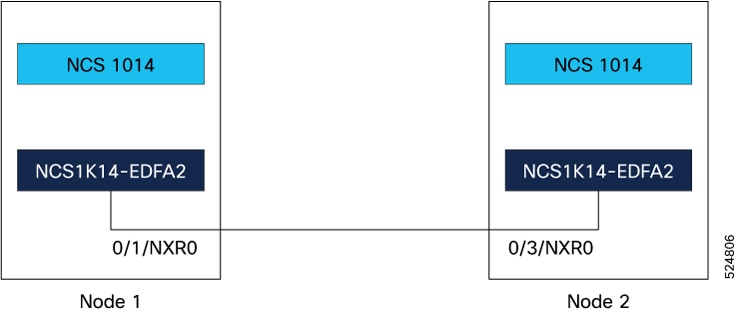
Figure 1. Sample two node topology

OSPFv2 supports only IPv4 addressing.

Procedure

1.

Configure the interfaces.

  1. Use the interface Loopback command to configure the loopback interface IPv4 address, which is the primary loopback address that you want to reuse for all areas.

    Example:

    Node 1:

    
    RP/0/CPU0:ios(config)# interface Loopback 0
    RP/0/CPU0:ios(config-if)# ipv4 address 10.10.10.10 255.255.255.255
    RP/0/CPU0:ios(config-if)# no shut
    RP/0/CPU0:ios(config-if)# exit
    

    Node 2:

    
    RP/0/CPU0:ios(config)# interface Loopback 0
    RP/0/CPU0:ios(config-if)# ipv4 address 10.10.10.11 255.255.255.255
    RP/0/CPU0:ios(config-if)# no shut
    RP/0/CPU0:ios(config-if)# exit
    
  2. Use the interface GigabitEthernet command to configure the Gigabit Ethernet interface for the OSC link.

    Example:

    Node 1:

    
    RP/0/CPU0:ios(config)# interface GigabitEthernet 0/1/0/5
    RP/0/CPU0:ios(config-if)# ipv4 point-to-point
    RP/0/CPU0:ios(config-if)# ipv4 unnumbered Loopback0
    RP/0/CPU0:ios(config-if)# no shut
    RP/0/CPU0:ios(config-if)# exit
    

    Node 2:

    
    RP/0/CPU0:ios(config)# interface GigabitEthernet 0/3/0/5
    RP/0/CPU0:ios(config-if)# ipv4 address 10.1.1.2 255.255.255.0
    RP/0/CPU0:ios(config-if)# no shut
    RP/0/CPU0:ios(config-if)# exit
    
2.

Configure the OSPF process:

  1. Use the router ospf process-name to enable OSPF routing.

  2. Use the distribute link-state keyword to distribute OSPF link-state data.

  3. Use the segment-routing mpls keyword to enable MPLS-based segment routing for the OSPF process.

    This step is optional.

  4. Use the network point-to-point keyword to configure an interface OSPF network type to point-to-point.

  5. Use the area keyword to configure an OSPF area.

Example:

Node 1 and 2:


RP/0/RP0/CPU0:ios(config)# router ospf 1
RP/0/RP0/CPU0:ios(config-ospf)#distribute link-state
RP/0/RP0/CPU0:ios(config-ospf)#segment-routing mpls
RP/0/RP0/CPU0:ios(config-ospf)#area 0
3.

Add the configured interfaces to the OSPF area.

Example:

Node 1:


RP/0/RP0/CPU0:ios(config-ospf-ar)# interface Loopback 0
RP/0/RP0/CPU0:ios(config-ospf-ar-if)# exit
RP/0/RP0/CPU0:ios(config-ospf-ar)# interface GigabitEthernet 0/1/0/5

Node 2:


RP/0/RP0/CPU0:ios(config-ospf-ar)# interface Loopback 0
RP/0/RP0/CPU0:ios(config-ospf-ar-if)# exit
RP/0/RP0/CPU0:ios(config-ospf-ar)# interface GigabitEthernet 0/3/0/5
4.

Exit the OSPF area configuration mode and commit your configuration.

Example:

Node 1 and 2:


RP/0/RP0/CPU0:ios(config-ospf-ar-if)# exit
RP/0/RP0/CPU0:ios(config-ospf-ar)# exit
RP/0/(config-ospf)# exit
RP/0/RP0/CPU0:ios(config)# commit
RP/0/RP0/CPU0:ios(config)# exit

View the topology information

Use this task to view the topology information.

Procedure

1.

Use the command show olc internal slot id port id topo-link to view the topology information.

Example:

RP/0/RP0/CPU0:ios# show olc internal slot 0 port 0 topo-link
                        Thu Feb 20 19:53:52.277 IST
                        Self RID: 172.16.0.1
                        Node Type: OLT
                        <OLT><172.16.0.1><0x6a> --- <OLT><192.168.0.1><0x69>

If no neighbors are discovered, an alarm will be triggered at the OSC port.

Example:

RP/0/RP0/CPU0:ios#show alarms brief system active
                        Thu Feb 20 19:54:31.266IST
                        ------------------------------------------------------------------------------------
                        Active Alarms
                        ------------------------------------------------------------------------------------
                        Location  Severity   Group       Set Time                  Description
                        0/1/NXR0  Minor      Software   02/20/2025 19:54:31 IST    Ots0/1/0/0 - Neighbour not found
                    
RP/0/RP0/CPU0:ios#show alarms brief system 
                        Thu Feb 20 19:44:35.212 UTC
                        ------------------------------------------------------------------------------------
                        Active Alarms
                        ------------------------------------------------------------------------------------
                        Location  Severity   Group       Set Time                  Description
                        0/3/NXR0  Minor      Software   02/20/2025 19:14:35 IST    Ots0/3/0/0 - Neighbour not found
                    
2.

Use the command show ip ospf neighbor to display OSPF neighbor information on a per-interface basis.

Example:


                        RP/0/RP0/CPU0:ios#show ip ospf neighbor 
                        Thu Feb 20 19:53:53.324 IST
                        
                        * Indicates MADJ interface
                        # Indicates Neighbor awaiting BFD session up
                        
                        Neighbors for OSPF 1
                        
                        Neighbor ID     Pri   State           Dead Time   Address         Interface
                        192.168.0.1     1     FULL/  -        00:00:30    192.168.0.1     GigabitEthernet0/0/0/5
                        Neighbor is up for 00:00:56
                        
                        Total neighbor count: 1
3.

Use the show ip interface brief command to view a summary of the router interfaces.

Example:


                        RP/0/RP0/CPU0:ios#show ip interface  brief
                        Thu Feb 20 19:53:54.653 IST
                        
                        Interface                      IP-Address      Status          Protocol   Vrf-Name
                        Loopback0                      10.10.10.10        Up              Up       default 
                        GigabitEthernet0/0/0/5         10.10.10.11        Up              Up       default 
                        GigabitEthernet0/0/0/5         172.16.0.1         Down            Down     default 
                        MgmtEth0/RP0/CPU0/0            10.0.230.189       Up              Up       default 
                        MgmtEth0/RP0/CPU0/1            unassigned      Shutdown          Down      default 
                        PTP0/RP0/CPU0/1                unassigned      Shutdown          Down      default 
                        RP/0/RP0/CPU0:ios#