Configuration Guide for Cisco NCS 1014, IOS XR Releases 26.x.x

PDF

QXP cards

Want to summarize with AI?

Log in

This section explains the features, operating modes, supported data rates, and configuration of QXP cards in the Cisco NCS 1014 system.


Table 1. Feature History

Feature Name

Release Information

Description

NCS1K4-QXP-K9 Line Card Support on NCS 1014

Cisco IOS XR Release 24.1.1

NCS1K4-QXP-K9 line card delivers low cost 100G and 400G DWDM transmission with ZR+ optics on a router. This line card can be used in both traditional Optical Networking solution and in Routed Optical Networking solution. This line card has 16 pluggable ports with eight QSFP-DD client ports and eight QSFP-DD trunk ports.

For more information about the NCS1K4-QXP-K9 card, see the datasheet.

The NCS1K4-QXP-K9 3.2T QSFP-DD DCO Transponder Line Card has eight client ports (QSFP-DD) and eight trunk ports (QSFP-DD ZR+). Each line card supports up to 3.2 Tbps traffic. The client rates that are supported are 400GE, 4x100GE, and 100GE Ethernet only. The modulation formats supported are 16 QAM for 400GE Txp/4x100GE Mxp.

The QXP line card provides up to 16 QSFP-DD ports (eight QSFP-DD client ports and eight QSFP-DD trunk ports). The supported operating modes are:

  • 400GE-TXP

  • 4X100GE MXP

  • 2x100GE MXP

The QXP card has 8 slices. Each slice consists of one client and one trunk port with a slice capacity of 400G. The total capacity is 3.2T.

Table 2. Slice and port mapping on the QXP card

Slice

Trunk port

Client port

0

0

1

1

2

3

2

4

5

3

6

7

4

8

9

5

10

11

6

12

13

7

14

15

Note
  • When you use OPENROADM trunk mode by configuring the trunk-mode OR command, use only alternate slices on the QXP card. Either use slices 0, 2, 4, 6 or 1, 3, 5, 7.

  • QDD-400G-ZR-S pluggable module supports FEC mode CFEC only.

  • QDD-400G-ZR-S pluggable module operates only as an Ethernet transponder.

Supported data rates for QXP card

This table shows the client and trunk ports that are enabled for transponder and muxponder modes.

Operating mode

Card support

Client data rate

Client optics

Trunk ports

Client ports

400GE-TXP QXP Card 400G
  • QDD-400G-DR4-S

  • QDD-400G-FR4-S

  • QDD-400-AOCxM

0,2,4,6,8,10,12,14 1,3,5,7,9,11,13,15
4X100GE MXP QXP Card 4X100G Break out
  • QDD-400G-DR4-S

  • QDD-4X100G-LR-S

0,2,4,6,8,10,12,14 1,3,5,7,9,11,13,15

2X100GE MXP

QXP Card

2X100G Break out

  • QDD-400G-DR4-S

  • QDD-4X100G-LR-S

0,2,4,6,8,10,12,14 1,3,5,7,9,11,13,15

DAC supported modes for NCS1K4-QXP-K9 card

DAC support is enabled on the NCS1K4-QXP-K9 card for 2x100G, 4x100G, and 400G operating modes.

This table provides the details of the respective DAC rates for the different trunk rates for NCS1K4-QXP-K9 card.

Table 3. DAC supported data rates for NCS1K4-QXP-K9 card

Trunk rate

Modulation format

Default value

Modified DAC supported

200G

QPSK

1x1

1x1.50

200G

8QAM

1x1.25

N/A

200G

16-QAM

1x1.25

N/A

400G

16-QAM

1x1

1x1.50

This example changes the DAC rate to 1x1.5 on an optics controller.


RP/0/RP0/CPU0:ios(config)#controller optics 0/0/0/0
RP/0/RP0/CPU0:ios(config-Optics)#dac-Rate 1x1.50
RP/0/RP0/CPU0:ios(config-Optics)#commit
Note
  • Changing the DAC turns the laser Off and then back on for the optics. This is a traffic impacting operation.

  • The DAC rate configuration must match on both ends of a connection.

Configure 400G transponder mode

Use this task to configure and provision the 400G transponder mode.

Procedure

Run the hw-module location location mxponder-slice slice-number trunk-rate 400G trunk-mode [ZR | OR] client-port-rate port-number client-type 400 GE to configure and provision 400G TXP.

Example:

This is a sample configuration for setting up a 400G TXP.


RP/0/RP0/CPU0:ios#configure
Tue Apr 11 19:29:20.132 UTC
RP/0/RP0/CPU0:ios(config)#hw-module location 0/1 mxponder-slice 0 
RP/0/RP0/CPU0:ios(config-hwmod-mxp)#trunk-rate 100G
RP/0/RP0/CPU0:ios(config-hwmod-mxp)#client-port-rate 1 client-type 100GE

This is a sample output of show hw-module location location mxponder-slice slice-number when configured in 100G Transponder Mode.


RP/0/RP0/CPU0:ios#sh hw-module location 0/0 mxponder-slice 0
Sat Jun 25 21:58:15.417 UTC
Location:             0/0
Slice ID:             0
Client Bitrate:       100GE
Trunk  Bitrate:       100G
Status:               Provisioned
LLDP Drop Enabled:    FALSE
ARP Snoop Enabled:    FALSE
Client Port                     Mapper/Trunk Port          CoherentDSP0/0/0/0   
                                Traffic Split Percentage

HundredGigECtrlr0/0/0/1                  -                            100
Note

The trunk-mode command allows you to choose between OTN and ethernet traffic on the trunk port.


Configure 400G muxponder mode

Use this task to configure and provision a 400G MXP.

Procedure

Run the hw-module location location mxponder-slice slice-number trunk-rate 400G client-port-rateport-number lane lane-number client-type 100GE to configure and provision 400G MXP.

Example:

The is a sample to configure a 400G MXP.


RP/0/RP0/CPU0:ios#configure
Tue Apr 11 19:29:20.132 UTC
RP/0/RP0/CPU0:ios(config)#hw-module location 0/0 mxponder-slice 0
RP/0/RP0/CPU0:ios(config-hwmod-mxp)#trunk-rate 400G
RP/0/RP0/CPU0:ios(config-hwmod-mxp)#client-port-rate 1 lane 1 client-type 100GE
RP/0/RP0/CPU0:ios(config-hwmod-mxp)#client-port-rate 1 lane 2 client-type 100GE
RP/0/RP0/CPU0:ios(config-hwmod-mxp)#client-port-rate 1 lane 3 client-type 100GE
RP/0/RP0/CPU0:ios(config-hwmod-mxp)#client-port-rate 1 lane 4 client-type 100GE

This is a sample output of show hw-module location location mxponder-slice slice-number when configured in 400G MXP Mode.


RP/0/RP0/CPU0:ios#sh hw-module location 0/3 mxponder-slice 1
Sat Jun 25 23:03:20.823 UTC
Location: 0/3
Slice ID: 1
Client Bitrate: 100GE
Trunk Bitrate: 400G
Status: Provisioned
LLDP Drop Enabled: FALSE
ARP Snoop Enabled: FALSE
Client Port Mapper/Trunk Port CoherentDSP0/3/0/2
Traffic Split Percentage
HundredGigECtrlr0/3/0/3/1 - 100
HundredGigECtrlr0/3/0/3/2 - 100
HundredGigECtrlr0/3/0/3/3 - 100
HundredGigECtrlr0/3/0/3/4 - 100

Configure 2x100G muxponder mode

Use this task to configure and provision 2x100G MXP.

Procedure

Run the hw-module location location mxponder-slice slice-number trunk-rate 200G client-port-rateport-number lane lane-number client-type 100GE to configure 2x100G MXP.

Example:

This is a sample to configure 2x100G MXP.


RP/0/RP0/CPU0:ios#configure
Tue Apr 11 19:29:20.132 UTC
RP/0/RP0/CPU0:ios(config)#hw-module location 0/0 mxponder-slice 0 
RP/0/RP0/CPU0:ios(config-hwmod-mxp)#trunk-rate 200G
RP/0/RP0/CPU0:ios(config-hwmod-mxp)#client-port-rate 1 lane 1 client-type 100GE 
RP/0/RP0/CPU0:ios(config-hwmod-mxp)#client-port-rate 1 lane 2 client-type 100GE 

This is a sample output of show hw-module location location mxponder-slice slice-number when configured in 2x100G MXP mode.


RP/0/RP0/CPU0:ios#sh hw-module location 0/3 mxponder-slice 1
Sat Jun 25 23:03:20.823 UTC

Location:             0/3
Slice ID:             1
Client Bitrate:       100GE
Trunk  Bitrate:       200G
Status:               Provisioned
LLDP Drop Enabled:    FALSE
ARP Snoop Enabled:    FALSE
Client Port                     Mapper/Trunk Port          CoherentDSP0/3/0/2   
                                Traffic Split Percentage

HundredGigECtrlr0/3/0/3/1                -                            100
HundredGigECtrlr0/3/0/3/2                -                            100

Cisco 400G QSFP-DD high-power (Bright ZR+) optical module support on QXP card

QXP card supports Cisco 400G QSFP-DD High-Power (Bright) optical modules.

  • DP04QSDD-HK9 operates as Ethernet or OTN transponder.

  • DP04QSDD-HE0 and DP04QSDD-HE0-A1 operate only as an Ethernet transponder.

Table 4. Operating modes supported for Bright ZR+ pluggable modules on QXP card

Operating mode

Modulation

FEC

4x100GE MXP

16-QAM

CFEC

4x100GE MXP

16-QAM

OFEC

2x100GE MXP

QPSK

OFEC

400GE TXP

16-QAM

CFEC

400GE TXP

16-QAM

OFEC

Note

Due to hardware limitation, the DP04QSDD-HE0-A1 pluggable requires the user to explicitly configure OFEC for traffic to come up with the MXP configuration.


Configure OTN and Ethernet data path on the Bright ZR plus pluggable optical modules

Use this task to configure the OTN and Ethernet data path on Bright ZR+ pluggable optical modules.

Procedure

1.

Run the hw-module location location mxponder-slice slice-number trunk-mode OR client-raterate to configure OTN data path on the Bright ZR+ pluggable optical modules. The trunk-mode OR refers to OpenROADM.

Example:

This is a sample to configure a 4x100G OTN trunk on a Bright ZR+ pluggable.


RP/0/RP0/CPU0:ios#configure
Tue Apr 11 19:29:20.132 UTC
RP/0/RP0/CPU0:ios(config)#hw-module location 0/0
RP/0/RP0/CPU0:ios(config-hwmod)#mxponder-slice 4
RP/0/RP0/CPU0:ios(config-hwmod-mxp)#trunk-mode OR
RP/0/RP0/CPU0:ios(config-hwmod-mxp)#trunk-rate 400G
RP/0/RP0/CPU0:ios(config-hwmod-mxp)#  client-port-rate 9 lane 1 client-type 100GE
RP/0/RP0/CPU0:ios(config-hwmod-mxp)#  client-port-rate 9 lane 2 client-type 100GE
RP/0/RP0/CPU0:ios(config-hwmod-mxp)#  client-port-rate 9 lane 3 client-type 100GE
RP/0/RP0/CPU0:ios(config-hwmod-mxp)#  client-port-rate 9 lane 4 client-type 100GE
2.

Run the hw-module location location mxponder-slice slice-number trunk-mode ZR client-rate rate to configure Ethernet data path on the Bright ZR+ pluggable optical modules.

Example:

This is a sample to configure an Ethernet trunk on a Bright ZR+ pluggable.

RP/0/RP0/CPU0:ios#configure
Tue Apr 11 19:29:20.132 UTC
RP/0/RP0/CPU0:ios(config)#hw-module location 0/0
RP/0/RP0/CPU0:ios(config-hwmod)#mxponder-slice 4
RP/0/RP0/CPU0:ios(config-hwmod-mxp)#trunk-mode ZR
RP/0/RP0/CPU0:ios(config-hwmod-mxp)#trunk-rate 400G

This is a sample configuration to set 0dBm transmit power on a Bright ZR+ pluggable.

RP/0/RP0/CPU0:ios#configure
RP/0/RP0/CPU0:ios(config)#controller optics 0/0/0/2
RP/0/RP0/CPU0:ios(config-Optics)#transmit-power 0
Thu Mar  9 13:02:30.662 UTC
WARNING! Changing TX power can impact traffic
RP/0/RP0/CPU0:ios(config-Optics)#commit 
Thu Mar  9 13:02:31.566 UTC

The is a sample output of the show controllers optics command, with the transmit power set to 0 dBm.

RP/0/RP0/CPU0:ios#show controllers optics 0/0/0/8
Thu Apr 13 13:54:33.163 UTC
 Controller State: Up
 Transport Admin State: In Service
 Laser State: On
 LED State: Green
 Optics Status
         Optics Type:  QSFP-DD DWDM
         DWDM carrier Info: C BAND, MSA ITU Channel=49, Frequency=193.70THz,
         Wavelength=1547.715nm
         Alarm Status:
         -------------
         Detected Alarms: None
         LOS/LOL/Fault Status:
         Alarm Statistics:
         -------------
         HIGH-RX-PWR = 0            LOW-RX-PWR = 4
         HIGH-TX-PWR = 0            LOW-TX-PWR = 1
         HIGH-LBC = 0               HIGH-DGD = 0
         OOR-CD = 0                 OSNR = 4
         WVL-OOL = 0                MEA  = 0
         IMPROPER-REM = 0
         TX-POWER-PROV-MISMATCH = 0
         Laser Bias Current = 0.0 %
         Actual TX Power = 0.00 dBm
         RX Power = -10.50 dBm
         RX Signal Power = -10.35 dBm
         Frequency Offset = 199 MHz

         Performance Monitoring: Enable

         THRESHOLD VALUES
         ----------------

         Parameter                 High Alarm  Low Alarm  High Warning  Low Warning
         ------------------------  ----------  ---------  ------------  -----------
         Rx Power Threshold(dBm)          3.0      -24.5           0.0          0.0
         Tx Power Threshold(dBm)          0.0      -16.0           0.0          0.0
         LBC Threshold(mA)                N/A        N/A          0.00         0.00

         LBC High Threshold = 90 %
         Configured Tx Power = 0.00 dBm
         Configured CD High Threshold = 52000 ps/nm
         Configured CD lower Threshold = -52000 ps/nm
         Configured OSNR lower Threshold = 21.10 dB
         Configured DGD Higher Threshold = 67.00 ps
Note

DP04QSDD-HK9 operates as Ethernet or OTN transponder. DP04QSDD-HE0 and DP04QSDD-HE0-A1 operate only as an Ethernet transponder. DP04QSDD-HE0 and DP04QSDD-HE0-A1 support only trunk-mode ZR. Configuring trunk-mode OR on the DP04QSDD-HE0 and DP04QSDD-HE0-A1 pluggable raises the MEA alarm.


Configure Bright ZR plus regeneration mode

Use this task to configure the Bright ZR+ regeneration on regen-slice mode.

Before you begin

Enter the configuration mode using the configure command.

Table 5. Feature history

Feature name

Release information

Feature description

ZRP-Based Regeneration for NCS1K4-QXP-K9 line card

Cisco IOS XR Release 26.1.1

Supports Open ZRP regeneration on NCS1K4-QXP-K9. You can configure client and trunk rates for Open ZR+ regeneration. Default configuration is FOIC or OTUCn regen.

The ZR+ regeneration mode configuration is supported on these ZR+ pluggables.

  • DP04QSDD-E26-A1

  • DP04QSDD-HK9

  • DP01QSDD-LK9

Table 6. Supported data rate and DAC

Data rate

FEC

Modulation

DAC

400G

OFEC

16QAM

2, 1.5, 1.25

400G

CFEC

16QAM

1.5, 1

200G

OFEC

16QAM

1.25

200G

OFEC

8QAM

1.25

200G

OFEC

QPSK

1.5, 1.25, 1

Procedure

1.

Enter the regen-slice mode.

Example:

RP/0/RP0/CPU0:ios(config)#hw-module location 0/2/NXR0 regen-slice 2
               
2.

Use trunk rate rate to set the trunk rate.

Example:

RP/0/RP0/CPU0:ios(config-regen)#trunk-rate 400G
3.

Set the client rate to enable ZR+ regeneration support on 400GE-TXP or 100GE-MXP operating mode.

Note

If the client rate is not set, then the operating mode defaults to FOIC regen configuration.

  • To enable ZR+ regeneration support on 400GE-TXP mode, run
    RP/0/RP0/CPU0:ios(config-regen)#client-rate 400G
    RP/0/RP0/CPU0:ios(config-regen)#commit
  • To enable ZR+ regeneration support on 100GE-MXP mode, run
    RP/0/RP0/CPU0:ios(config-regen)#client-rate 100G
    RP/0/RP0/CPU0:ios(config-regen)#commit

The ZR+ regeneration support is enabled for the required operating mode.

4.

Use show hw-module location location regen-slice slice-number to verify the ZR+ regeneration support on regen slice.

Example:

This output shows the ZR+ regeneration support is enabled on the regen-slice 2.

RP/0/RP0/CPU0:ios#show hw-module location 0/2/NXR0 regen-slice 2
Thu Jan 9 13:40:54.123 UTC

Location: 0/2/NXR0
Slice ID: 2
Trunk Bitrate: 400G
Status: Provisioned
East Port West Port
--------- ---------
CoherentDSP0/2/0/4 CoherentDSP0/2/0/5
RP/0/RP0/CPU0:ios#

Limitation of ZR+ regeneration

ZR+ regeneration mode for QXP are these limitations:

  • ZR regeneration is supported only when compatible ZR-class pluggables are present and configured correctly at both ends.

  • Trunk PRBS between two peer ZR MXP or TXP slices do not work if a ZR REGEN slice is present between the two slices. This scenario is possible in REGEN FOIC mode.

  • ZR alarm propagation do not appear transparent between two ZR TXP or MXP peer slices when ZR Regen slice is present between two peers.

  • Traffic from QXP card to routers with GreyLock-2 based pluggables are supported with Regen mode. The Regen mode expects only GAUI-2/8 based ZR traffic.


Configure the GCC0 interface on a QXP card

Use this task to enable and configure the GCC0 interface on a Coherent DSP controller in a QXP card. Assign an IPv4 address to the interface to facilitate configuration. The GCC0 interface operates at a data rate of 7.7 Mbps on the QXP card.

Table 7. Feature History

Feature Name

Release Information

Feature Description

GCC0 interface support on NCS1K4-QXP-K9 card

Cisco IOS XR Release 25.4.1 This feature introduces GCC0 interface support in Trunk OpenROADM mode for the DP04QSDD-HK9 pluggable on the NCS1K4-QXP-K9 card.

The Coherent DSP controller supports the GCC0 interface, enabling you to remotely manage, monitor, and operate the chassis and line cards, especially in environments without direct Data Communication Network (DCN) access.

Follow these steps to configure the GCC0 interface on a QXP card.

Procedure

1.

Enter configuration mode for the Coherent DSP controller and enable the GCC0 interface.

Example:


RP/0/RP0/CPU0:ios#configure
RP/0/RP0/CPU0:ios(config)#controller coherentDSP 0/0/0/0
RP/0/RP0/CPU0:ios(config-CoDSP)#gcc0
RP/0/RP0/CPU0:ios(config-CoDSP)#commit
2.

Enter the ipv4 address ipv4-address net-mask command to assign the IPv4 address and subset mask to the GCC0 interface.

Example:


RP/0/RP0/CPU0:ios#configure
RP/0/RP0/CPU0:ios(config)#interface gcc0 0/0/0/0
RP/0/RP0/CPU0:ios(config-CoDSP)#ipv4 address 192.0.2.1 255.255.255.0
RP/0/RP0/CPU0:ios(config-CoDSP)#commit
3.

(Optional) Enter the interface Loopback R/S/I/P ipv4 address ipv4-address command to configure the interface loopback.

Example:


RP/0/RP0/CPU0:ios#configure
RP/0/RP0/CPU0:ios(config)#interface Loopback0
RP/0/RP0/CPU0:ios(config-if)#ipv4 address 20.1.1.1 255.255.255.255
4.

(Optional) Enter the ipv4 unnumbered loopback 0 command to configure the GCC0 interface using the loopback IP address.

Example:


RP/0/RP0/CPU0:ios#configure
RP/0/RP0/CPU0:ios(config)#interface GCC0 0/1/0/0
RP/0/RP0/CPU0:ios(config-if)#ipv4 unnumbered loopback 0
RP/0/RP0/CPU0:ios(config-if)#exit
RP/0/RP0/CPU0:ios(config)#exit

The GCC0 interface is enabled with the specified IPv4 address and configured on the Coherent DSP controller of the QXP card.


Verify the GCC0 interface status and IPv4 configuration

Use this task to confirm the operational status and assigned IPv4 address of GCC0 interfaces.

Procedure

Run the show ipv4 interface brief command to display a summary of IPv4 interfaces.

Example:


RP/0/RP0/CPU0:ios#show ipv4 interface brief
Tue Sep 16 00:40:52.056 UTC
Interface                 IP-Address      Status          Protocol        Vrf-Name
GCC00/0/0/0               198.51.100.51     Up              Up              default
MgmtEth0/RP0/CPU0/0       192.0.2.32    Up              Up              default
MgmtEth0/RP0/CPU0/1       unassigned      Shutdown        Down            default
MgmtEth0/RP0/CPU0/2       unassigned      Shutdown        Down            default

The output displays the IPv4 address, status, and protocol for GCC0 interfaces, confirming their configuration.


Configure the MTU to prevent IP fragmentation on GCC0 for SCP

Use this task to prevent IP fragmentation on GCC0 interfaces during SCP protocol operations by limiting the maximum transmission unit (MTU).

IP fragmentation is not supported on GCC0 interfaces for the SCP protocol. To avoid fragmentation, configure the interface to restrict the maximum packet size to less than 1454 bytes, which is the fragmentation limit.

Procedure

1.

Enter the configuration mode and enable the GCC0 interface.

Example:


RP/0/RP0/CPU0:ios#configure
RP/0/RP0/CPU0:ios(config)#interface gcc0 0/0/0/0
2.

Enter the command ipv4 mtu size to set the IPv4 MTU size for the GCC0 interface.

The MTU size must be 1200 bytes.

Example:


RP/0/RP0/CPU0:ios(config-if)#ipv4 mtu 1200
RP/0/RP0/CPU0:ios(config-if)#commit

The IPv4 MTU is now configured on the GCC0 interface. This setting limits the maximum packet size and prevents SCP-related fragmentation.


ONS-QDD-OLS pluggable

Table 8. Feature History

Feature Name

Release Information

Description

Pluggable support

Cisco IOS XR Release 25.2.1

The NCS1K4-QXP-K9 line card now supports the new ONS-QDD-OLS optical amplifier pluggable.

It is supported independently on all 16 ports of the QXP card and offers various channel breakout options to combine or separate each channel from a coherent DWDM optical source using these breakout cables:

  • ONS-BRK-CS-8LC

  • ONS-BRK-CS-16LC

  • ONS-CAB-CS-LC-5

This pluggable increases fiber bandwidth and lowers power dissipation.

CLI:

These keywords are added to the hw-module location command:

  • ols-port <port number>

  • mode edfa


ONS QDD optical line systems

The ONS-QDD-OLS is a pluggable optical amplifier that interconnects two routers or switches for transporting a limited number of coherent optical channels over a single span point-to-point link.

ONS-QDD-OLS features and support

These are the key features of the ONS-QDD-OLS pluggable optical amplifier:

  • OLS Optics is supported independently on all 16 ports of NCS1K4-QXP-K9 line card. The EDFA ols-port mode is supported on ports 0 through 15 of the ONS-QDD-OLS pluggable.

  • New XR CLI commands are introduced for OLS configuration:

    • OLS-PORT is used to select a specific port, extending the hwmode configuration.

    • OLS-MODE is used under the hw-module configuration specifically for EDFA settings.

  • When a port is configured as an OLS-PORT, the corresponding TXP/MXP slice becomes unavailable for provisioning.

    • COM is represented as OTS R/S/I/P/0.

    • LINE is represented as OTS R/S/I/P/1.

  • On the OTS controller, only egress parameters configuration is supported; ingress parameters are not supported.

The OLS configurations also utilize these additional breakout cable- assembly and patch-cord to establish connections between the EDFA module and the QDD-ZR/ZRP optical channels:

  • ONS-BRK-CS-8LC: A dual-fanout 1x8 cable-assembly with embedded passive splitter and coupler.

  • ONS-BRK-CS-16LC: A dual-fanout 1x16 cable-assembly with embedded passive splitter and coupler.

  • ONS-CAB-CS-LC-5: A 5-meter dual adapter patch-cord with CS-connectors on one end and LC-connectors on the other.

Supported wavelength or frequency configuration

For each channel supported through ONS-BRK-CS-8LC or ONS-BRK-CS-16LC passive/mux cable, the wavelength or the frequency must be configured according to this table:

Table 9. ONS-QDD-OLS operating signal wavelength range

Channel spacing

Total bandwidth

Wavelength

Frequency

Start

End

Start

End

8 channels - 200 GHz spaced

16 channels - 100 GHz spaced

19.2 nm

2.4 THz

1539.1 nm

1558.4 nm

192.375 THz

194.775 THz

Functional description of QDD-OLS

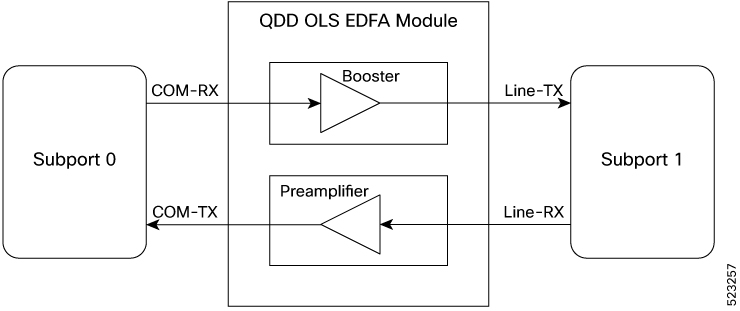
The QDD OLS pluggable contains the COM side and the Line side as shown in this figure:
Figure 1. Functional description of QDD OLS

Each physical port of the QDD OLS pluggable is represented as two ots controllers (subport 0 and subport 1). COM port is subport 0 and Line port is subport 1.

The Gain of the Booster is associated to subport 1 while the gain of the Preamplifier is associated to subport 0.

Table 10. OTS and optical ports
Controller Optical ports

ots R/S/I/P/0

COM-RX (booster input)

COM-TX (preamplifier output)

ots R/S/I/P/1

LINE-RX (preamplifier input)

LINE-TX (booster output)


Configure the ols-port in EDFA mode

Use this task to configure the ONS-QDD-OLS pluggable ols-port in EDFA mode.

Procedure

1.

Run the hw-module location command to configure the pluggable on specific ols-port.

Example:

This is a sample to configure the pluggable on slot 2 and port 14.


RP/0/RP0/CPU0:ios#conf
Fri Feb 28 22:36:59.927 IST
RP/0/RP0/CPU0:ios(config)#hw-module location 0/2/NXR0 ols-port 14
2.

Configure the ols-port in the EDFA mode.

Example:


RP/0/RP0/CPU0:ios(config-ols)#mode edfa 
3.

Run the commit and end commands to commit the changes and exit the configuration mode.

Example:

RP/0/RP0/CPU0:ios(config-ols)#commit
Fri Feb 28 22:37:26.891 IST
RP/0/RP0/CPU0:ios(config-ols)#end
RP/0/RP0/CPU0:ios#
4.

Verify the configuration using the show hw-module locationlocationols-port command in EDFA mode.

Example:

RP/0/RP0/CPU0:ios#show hw-module location 0/2/NXR0
         ols-port 14
         mode edfa

OTS parameters and operational data sample configurations

This table lists configuration examples for ONS-QDD-OLS pluggable OTS parameters:

Table 11. OTS parameters

Parameters

Configuration example

Gain setting in COM port


RP/0/RP0/CPU0:ios#configur
Fri Feb 28 23:06:25.489 IST
RP/0/RP0/CPU0:ios(config)#controller ots 0/2/0/14/0
RP/0/RP0/CPU0:ios(config-Ots)#egress-ampli-gain 200    
RP/0/RP0/CPU0:ios(config-Ots)#commit
Fri Feb 28 23:06:48.834 IST
RP/0/RP0/CPU0:ios(config-Ots)#end
RP/0/RP0/CPU0:ios#
RP/0/RP0/CPU0:ios#

Operational mode


RP/0/RP0/CPU0:ios#configur
Mon Feb  3 19:20:02.757 UTC
RP/0/RP0/CPU0:ios(config)#controller ots 0/0/0/1/0 
RP/0/RP0/CPU0:ios(config-Ots)#egress-ampli-mode ?
  power-control  Set amplifier to power control mode
RP/0/RP0/CPU0:ios(config-Ots)#egress-ampli-mode power-control 
RP/0/RP0/CPU0:ios(config-Ots)#commit 
Mon Feb  3 19:20:13.832 UTC

Gain setting in Line port


RP/0/RP0/CPU0:ios#configur
Fri Feb 28 23:08:08.172 IST
RP/0/RP0/CPU0:ios(config)#
RP/0/RP0/CPU0:ios(config)#controller ots 0/2/0/14/1
RP/0/RP0/CPU0:ios(config-Ots)#egress-ampli-gain 210    
RP/0/RP0/CPU0:ios(config-Ots)#commit
Fri Feb 28 23:08:20.677 IST
RP/0/RP0/CPU0:ios(config-Ots)#

Power


RP/0/RP0/CPU0:ios#configur                      
Mon Feb  3 19:22:36.395 UTC
RP/0/RP0/CPU0:ios(config)#controller ots 0/0/0/1/0        
RP/0/RP0/CPU0:ios(config-Ots)#egress-ampli-power 110   
RP/0/RP0/CPU0:ios(config-Ots)#commit 
Mon Feb  3 19:22:45.173 UTC

Egress ampli OSRI mode


RP/0/RP0/CPU0:ios(config)#controller ots 0/2/0/14/0
RP/0/RP0/CPU0:ios(config-Ots)#egress-ampli-osri 
RP/0/RP0/CPU0:ios(config-Ots)#commit
Fri Feb 28 23:13:07.065 IST
RP/0/RP0/CPU0:ios(config-Ots)#

Delete configuration for egress ampli OSRI mode


RP/0/RP0/CPU0:ios(config)#controller ots 0/2/0/14/0
RP/0/RP0/CPU0:ios(config-Ots)#no egress-ampli-osri 
RP/0/RP0/CPU0:ios(config-Ots)#commit
Fri Feb 28 23:14:05.117 IST
RP/0/RP0/CPU0:ios(config-Ots)#

ALS on line


RP/0/RP0/CPU0:ios#configur
Mon Feb  3 19:11:03.983 UTC
RP/0/RP0/CPU0:ios(config)#controller ots 0/1/0/1/1
RP/0/RP0/CPU0:ios(config-Ots)#egress-ampli-safety-control-mode ?
  auto      Select Safety Control Mode: Automatic
  disabled  Disable Safety Control Mode
RP/0/RP0/CPU0:ios(config-Ots)#egress-ampli-safety-control-mode disabled 
RP/0/RP0/CPU0:ios(config-Ots)#commit 
Mon Feb  3 19:11:30.980 UTC

TX low threshold


RP/0/RP0/CPU0:ios#configur
Mon Feb  3 18:38:42.101 UTC
RP/0/RP0/CPU0:ios(config)#controller ots 0/0/0/1/0 
RP/0/RP0/CPU0:ios(config-Ots)#tx-low-threshold 160
RP/0/RP0/CPU0:ios(config-Ots)#commit 
Mon Feb  3 18:39:09.280 UTC

RX low threshold


RP/0/RP0/CPU0:ios#configur
Mon Feb  3 18:42:06.049 UTC
RP/0/RP0/CPU0:ios(config)#controller ots 0/0/0/1/1
RP/0/RP0/CPU0:ios(config-Ots)#rx-low-threshold -40
RP/0/RP0/CPU0:ios(config-Ots)#commit 
Mon Feb  3 18:42:27.695 UTC

Operational data on COM port, line port, and optics

This table lists configurations examples and unsupported parameters on the ONS-QDD-OLS pluggable:

Table 12. Operational data for COM port, line port, and optics

Operational data

Configuration example

Unsupported parameters

COM port (OTS 0)


RP/0/RP0/CPU0:ios#show controllers ots 0/2/0/14/0
Fri Feb 28 22:44:42.823 IST
 Controller State: Up 
 Transport Admin State: In Service 
 LED State: Green 
 Last link flapped: 00:38:04
         Alarm Status:
         -------------
         Detected Alarms: None
         Alarm Statistics:
         -----------------
         RX-LOS-P = 0          
         RX-LOC = 0          
         TX-POWER-FAIL-LOW = 0          
         INGRESS-AUTO-LASER-SHUT = 0          
         INGRESS-AUTO-POW-RED = 0          
         INGRESS-AMPLI-GAIN-LOW = 0          
         INGRESS-AMPLI-GAIN-HIGH = 0          
         EGRESS-AUTO-LASER-SHUT = 0          
         EGRESS-AUTO-POW-RED = 0          
         EGRESS-AMPLI-GAIN-LOW = 0          
         EGRESS-AMPLI-GAIN-HIGH = 0          
         HIGH-TX-BR-PWR = 0          
         HIGH-RX-BR-PWR = 0          
         SPAN-TOO-SHORT-TX = 0          
         SPAN-TOO-SHORT-RX = 0          
         INGRESS-AMPLI-LASER-OFF = 0          
         EGRESS-AMPLI-LASER-OFF = 0

         Parameter Statistics:
         ---------------------
         Total Rx Power = -9.18 dBm 
         Total Tx Power = 14.36 dBm 
         Egress Ampli Mode = Gain
         Egress Ampli Gain = 19.0 dB
         Egress Ampli OSRI = OFF 
         Egress Ampli Force APR = OFF 
                           
         Configured Parameters:
         -------------
         Egress Ampli Mode = Gain
         Egress Ampli Gain = 19.0 dB 
         Egress Ampli Power = 8.0 dBm
         Egress Ampli OSRI = OFF 
         Rx Low Threshold = -30.0 dBm 
         Tx Low Threshold = -5.0 dBm 
          
RP/0/RP0/CPU0:ios#
RP/0/RP0/CPU0:ios#
  • INGRESS Parameters(alarms statistics)

  • HIGH-TX/RX-BR-POWER

  • SPAN-TOO-SHORT- TX/RX

  • Egress Ampli Force APR

Line port (OTS 1)


RP/0/RP0/CPU0:ios#sh controllers ots 0/2/0/14/1
Fri Feb 28 22:54:15.156 IST
 Controller State: Up 
 Transport Admin State: In Service 
 LED State: Green 
 Last link flapped: 00:47:36
         Alarm Status:
         -------------
         Detected Alarms: None
         Alarm Statistics:
         -----------------
         RX-LOS-P = 0          
         RX-LOC = 0          
         TX-POWER-FAIL-LOW = 0          
         INGRESS-AUTO-LASER-SHUT = 0          
         INGRESS-AUTO-POW-RED = 0          
         INGRESS-AMPLI-GAIN-LOW = 0          
         INGRESS-AMPLI-GAIN-HIGH = 0          
         EGRESS-AUTO-LASER-SHUT = 0          
         EGRESS-AUTO-POW-RED = 0          
         EGRESS-AMPLI-GAIN-LOW = 0          
         EGRESS-AMPLI-GAIN-HIGH = 0          
         HIGH-TX-BR-PWR = 0          
         HIGH-RX-BR-PWR = 0          
         SPAN-TOO-SHORT-TX = 0          
         SPAN-TOO-SHORT-RX = 0          
         INGRESS-AMPLI-LASER-OFF = 0          
         EGRESS-AMPLI-LASER-OFF = 0 
  Parameter Statistics:
         ---------------------
         Total Rx Power = -5.67 dBm 
         Total Tx Power = 10.80 dBm 
         Egress Ampli Mode = Gain
         Egress Ampli Gain = 21.0 dB
         Egress Ampli Safety Control mode = disabled 
         Egress Ampli OSRI = OFF 
         Egress Ampli Force APR = OFF 
                   
         Configured Parameters:
         -------------
         Egress Ampli Mode = Gain
         Egress Ampli Gain = 21.0 dB 
         Egress Ampli Power = 8.0 dBm
         Egress Ampli Safety Control mode = auto 
         Egress Ampli OSRI = OFF 
         Rx Low Threshold = -30.0 dBm 
         Tx Low Threshold = -5.0 dBm 
  • INGRESS Parameters(alarms statistics)

  • HIGH-TX/RX-BR-POWER

  • SPAN-TOO-SHORT- TX/RX

  • Egress Ampli Force APR

Optics


RP/0/RP0/CPU0:Node68#sh controllers ots
Ots  Ots-Och  
RP/0/RP0/CPU0:Node68#sh controllers optics 0/3/0/2
 Controller State: Administratively Down 
 Transport Admin State: Out Of Service 
 Laser State: Off 
 LED State: Off Optics Status 
         Optics Type:  QSFP-DD DUAL EDFA
Transceiver Vendor Details
          
         Form Factor            : QSFP-DD
         Name                   : CISCO-ACCELINK
         Part Number            : 10-100458-01
         Rev Number             : 27
         Serial Number          : ACW2739Z00M
         PID                    : ONS-QDD-OLS
         VID                    : V01 
         Firmware Version       : Major.Minor.Build
         Active                 : 2.07.
         Inactive               : 2.05.
         Date Code(yy/mm/dd)    : 23/10/04
         Fiber Connector Type: CS 
         Otn Application Code: Not Set 
         Sonet Application Code: Not Set 
         Ethernet Compliance Code: Not set 


DP04QSDD-E26-A1 pluggable

A DP04QSDD-E26-A1 pluggable is a transceiver module that:

  • Operates as a variant of the ZR pluggable family.

  • Is supported on the QXP line card.

  • Can be hosted by a DWDM line interface to support TXP or MXP datapaths.

Limitations for DP04QSDD-E26-A1 pluggable

  • Supports only CFEC mode for FEC.

  • Datapath support is limited to 400GE TXP and 4x100GE MXP.

  • Supports only the ZRP trunk framing format.