Cisco APIC Layer 2 Networking Configuration Guide, Release 6.2(x)

PDF

Cisco APIC Layer 2 Networking Configuration Guide, Release 6.2(x)

Bridge domains and subnets

Want to summarize with AI?

Log in

Explains the Layer 2 forwarding constructs within the fabric and their relationship to VRF instances and subnets.


A bridge domain must be linked to a VRF instance (also known as a context or private network). With the exception of a Layer 2 VLAN, it must have at least one subnet (fvSubnet) associated with it. The bridge domain defines the unique Layer 2 MAC address space and a Layer 2 flood domain if such flooding is enabled. While a VRF instance defines a unique IP address space, that address space can consist of multiple subnets. Those subnets are defined in one or more bridge domains that reference the corresponding VRF instance.
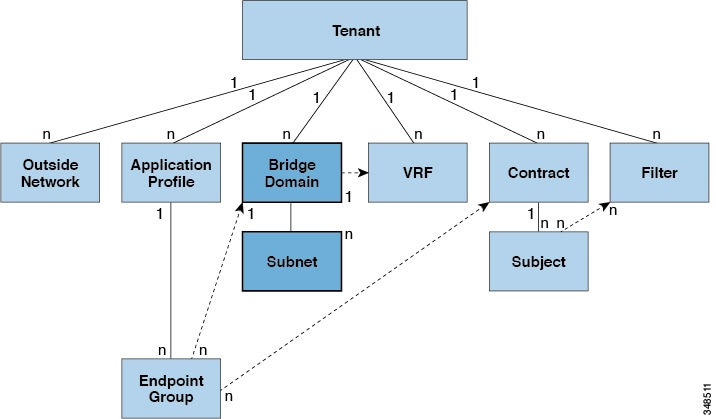
Figure 1. Bridge domains


Subnet options under a bridge domain or EPG include:

  • Public: The subnet can be exported to a routed connection.

  • Private: The subnet applies only within its tenant.

  • Shared: The subnet can be shared with and exported to multiple VRF instances in the same tenant or across tenants as part of a shared service. An example of a shared service is a routed connection to an EPG present in another VRF instance in a different tenant. This enables traffic to pass in both directions across VRF instances. An EPG that provides a shared service must have its subnet configured under that EPG (not under a bridge domain), and its scope must be set to advertised externally, and shared between VRF instances.

    Note

    Shared subnets must be unique across the VRF instance involved in the communication. When a subnet under an EPG provides a Layer 3 external network shared service, such a subnet must be globally unique within the entire Cisco Application Centric Infrastructure (ACI) fabric.

Bridge domain packet behavior can be controlled in these ways:

Table 1. Bridge domain packet behavior control

Packet type

Mode

ARP

You can enable or disable ARP Flooding; without flooding, ARP packets are sent with unicast.

Note

If the limitIpLearnToSubnets in fvBD is set, endpoint learning is limited to the bridge domain only if the IP address is in a configured subnet of the bridge domain or an EPG subnet that is a shared service provider.

Unknown Unicast

L2 Unknown Unicast, which can be Flood or Hardware Proxy.

Note

When the bridge domain has L2 Unknown Unicast set to Flood, if an endpoint is deleted the system deletes it from both the local leaf switches as well as the remote leaf switches where the bridge domain is deployed, by selecting Clear Remote MAC Entries. Without this feature, the remote leaf continues to have this endpoint learned until the timer expires.

Modifying the L2 Unknown Unicast setting causes traffic to bounce (go down and up) on interfaces to devices attached to EPGs associated with this bridge domain.

Unknown IP Multicast

L3 Unknown Multicast Flooding

Flood: Packets are flooded on ingress and border leaf switch nodes only. With N9K-93180YC-EX, packets are flooded on all the nodes where a bridge domain is deployed.

Optimized:Multicast flooding is limited to the ingress border leaf switch node only. With N9K-93180YC-EX, it is limited to the nodes where a bridge domain is deployed and the border leaf switch nodes.

IPv6 Unknown Multicast

IPv6 Unknown Multicast Flooding

Flood: Packets are flooded on ingress and border leaf switch nodes only. With N9K-93180YC-EX, packets are flooded on all the nodes where a bridge domain is deployed.

Optimized: Multicast flooding is limited to the ingress border leaf switch node only. With N9K-93180YC-EX, it is limited to the nodes where a bridge domain is deployed and the border leaf switch nodes.

Multi Destination Flooding

Multi Destination Flooding

  • Flood in BD: Flood the packets in the bridge domain.

  • Flood in Encap: Flood the packets only in the encapsulation.

  • Drop: Drop the packets

Note
Beginning with Cisco APIC release 3.1(1), on the Cisco N 9000 series switches (with names ending with EX and FX and onwards), the following protocols can be flooded in encapsulation or flooded in a bridge domain: OSPF/OSPFv3, BGP, EIGRP, LACP, ISIS, IGMP, PIM, ST-BPDU, ARP/GARP, RARP, and ND.

Bridge domains can span multiple switches. A bridge domain can contain multiple subnets, but a subnet is contained within a single bridge domain. If the bridge domain (fvBD) limitIPLearnToSubnets property is set to yes, endpoint learning will occur in the bridge domain only if the IP address is within any of the configured subnets for the bridge domain or within an EPG subnet when the EPG is a shared service provider. Subnets can span multiple EPGs; one or more EPGs can be associated with one bridge domain or subnet. In hardware proxy mode, ARP traffic is forwarded to an endpoint in a different bridge domain when that endpoint has been learned as part of the Layer 3 lookup operation.


Bridge domain options

A bridge domain option is a configuration setting that

  • determines how Layer 2 unknown unicast traffic is handled within the bridge domain

  • controls IP routing and learning capabilities for the bridge domain, and

  • enables specialized modes like scaled L2 only mode for high VLAN density requirements.

A bridge domain can be set to operate in flood mode for unknown unicast frames or in an optimized mode that eliminates flooding for these frames. When operating in flood mode, Layer 2 unknown unicast traffic is flooded over the multicast tree of the bridge domain (GIPo). For the bridge domain to operate in optimized mode you should set it to hardware-proxy. In this case, Layer 2 unknown unicast frames are sent to the spine-proxy anycast VTEP address.

Caution

Changing from unknown unicast flooding mode to hw-proxy mode is disruptive to the traffic in the bridge domain.

If IP routing is enabled in the bridge domain, the mapping database learns the IP address of the endpoints in addition to the MAC address.

The Layer 3 Configurations tab of the bridge domain panel allows the administrator to configure the following parameters:

  • Unicast Routing: If this setting is enabled and a subnet address is configured, the fabric provides the default gateway function and routes the traffic. Enabling unicast routing also instructs the mapping database to learn the endpoint IP-to-VTEP mapping for this bridge domain. The IP learning is not dependent upon having a subnet configured under the bridge domain.

  • Subnet Address: This option configures the SVI IP addresses (default gateway) for the bridge domain.

  • Limit IP Learning to Subnet: This option is similar to a unicast reverse-forwarding-path check. If this option is selected, the fabric will not learn IP addresses from a subnet other than the one configured on the bridge domain.

Caution

Enabling Limit IP Learning to Subnet is disruptive to the traffic in the bridge domain.

Scaled L2 Only Mode - Legacy Mode

In Cisco Application Centric Infrastructure (ACI), the same VLAN ID can be reused for any purpose as long as the VLAN is deployed on different leaf nodes. This allows the Cisco ACI fabric to overcome the theoretical maximum number of VLANs 4094 as a fabric. However, to accomplish this, and also to hide the complexity of underlying VxLAN implementation, each individual leaf node can contain smaller number of VLANs. This may pose a problem when the density of VLANs per leaf node is required. In such a scenario, you can enable Scaled L2 Only mode, formerly known as legacy mode on the bridge domain. A bridge domain in scaled L2 only mode allows large number of VLANs per leaf node. However, such a bridge domain has some limitations.

For the number of VLANs or bridge domains supported per leaf node with or without scaled L2 only mode, see Verified Scalability Guide for your specific release.

Limitations for Scaled L2 Only Mode

The following are limitations for legacy mode or scaled L2 only mode.

  • The bridge domain can contain only one EPG and one VLAN.

  • Unicast routing is not supported.

  • Contracts are not supported.

  • Dynamic VLAN allocation for VMM integration is not supported.

  • Service graph is not supported.

  • A QoS policy is not supported.

  • The bridge domain essentially behaves as a VLAN in standalone Cisco NX-OS.

Scaled L2 Only Mode Configuration

The following are considerations to configure a bridge domain in scaled L2 only mode.

  • VLAN ID is configured on the bridge domain.

  • VLAN IDs configured under the EPG are overridden.

  • Enabling or disabling a scaled L2 only mode on an existing bridge domain will impact service.

    Cisco Application Policy Infrastructure Controller (APIC) will automatically undeploy and redeploy the bridge domain when the VLAN ID is different from what was used prior to the change.

    When the same VLAN ID is used before and after the mode change, Cisco APIC will not automatically undeploy and redeploy the bridge domain. You must manually undeploy and redeply the bridge domain, which can be performed by deleting and recreating the static port configuration under the EPG.

  • When changing the VLAN ID for scaled L2 only mode, you must first disable the mode, then enable scaled L2 only mode with the new VLAN ID.

Disabling IP Learning per Bridge Domain

You can disable IP dataplane learning for a bridge domain. The MAC learning still occurs in the hardware, but the IP learning only occurs from the ARP/GARP/ND processes. This functionality was introduced in the Cisco APIC 3.1 releases primarily for service graph policy-based redirect (PBR) deployments, and it has been superseded by the ability to disable IP dataplane learning per-VRF instance (Cisco APIC release 4.0), per bridge domain subnet (Cisco APIC release 5.2), and per-EPG (Cisco APIC release 5.2). We do not recommend disabling IP learning per bridge domain and it is not supported except when used with PBR.

See the following guidelines and limitations for disabling IP learning per bridge domain:

  • Layer 3 multicast is not supported because the source IP address is not learned to populate the S,G information in the remote leaf switches.

  • As the DL bit is set in the iVXLAN header, the MAC address is also not learned from the data path in the remote leaf switches. It results in flooding of the unknown unicast traffic from the remote leaf switch to all leaf switches in the fabric where this bridge domain is deployed. We recommend that you configure the bridge domain in proxy mode to overcome this situation if endpoint dataplane learning is disabled.

  • ARP should be in flood mode and GARP based detection should be enabled.

  • When IP learning is disabled, Layer 3 endpoints are not flushed in the corresponding VRF instance. It may lead to the endpoints pointing to the same leaf switch forever. To resolve this issue, flush all the remote IP endpoints in this VRF on all leaf switches.

The configuration change of disabling dataplane learning on the bridge domain does not flush previously locally learned endpoints. This limits the disruption to existing traffic flows. MAC learned endpoints age as usual if the Cisco ACI leaf switch sees no traffic with the given source MAC for longer than the endpoint retention policy.

Note

Disabling IP dataplane learning means that the endpoint IP information is not updated as a result of traffic forwarding, but Cisco ACI can refresh the endpoint IP information with ARP/ND. This means that the aging of the local endpoints (whether they were learned before the configuration change, or they are learned after the configuration change) differs slightly from the normal aging and it depends also from System > System Settings > Endpoint Controls > IP Aging.

If IP Aging is disabled, traffic from a source MAC that matches an already learned endpoint MAC, refreshes the MAC addresses information in the endpoint table, and as a result also refreshes the IP information (this is the same as IP dataplane learning enabled).

If IP Aging is enabled, Cisco ACI ages out endpoint IP addresses individually (this is no different from what happens with IP dataplane learning enabled), but differently from configurations with IP dataplane learning enabled, traffic from a known source MAC and IP that matches an already learned endpoint, refreshes the MAC address information in the endpoint table, but not the IP information.