Describes how flood in encapsulation controls broadcast flooding to endpoints within bridge domains based on encapsulation and enables proxy ARP across different encapsulations.
Flood in encapsulation is a bridge domain feature that
-
controls broadcast flooding to endpoints within the bridge domain based on the encapsulation of the virtual or physical domain that EPGs are associated with
-
limits flooding traffic inside the bridge domain to a single encapsulation, and
-
enables proxy ARP to ensure communication between endpoints of different EPGs in the same bridge domain.
Flood in encapsulation configuration requirements
Cisco Application Centric Infrastructure (ACI) uses the bridge domain as the Layer 2 broadcast boundary. Each bridge domain can include multiple endpoint groups (EPGs), and each EPG can be mapped to multiple virtual or physical domains. Each EPG can also use different VLAN or VXLAN encapsulation pools in each domain.
Ordinarily, when you put multiple EPGs within bridge domains, broadcast flooding sends traffic to all the EPGs in the bridge domain. Because EPGs are used to group endpoints and manage traffic to fulfill specific functions, sending the same traffic to all the EPGs in the bridge domain is not always practical.
The flood in encapsulation feature helps to consolidate bridge domains in your network. The feature does so by enabling you to control broadcast flooding to endpoints within the bridge domain based on the encapsulation of the virtual or physical domain that the EPGs are associated with.
Flood in encapsulation requires the bridge domain to be configured with a subnet and with IP routing because in order to allow communication between endpoints of different EPGs in the same bridge domain Cisco ACI performs proxy ARP.
Beginning with Cisco Application Policy Infrastructure Controller (APIC) release 3.1(1), on the Cisco N 9000 series switches (with names ending with EX and FX and onwards), all protocols are flooded in encapsulation. Also, when flood in encapsulation is enabled under the bridge domain for any inter-VLAN traffic, Proxy ARP ensures that the MAC flap issue does not occur. It also limits all flooding (ARP, GARP, and BUM) to the encapsulation. The restriction applies for all EPGs under the bridge domain where it is enabled.
Before Cisco APIC release 3.1(1), these features are not supported (proxy ARP and all protocols being included when flooding within encapsulation). In an earlier Cisco APIC release or earlier generation switches (without EX or FX on their names), if you enable flood in encapsulation it does not function, no informational fault is generated, but Cisco APIC decreases the health score by 1.
Beginning with Cisco APIC release 3.2(5), you can configure flood in encapsulation for EPGs associated with VXLAN encapsulation. Previously, only VLANs were supported for flood in encapsulation for virtual domains. You configure flood in encapsulation when you create or modify a bridge domain or an EPG.
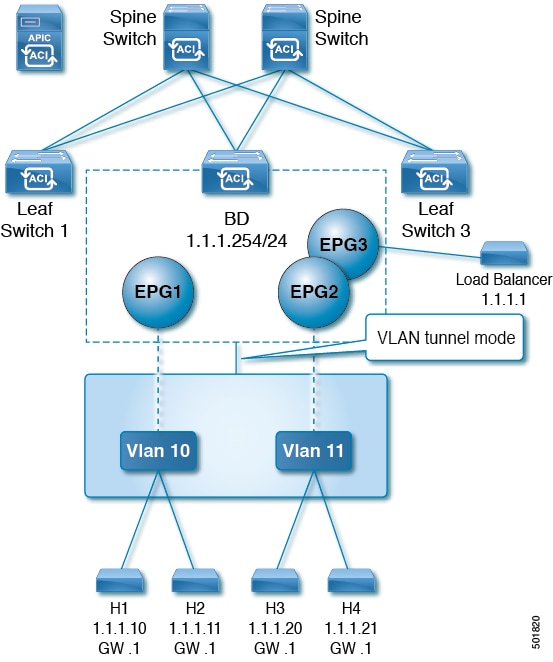
Cisco recommends you to support multiple EPGs under one bridge domain by adding an external switch. This design with multiple EPGs under one bridge domain with an external switch is illustrated in the following figure.
Within the same bridge domain, some EPGs can be service nodes and other EPGs can have flood in encapsulation configured. A load balancer resides on a different EPG. The load balancer receives packets from the EPGs and sends them to the other EPGs (There is no Proxy ARP and flood within encapsulation does not take place).
The EPG/bridge domain level broadcast segmentation is supported for the following network control protocols:
-
OSPF
-
EIGRP
-
LACP
-
IS-IS
-
BGP
-
IGMP
-
PIM
-
STP-BPDU (flooded within EPG)
-
ARP/GARP (controlled by ARP Proxy)
-
ND
Flood in Encapsulation Limitations
The following limitations apply when using flood in encapsulation for all protocols:
-
Flood in encapsulation does not work in ARP unicast mode.
-
Neighbor Solicitation (Proxy NS/ND) is not supported for this release.
-
Because proxy Address Resolution Protocol (ARP) is enabled implicitly, ARP traffic can go to the CPU for communication between different encapsulations.
To ensure even distribution to different ports to process ARP traffic, enable per-port Control Plane Policing (CoPP) for ARP with flood in encapsulation.
-
Flood in encapsulation is supported only in bridge domain in flood mode and ARP in flood mode. Bridge domain spine proxy mode is not supported.
-
IPv4 Layer 3 multicast is not supported.
-
IPv6 NS/ND proxy is not supported when flood in encapsulation is enabled. As a result, the connection between two endpoints that are under same IPv6 subnet but resident in EPGs with different encapsulation may not work.
-
Virtual machine migration to a different VLAN has momentary issues (60 seconds). Virtual machine migration to a different VLAN or VXLAN has momentary issues (60 seconds).
-
Setting up communication between virtual machines through a firewall, as a gateway, is not recommended because if the virtual machine IP address changes to the gateway IP address instead of the firewall IP address, then the firewall can be bypassed.
-
Prior releases are not supported (even interoperating between prior and current releases).
-
A mixed-mode topology with older-generation Application Leaf Engine (ALE) and Application Spine Engine (ASE) is not recommended and is not supported with flood in encapsulation. Enabling them together can prevent QoS priorities from being enforced.
-
Flood in encapsulation is not supported for EPG and bridge domains that are extended across Cisco ACI fabrics that are part of the same Multi-Site domain. However, flood in encapsulation is still working and fully supported, and works for EPGs or bridge domains that are locally defined in Cisco ACI fabrics, independently from the fact those fabrics may be configured for Multi-Site. The same considerations apply for EPGs or bridge domains that are stretched between Cisco ACI fabric and remote leaf switches that are associated to that fabric.
-
Flood in encapsulation is not supported on EPGs where any form of microsegmentation is configured. These include intra-EPG isolation, "allow microsegmentation" on a VMM domain, microsegmentation EPGs, and intra-EPG contracts.
-
Flood in encapsulation is not supported for Common Pervasive Gateway. See the chapter "Common Pervasive Gateway" in the Cisco APIC Layer 3 Networking Configuration Guide.
-
If you configure the flood in encapsulation on all EPGs of a bridge domain, ensure that you configure the flood in encapsulation on the bridge domain as well.
-
IGMP snooping is not supported with flood in encapsulation.
-
There is a condition that causes Cisco ACI to flood in the bridge domain (instead of the encapsulation) packets that are received on an EPG that is configured for flood in encapsulation. This happens regardless of whether the administrator configured flood in encapsulation directly on the EPG or on the bridge domain. The condition for this forwarding behavior is if the ingress leaf node has a remote endpoint for the destination MAC address while the egress leaf node does not have a corresponding local endpoint. This can happen due to reasons such as an interface flapping, an endpoint flush due to STP TCN, learning being disabled on the bridge domain due to an excessive amount of moves, and so on.
In the 4.2(6o) and later 4.2(6) releases, 4.2(7m) and later 4.2(7) releases, and 5.2(1g) and later releases, this behavior was enhanced. If the administrator enables flood in encapsulation on the bridge domain (instead of the EPG), Cisco ACI does not send out such packets on any encapsulations from downlinks facing external devices on the non-ingress (egress and transit) leaf nodes. This new behavior prevents the packets from leaking to unexpected encapsulations. When flood in encapsulation is enabled only at an EPG level, the non-ingress leaf node may still flood packets in the bridge domain instead of the encapsulation. For more information, see the enhancement bug CSCvx83364.
-
A Layer 3 gateway must be in the Cisco ACI fabric.