Explains the interface configuration methods available in ACI.
An access interface is a network interface configuration mechanism that
-
associates interface policy groups with switch node interfaces
-
can be configured using either profiles and selectors or per-port configuration, and
-
controls interface settings such as speed and link layer discovery protocol (LLDP).
Configuration methods
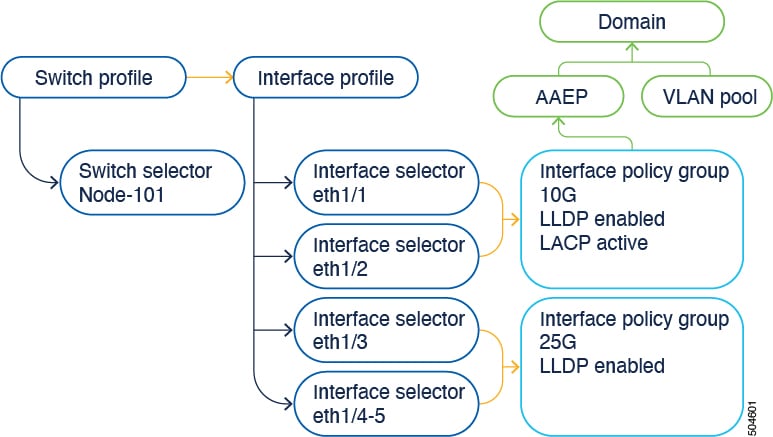
In Cisco Application Centric Infrastructure (ACI), interface configurations are performed by associating an interface policy group, which is a group of interface policies such as interface speed or link layer discovery protocol (LLDP), to an interface on a switch node. Cisco ACI uses four objects (switch profile, switch selector, interface profile, and interface selector) to select a certain interface on a certain switch node. This document refers to this mode of operations as the "profiles and selectors configuration."
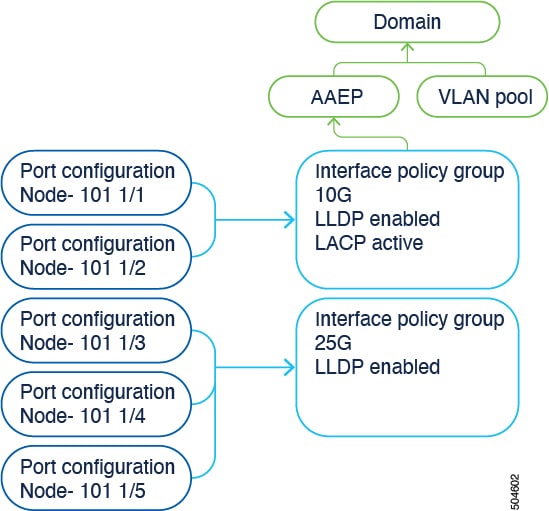
The Cisco ACI 6.0(1) release adds the "per-port configuration" configuration option (also known as the "interface configuration" or infraPortConfig, which is the name of the object for this configuration) that simplifies the interface configuration. This option presents the four objects as a single object and has the object specify an interface on a switch node. As a result, you can neither use nor maintain switch profiles, switch selectors, interface profiles, and interface selectors.
You can access the per-port configuration in the following ways in the Cisco Application Policy Infrastructure Controller (APIC) GUI:
You can configure a switch using switch profiles and selectors and interface profiles and selectors at the same locations as before in the Cisco APIC GUI:
However, we recommend that you use the per-port configuration.
When using the interface configuration option, the Cisco APIC creates and maintains switch profiles and selectors and interface profiles and selectors as read-only with as few objects as possible. For example, if you configure two contiguous ports identically, the Cisco APIC automatically creates a range in the configuration. You configure the ports individually and you do not have to worry about these optimizations; the Cisco APIC handles them automatically.
If you configure an interface using the per-port configuration and the interface is already part of an existing interface profile and selector, the Cisco APIC automatically removes the interface from the existing profiles and moves the interface to the system-generated profiles seamlessly. If the pre-existing switch and interface profiles contain other interfaces, the Cisco APIC does not delete them; you can keep using them in the traditional way. If the pre-existing profiles no longer contain any interfaces, the Cisco APIC automatically removes those profiles because they are no longer needed.
If you already configured an interface using a multinode selector, meaning that you assigned the port selector to a profile with multiple leaf switches, you must simultaneously configure the same interface for each node that belongs to the multinode selector for the Cisco APIC to remove those nodes automatically from the existing profile. Otherwise, a validation failure blocks the migration.