Describes the enforced bridge domain configuration that creates an endpoint in a subject endpoint group (EPG) that can only ping subnet gateways within the associated bridge domain.
An enforced bridge domain configuration entails creating an endpoint in a subject endpoint group (EPG) that can only ping subnet gateways within the associated bridge domain. With this configuration, you can then create a global exception list of IP addresses that can ping any subnet gateway.
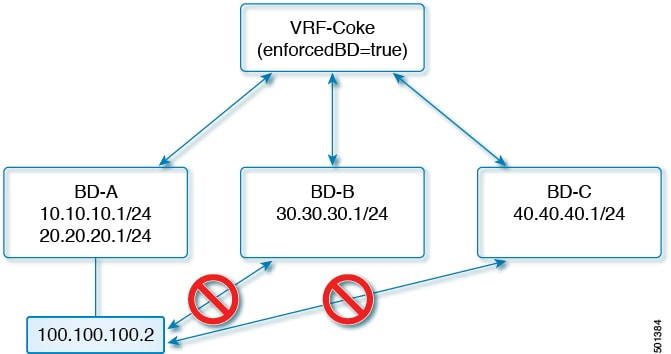
Enforced bridge domain considerations
These considerations apply to enforced bridge domains:
-
The exception IP addresses can ping all of the bridge domain gateways across all of your VRF instances.
-
A loopback interface configured for an L3Out does not enforce reachability to the IP address that is configured for the subject loopback interface.
-
When an eBGP peer IP address exists in a different subnet than the subnet of the L3Out interface, you must add the peer subnet to the allowed exception subnets. Otherwise, eBGP traffic is blocked because the source IP address exists in a different subnet than the L3Out interface subnet.
-
For a BGP prefixed-based peer, you must add the peer subnet to the list of allowed exception subnets. For example, if 20.1.1.0/24 is configured as BGP prefixed-based peer, you must add 20.1.1.0/24 to the list of allowed exception subnets.
-
An enforced bridge domain is not supported with the Management tenant, regardless if the VRF instances are in-band or out-of-band, and any rules to control the traffic to these VRF instances should be configured using regular contracts.