Threat defense service policies
Use Threat Defense service policies to apply services to specific traffic classes. Service policies let you apply different services to different connections entering the device or interface.
For example, you can use a service policy to create a timeout configuration that is specific to a particular TCP application, as opposed to one that applies to all TCP applications. A service policy consists of multiple actions or rules applied to an interface or applied globally.
Traffic class types
A traffic class is a combination of the interface and an extended access control list (ACL). The ACL "allow" rules determine which connections are part of the class. Any "denied" traffic in the ACL simply does not have the service applied to it: these connections are not actually dropped. You can use IP addresses and TCP/UDP ports to identify matching connections as precisely as you require.
There are two types of traffic class:
-
Interface-based rules—If you specify a security zone or interface group in a service policy rule, the rule applies to the ACL "allowed" traffic that goes through any interface that is part of the interface objects.
Interface-based rules that are applied to the ingress interface always take precedence over global rules for any feature. If an ingress interface-based rule applies to a connection, the system ignores any matching global rule. If no ingress interface or global rule applies, then an interface service rule on the egress interface is applied.
-
Global rules—These rules apply to all interfaces. If an interface-based rule does not apply to a connection, the global rules are checked and applied to any connections that the ACL "allows." If none apply, then the connections proceed without any services applied.
A given connection can match only one traffic class, either interface-based or global, for a given feature. There should be at most one rule for a given interface object/traffic flow combination.
Service policy rules are applied after access control rules. These services are configured only for connections you are allowing.
Service policy relationships with FlexConfig and other features
Connection-related service policy features are managed separately from other service-rule features, so overlapping traffic classes generally aren't an issue, but they should still be configured carefully.
Service policy feature interactions
Because connection-related service policy features are treated as a separate feature group from other service-rule implemented features, you should not run into problems with overlapping traffic classes. However, please be mindful when configuring these features:
-
QoS policy rules: QoS policy rules are implemented using the service policy CLI. These rules are applied before connection-based service policy rules. However, both QoS and connection settings can be applied to the same or overlapping traffic classes.
-
FlexConfig policies: You can use FlexConfig policies to implement custom application inspections and NetFlow. Use the show running-config command to examine the CLI that already configures service rules, including the policy-map , class-map , and service-policy commands. Netflow and application inspection are compatible with QoS and connection settings, but you need to understand the existing configuration before implementing FlexConfig. Connection settings are applied before application inspections and Netflow.
 Note |
Traffic classes that are created from the Threat Defense service policy are named class_map_ACLname , where ACLname is the name of the extended ACL object used in the service policy rule. |
Connection settings
Connection settings refer to a variety of features that manage connections through a device.
Connection setting types
Connection settings include these types:
-
Global timeouts for various protocols—All global timeouts have default values. Change them only if you experience premature connection loss. You configure global timeouts in the Threat Defense platform policy. Select .
-
Connection timeouts per traffic class—You can override the global timeouts for specific types of traffic using service policies. All traffic class timeouts have default values, so you do not have to set them.
-
Connection limits and TCP Intercept—By default, there are no limits on how many connections can go through (or to) the Firewall Threat Defense. Use service policy rules to set limits on particular traffic classes. This protects servers from denial of service attacks. Particularly, you can set limits on embryonic connections (those that have not finished the TCP handshake), which protects against SYN flooding attacks. When embryonic limits are exceeded, the TCP Intercept component activates to proxy connections and throttle attacks.
-
Dead connection detection (DCD)—Enable dead connection detection if you have persistent connections that are valid but often idle. These connections may get closed when they exceed idle timeout settings. Dead connection detection identifies idle but valid connections and keeps them alive by resetting their idle timers. Whenever idle times are exceeded, DCD probes both sides of the connection to see if both sides agree that the connection is valid. The show service-policy command output includes counters to show the amount of activity from DCD. You can use the show conn detail command to get information about the initiator and responder and how often each has sent probes.
-
TCP sequence randomization—Each TCP connection has two initial sequence numbers (ISN): one generated by the client and one generated by the server. By default, the Firewall Threat Defense randomizes the ISN of the TCP SYN passing in both the inbound and outbound directions. Randomization prevents an attacker from predicting the next ISN for a new connection and potentially hijacking the new session. However, TCP sequence randomization effectively breaks TCP SACK (Selective Acknowledgement), as the sequence numbers the client sees are different from what the server sees. You can disable randomization per traffic class if desired.
-
TCP normalization—The TCP Normalizer protects against abnormal packets. You can configure how some types of packet abnormalities are handled by traffic class. You can configure TCP Normalization using the FlexConfig policy.
-
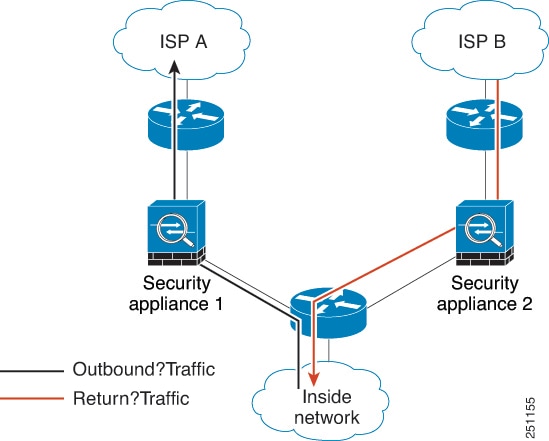
TCP state bypass—You can bypass TCP state checking if you use asymmetrical routing in your network.


 Feedback