User identity
User identity information can help you to identify the source of policy breaches, attacks, or network vulnerabilities, and trace them to specific users.
User identity information can help you determine:
-
Who owns the host targeted by an intrusion event that has a Vulnerable (level 1: red) impact level.
-
Who initiated an internal attack or portscan.
-
Who is attempting unauthorized access to a specified host.
-
Who is consuming an unreasonable amount of bandwidth.
-
Who has not applied critical operating system updates.
-
Who is using instant messaging software or peer-to-peer file-sharing applications in violation of company policy.
-
Who is associated with each indication of compromise on your network.
Armed with this information, you can use other features of the system to mitigate risk, perform access control, and take action to protect others from disruption. These capabilities also significantly improve audit controls and enhance regulatory compliance.
After you configure user identity sources to gather user data, you can perform user awareness and user control.
For more information about identity sources, see About user identity sources.
Identity terminology
Identity terminology is a set of concepts that
-
identifies users on networks using identity sources
-
enables user awareness from authoritative and non-authoritative sources, and
-
manages user access using identity policies.
Key identity terminology
This topic discusses common terminology for user identity and user control.
-
User awareness: Identifying users on your network using identity sources (such as, TS Agent, or Cisco ISE). User awareness enables you to identify users from both authoritative (such as Active Directory) and non-authoritative (application-based) sources. To use Active Directory as an identity source, you must configure a realm and directory. For more information, see About user identity sources.
-
User control: Configuring an identity policy that you associate with an access control policy. (The identity policy is then referred to as an access control subpolicy.) The identity policy specifies the identity source and, optionally, users and groups belonging to that source. By associating the identity policy with an access control policy, you determine whether to monitor, trust, block, or allow users or user activity in traffic on your network. For more information, see Access Control Policies.
-
Authoritative identity source: a trusted server that validates user logins (for example, Active Directory). You can use the data obtained from authoritative logins to perform user awareness and user control. Authoritative user logins are obtained from passive and active authentications:
-
Passive authentications occur when a user authenticates with Cisco ISE.
-
Active authentications occur when a user authenticates through preconfigured managed devices. Captive portal is another name for active authentication. Active authentication generally uses the same user repositories as passive authentication (the exceptions being ISE/ISE-PIC, TS Agent, and the Passive Identity Agent, which are passive only).
-
-
Non-authoritative identity source: an unknown or untrusted server that validates the user login. Traffic-based detection is the only non-authoritative identity source supported by the system. You can use the data obtained from non-authoritative logins to perform user awareness.
About user identity sources
Learn how to select and configure user identity sources for the firewall to enable user awareness and access control policies. This overview covers supported identity sources, authentication types, and key considerations for optimizing user identity management.
The table provides a brief overview of the user identity sources supported by the system. Each identity source provides a store of users for user awareness. These users can then be controlled with identity and access control policies.
|
User Identity Source |
Server Requirements |
Login Type |
Authentication Type |
User Control |
For more, see... |
|---|---|---|---|---|---|
|
Captive portal |
OpenLDAP Microsoft Active Directory Microsoft Azure Active Directory |
Authoritative |
Active |
Yes |
Captive portal identity source Create a Microsoft Azure AD (SAML) realm for active authentication (captive portal) |
|
Passive authentication |
OpenLDAP Microsoft Active Directory |
Non-authoritative |
Active |
Yes |
Create an LDAP realm or an Active Directory realm and realm directory |
|
Passive authentication |
Microsoft Azure Active Directory |
Passive |
Passive |
Yes |
|
|
Passive authentication with the Passive Identity Agent |
Microsoft Active Directory |
Non-authoritative |
Passive |
Yes |
|
|
Passive authentication with the TS Agent |
Microsoft Windows Terminal Server |
Authoritative |
Passive |
Yes |
|
|
Remote Access VPN |
OpenLDAP or Microsoft Active Directory |
Authoritative |
Active |
Yes |
|
|
RADIUS |
Authoritative |
Active |
No, awareness only |
||
|
ISE/ISE-PIC |
Microsoft Active Directory |
Authoritative |
Passive |
Yes |
|
|
Traffic-based detection (Configured in the network discovery policy.) |
— |
Non-authoritative |
— |
No, awareness only |
Consider the information when selecting identity sources to deploy:
-
You must use traffic-based detection for non-LDAP user logins.
-
You must use traffic-based detection or captive portal to record failed login or authentication activity. A failed login or authentication attempt does not add a new user to the list of users in the database.
-
The captive portal identity source requires a managed device with a routed interface. You cannot use an inline (also referred to as tap mode) interface with captive portal.
Data from those identity sources is stored in the Secure Firewall Management Center's users database and the user activity database. You can configure Secure Firewall Management Center-server user downloads to automatically and regularly download new user data to your databases.
After you configure identity rules using the desired identity source, you must associate each rule with an access control policy and deploy the policy to managed devices for the policy to have any effect. For more information about access control policies and deployment, see Associate prefilter, decryption, and identity policies with an access control.
For general information about user identity, see User identity.
Best practices for user identity
General recommendations for identity policy setup
Review the following recommendations before you set up identity policies.
-
Know user limits
-
Health monitor
-
Use latest version of ISE/ISE-PIC, two types of remediation
-
User agent support drops in 6.7
-
Captive portal requires routed interface, several individual tasks
Microsoft active directory and LDAP
Create one realm per LDAP server or Active Directory domain. The system supports Active Directory, LDAP, and other user repositories for user awareness and control. The association between an Active Directory or LDAP repository and the Secure Firewall Management Center is referred to as a realm. For details about which versions are supported, see Supported servers for realms.
-
The only user identity source supported by LDAP is captive portal. To use other identity sources (with the exception of ISE/ISE-PIC), you must use Active Directory.
-
For Active Directory only: Create one directory per domain controller. For details, see Create an LDAP realm or an Active Directory realm and realm directory
-
Users and groups in trust relationships between two domains are supported provided you add all Active Directory domains and domain controllers as realms and directories, respectively. For more information, see Realms and trusted domains.
Passive Identity
Agent identity source
The passive identity agent software can monitor multiple Microsoft Active Directory servers and domain controllers and send user name and IP address information to the Secure Firewall Management Center. For more information, see The passive identity agent identity source.
pxGrid Cloud Identity Source
Proxy sequence
Health monitor
The Secure Firewall Management Center health monitor provides valuable information about the status of various Secure Firewall Management Center functions, including user/realm mismatches, Snort memory usage, and ISE connection status.
-
For more information about health modules, see Health Modules in the Cisco Secure Firewall Management Center Administration Guide.
-
To set up policies to monitor health modules, see Creating Health Policies in the Cisco Secure Firewall Management Center Administration Guide.
Device-specific user limits
Every physical or virtual Firewall Management Center device has limits to the number of users that can be downloaded. When the user limit is reached, the Firewall Management Center can run out of memory and can function unreliably as a result.
-
User limits are discussed in User limits for microsoft active directory.
-
If you use the ISE/ISE-PIC identity source, you can optionally limit the subnets the Firewall Management Center monitors to reduce memory usage using identity mapping filters as discussed in Create an identity policy.
Use the latest version of ISE/ISE-PIC
If you expect to use the ISE/ISE-PIC identity source, we strongly recommend you always use the latest version to make sure you get the latest features and bug fixes.
-
pxGrid 2.0 (which is used by version 2.6 patch 6 or later; or 2.7 patch 2 or later) also changes the remediation used by ISE/ISE-PIC from Endpoint Protection Service (EPS) to Adaptive Network Control (ANC). If you upgrade ISE/ISE-PIC, you must migrate your mediation policies from EPS to ANC.
-
More information about using ISE/ISE-PIC can be found in Best practices for ISE/ISE-PIC integration.
-
To set up the ISE/ISE-PIC identity source, see ISE/ISE-PIC configurations for user control.
Captive portal information
You can use captive portal active authentication with any of the following: LDAP, Microsoft AD, or Microsoft Azure AD (SAML).
-
For LDAP, see Captive portal identity source.
-
For Microsoft AD, see Captive portal identity source.
-
For Microsoft Azure AD (SAML), see Create a Microsoft Azure AD (SAML) realm.
-
For more information about the captive portal identity source, see Captive portal identity source.
TS agent information
The TS Agent user identity source is required to identify user sessions on a Windows Terminal Server. The TS Agent software must be installed on the Terminal Server machine as discussed in the Cisco Terminal Services (TS) Agent Guide. In addition, you must synchronize the time on your TS Agent server with the time on the Secure Firewall Management Center.
-
TS Agent data is visible in the Users, User Activity, and Connection Event tables and can be used for user awareness and user control.
-
For more information, see Best practices for TS agent configuration.
Associate the identity policy with an access control policy
After you configure your realm, directory, and user identity source, you must set up identity rules in an identity policy. To make the policy effective, you must associate the identity policy with an access control policy.
-
For more information about creating an identity policy, see Create an identity policy.
-
For more information about creating identity rules, see Create an identity rule.
-
To associate an identity policy with an access control policy, see Associate prefilter, decryption, and identity policies with an access control.
Identity deployments
The Secure Firewall Management Center uses various identity sources, such as TS Agent, ISE/ISE-PIC, pxGrid Cloud, passive identity agent, and captive portal, to collect and manage user and group data for access control and user awareness.
User data collection and storage
When the system detects user data from a user login, from any identity source, the user from the login is checked against the list of users in the Secure Firewall Management Center user database. If the login user matches an existing user, the data from the login is assigned to the user. Logins that do not match existing users cause a new user to be created, unless the login is in SMTP traffic. Non-matching logins in SMTP traffic are discarded.
The group to which the user belongs is associated with the user as soon as the user is seen by the Secure Firewall Management Center.
This diagram illustrates how the system collects and stores user data:
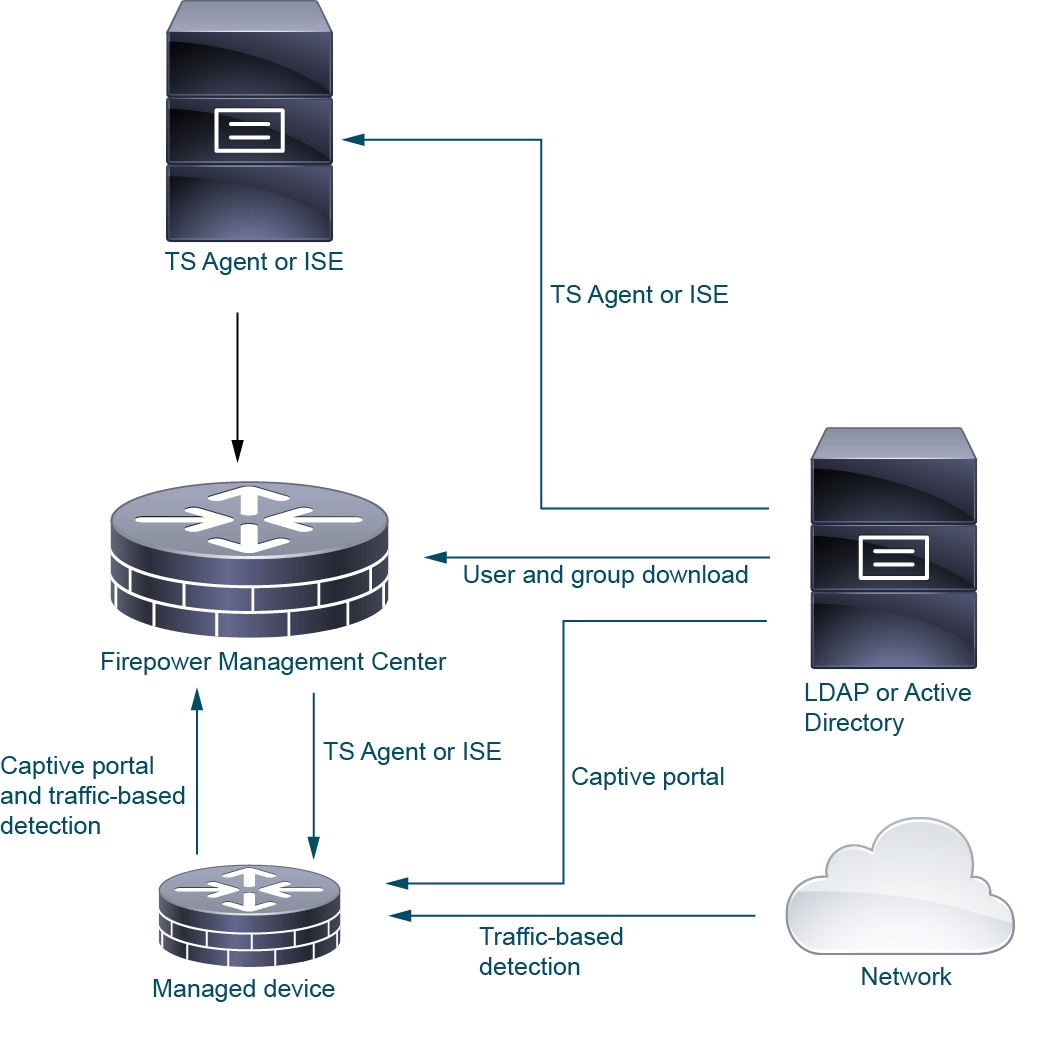
Here are examples of identity deployments.
In the preceding figure, Secure Firewall Management Center and one managed device are deployed to AWS and the other devices are located on premises. These devices can be either physical or virtual; they just need to be able to communicate with each other.
LDAP or Active Directory are required only for TS Agent and captive portal, as the following paragraphs explain.
For more information about setting up a system like this, see Set up an identity policy.
ISE/ISE-PIC identity source
When you deploy the ISE/ISE-PIC identity source, the ISE/ISE-PIC server sends users, groups, and subscriptions to the Secure Firewall Management Center.
You can optionally have an LDAP server in an ISE/ISE-PIC deployment but because it's optional, it isn't shown in this figure.
For more information about ISE/ISE-PIC, see The ISE/ISE-PIC identity source.
Passive identity agent source
Software that monitors one or several Microsoft AD domain controllers, sending user name and IP address information to the Secure Firewall Management Center.
For more information, see The passive identity agent identity source.
TS Agent identity source
The Terminal Services (TS) Agent software runs on a Microsoft Server and sends Secure Firewall Management Center user information based on the port range the users log in to the server with. TS Agent gets user identity information from LDAP or Active Directory and sends it to Secure Firewall Management Center.
For more information about the TS Agent identity source, see Terminal services agent identity source.
Captive portal
You can use captive portal active authentication with any of these
-
LDAP
For more information, see Captive portal identity source.
-
Microsoft AD
For more information, see Captive portal identity source.
-
Microsoft Azure AD (SAML)
For more information, see Create a Microsoft Azure AD (SAML) realm.
For more information about the captive portal identity source, see Captive portal identity source.
Set up an identity policy
Set up an identity policy to control user access and filter network traffic using various user identity sources such as TS Agent, ISE/ISE-PIC, Microsoft Azure AD (SAML), captive portal.
An identity policy is not required if all these conditions are true:
-
You use the ISE or ISE-PIC identity source.
-
You do not use users or groups in access control policies.
-
You use Security Group Tags (SGT) in access control policies.
This topic provides a high-level overview of setting up an identity policy using any available user identity source: TS Agent, ISE/ISE-PIC, Microsoft Azure AD (SAML), captive portal.
Procedure
| Command or Action | Purpose | |||
|---|---|---|---|---|
|
Step 1 |
Choose your identity source. |
|
||
|
Step 2 |
(Optional.) Create a realm and directory, one realm for every domain in the forest that contain users you want to use in user control. Also create one directory for every domain controller. Only users and groups that have corresponding Firewall Management Center realms and directories can be used in identity policies. |
Creating a realm, realm directory is optional if any of these are true:
The realm is a trusted user and group store, typically a Microsoft Active Directory repository. The Firewall Management Center downloads users and groups at intervals you specify. You can include or exclude users and groups from being downloaded. See Create an LDAP realm or an Active Directory realm and realm directory. For details about the options to create a realm, see Realm fields. A directory is an Active Directory domain controller that organizes information about a computer network's users and network shares. An Active Directory controller provides Directory Services for the realm. Active Directory distributes user and group objects across multiple domain controllers, which are peers that propagate local changes between each other by the use of Directory Services. For more information, see the Active Directory technical specification glossary on MSDN. You can specify more than one directory for a realm, in which case each domain controller is queried in the order listed on the realm's Directory tab page to match user and group credentials for user control.
|
||
|
Step 3 |
Synchronize users and groups from the realm. |
To be able to control users and groups, you must synchronize them with the Firewall Management Center. You can synchronize them with users and groups whenever you want or you can configure the system to synchronize them at a specified interval. When you synchronize users and groups, you can specify exceptions; for example, you can exclude the Engineering group from all user control for that realm, or you can exclude the user joe.smith from user controls that apply to the Engineering group. |
||
|
Step 4 |
(Optional.) Create a realm sequence. |
A realm sequence is an ordered list of realms that, when used in an identity policy, causes the system to search the realms in the specified order to find users to match the rule. See Create a realm sequence. |
||
|
Step 5 |
Create a method to retrieve user and group data (the identity source). |
Set up an identity source with its unique configuration to be able to control users and groups using data stored in the realm. Identity sources include TS Agent, captive portal, or Remote VPN. See one of these: |
||
|
Step 6 |
Create an identity policy. |
An identity policy contains one or more identity rules, optionally organized in categories. See Create an identity policy.
|
||
|
Step 7 |
Create one or more identity rules. |
Identity rules enable you to specify a number of matching criteria, including the type of authentication, network zones, networks or geolocation, realms, realm sequences, and so on. See Create an identity rule. |
||
|
Step 8 |
Associate your identity policy with an access control policy. |
An access control policy filters and optionally inspects traffic. An identity policy must be associated with an access control policy to have any effect. See Associate prefilter, decryption, and identity policies with an access control. |
What to do next
-
Deploy the access control policy to at least one managed device.
To use your policy to control user activity, the policy must be deployed to the managed devices to which clients connect. See Deploy configuration changes.
-
Monitor user activity.
View a list of active sessions collected by user identity sources or a list of user information collected by user identity sources. See Using Workflows in the Cisco Secure Firewall Management Center Administration Guide .
User activity database
The user activity database on the Secure Firewall Management Center is a logging system that contains records of user activity on your network detected or reported by all of your configured identity sources.
User activity logging events
The system logs events in these circumstances:
-
When it detects individual logins or logoffs.
-
When it detects a new user.
-
When a system administrator manually delete a user.
-
When the system detects a user that is not in the database, but cannot add the user because you have reached your user limit.
-
When you resolve an indication of compromise associated with a user, or enable or disable indication of compromise rules for a user.
 Note |
If the TS Agent monitors the same users as another passive authentication identity source (such as the ISE/ISE-PIC), the Firewall Management Center prioritizes the TS Agent data. If the TS Agent and another passive source report identical activity from the same IP address, only the TS Agent data is logged to the Firewall Management Center. |
You can view user activity detected by the system using the Secure Firewall Management Center. (.)
Users database
A users database on the Secure Firewall Management Center is a system component that
-
contains a record for each user detected or reported by all configured identity sources
-
stores data obtained from authoritative sources for user control, and
-
prioritizes user data based on identity source type when user limits are reached.
User database management and limitations
For more information about the supported non-authoritative and authoritative identity sources, refer to About user identity sources.
The total number of users the Secure Firewall Management Center can store depends on the Secure Firewall Management Center model, as described in User limits for microsoft active directory. After the user limit is reached, the system prioritizes previously-undetected user data based on its identity source, as described in this list:
-
Non-authoritative identity source: If the new user is from a non-authoritative identity source, the system does not add the user to the database. To allow new users to be added, you must delete users manually or with a database purge.
-
Authoritative identity source: If the new user is from an authoritative identity source, the system deletes the non-authoritative user who has remained inactive for the longest period and adds the new user to the database.
If an identity source is configured to exclude specific user names, user activity data for those user names are not reported to the Secure Firewall Management Center. These excluded user names remain in the database, but are not associated with IP addresses. For more information about the type of data stored by the system, refer to User Data in the Cisco Secure Firewall Management Center Administration Guide.
If you have Firewall Management Center high availability configured and the primary fails, no logins reported by a captive portal, ISE/ISE-PIC, TS Agent, or Remote Access VPN device can be identified during failover downtime, even if the users were previously seen and downloaded to the Firewall Management Center. The unidentified users are logged as Unknown users on the Firewall Management Center. After the downtime, the Unknown users are reidentified and processed according to the rules in your identity policy.
Note |
If the TS Agent monitors the same users as another passive authentication identity source (ISE/ISE-PIC), the Firewall Management Center prioritizes the TS Agent data. If the TS Agent and another passive source report identical activity from the same IP address, only the TS Agent data is logged to the Firewall Management Center. |
When the system detects a new user session, the user session data remains in the users database until one of these conditions occurs:
-
A user on the Firewall Management Center manually deletes the user session.
-
An identity source reports the logoff of that user session.
-
A realm ends the user session as specified by the realm's User Session Timeout: Authenticated Users, User Session Timeout: Failed Authentication Users, or User Session Timeout: Guest Users setting.
Note |
In deployments that use multitenancy with Firewall Management Center domains, passive identity sessions apply to all managed Firewall Threat Defense devices, regardless of domain. |

 Feedback