Overview
Explains the required and optional interface cable connections and provides cabling guidance.
Connect the ports on the appliance to a switch that provides these types of network access. You must configure the Enterprise port and Intracluster port interfaces at a minimum, because they are essential for Catalyst Center functionality.
When NIC bonding is enabled on a third-generation appliance, a secondary instance of the Enterprise port, Intracluster port, Management port, and Internet port resides on the Intel E810-XXVDA4 NIC. Connect these ports to a switch that's different from the one that you will connect to the primary instance of these ports (see NIC bonding overview).
During appliance configuration, the Maglev Configuration wizard prevents you from continuing until you assign the Cluster Link option to an interface. For both single-node and three-node deployments in a production environment, assign the Intracluster port as the Cluster Link.
You cannot change the interface marked as the Cluster Link after configuration completes. To change it, you must reimage the appliance. (For a description of the tasks you need to complete in order to reimage your Catalyst Center appliance, see Reimage the appliance.) Set up the Cluster Port with an IP address to support the expansion to a three-node cluster. Connect the cluster link interface to a switch port, and ensure it is in the UP state.
To build multiple clusters, you must use a separate IP scheme for each cluster to prevent cross-cluster interaction and corruption.
-
(Required) 10-Gbps Enterprise port (network adapter 1): The purpose of this port is to enable Catalyst Center to communicate with and manage your network. Connect this port to a switch with connections to the enterprise network and configure one IP address with a subnet mask for the port.
Primary instance:
-
This is the left port on the 32-core and 56-core Intel E810-XXVDA2 NIC, in the appliance PCIe riser 1/slot 1.
-
This is the left port on the 80-core Intel E810-XXVDA2 NIC, in the appliance riser 1A/slot 2.
Secondary instance:
-
This is the second port on the 32-core and 56-core Intel E810-XXVDA4 NIC, in the appliance PCIe riser 3/slot 3.
-
This is the second port on the 80-core Intel E810-XXVDA4 network adapter, in the appliance riser 3A/slot 5.
-
-
(Required) 10-Gbps Intracluster port (network adapter 2): The purpose of this port is to enable communications among the primary and secondary nodes in a cluster. Connect this port to a switch with connections to the other nodes in the cluster and configure one IP address with a subnet mask for the port.
Primary instance:
-
This is the right port on the 32-core and 56-core Intel E810-XXVDA2 NIC, in the appliance PCIe riser 1/slot 1.
-
This is the right port on the 80-core Intel E810-XXVDA2 network adapter, in the appliance riser 1A/slot 2.
Secondary instance:
-
This is first port on the 32-core and 56-core Intel E810-XXVDA4 NIC, in the appliance PCIe riser 3/slot 3.
-
This is the first port on the 80-core Intel E810-XXVDA4 NIC, in the appliance riser 3A/slot 5.
-
-
(Optional) 1-Gbps/10-Gbps Management port (network adapter 3): This port provides access to the Catalyst Center GUI so you can use the software on the appliance. Connect this port to a switch with connections to your enterprise management network, and configure one IP address with a subnet mask for the port.
Primary instance:
-
This is labeled 1 on the 32-core and 56-core appliance rear panel.
-
This is on the 80-core appliance rear panel, to the right of the second USB port.
Secondary instance:
-
This is the fourth port on the 32-core and 56-core Intel E810-XXVDA4 NIC, in the appliance PCIe riser 3/slot 3.
-
This is the fourth port on the 80-core Intel E810-XXVDA4 network adapter, in the appliance riser 3A/slot 5.
-
-
(Optional) 1-Gbps/10-Gbps Internet port (network adapter 4): This port, labeled 2 on the rear panel, is optional. Use it only if you cannot connect the appliance to the Internet (including to your Internet proxy server) using the 10-Gbps Enterprise Port (Network Adapter 1). If you need to use this port, connect it to a switch with connections to your Internet proxy server and configure one IP address with a subnet mask for the port.
Primary instance:
-
This is labeled 2 on the 32-core and 56-core appliance rear panel.
-
This is on the 80-core appliance rear panel, between the Management and Cisco IMC ports.
Secondary instance:
-
This is the third port on the 32-core and 56-core Intel E810-XXVDA4 NIC, in the appliance PCIe riser 3/slot 3.
-
This is the third port on the 80-core Intel E810-XXVDA4 network adapter, in the appliance riser 3A/slot 5.
-
-
(Optional, but strongly recommended) 1-Gbps Cisco IMC port: This port, located to the right of the Internet port on all third-generation Catalyst Center appliances, provides browser access to the Cisco IMC out-of-band appliance management interface and its GUI. Its purpose is to allow you to manage the appliance and its hardware. Connect this port to a switch with connections to your enterprise management network and configure an IP address with a subnet mask for the port.
These figures show the recommended connections for a single-node Catalyst Center cluster, as well as the label that's assigned to each interface:
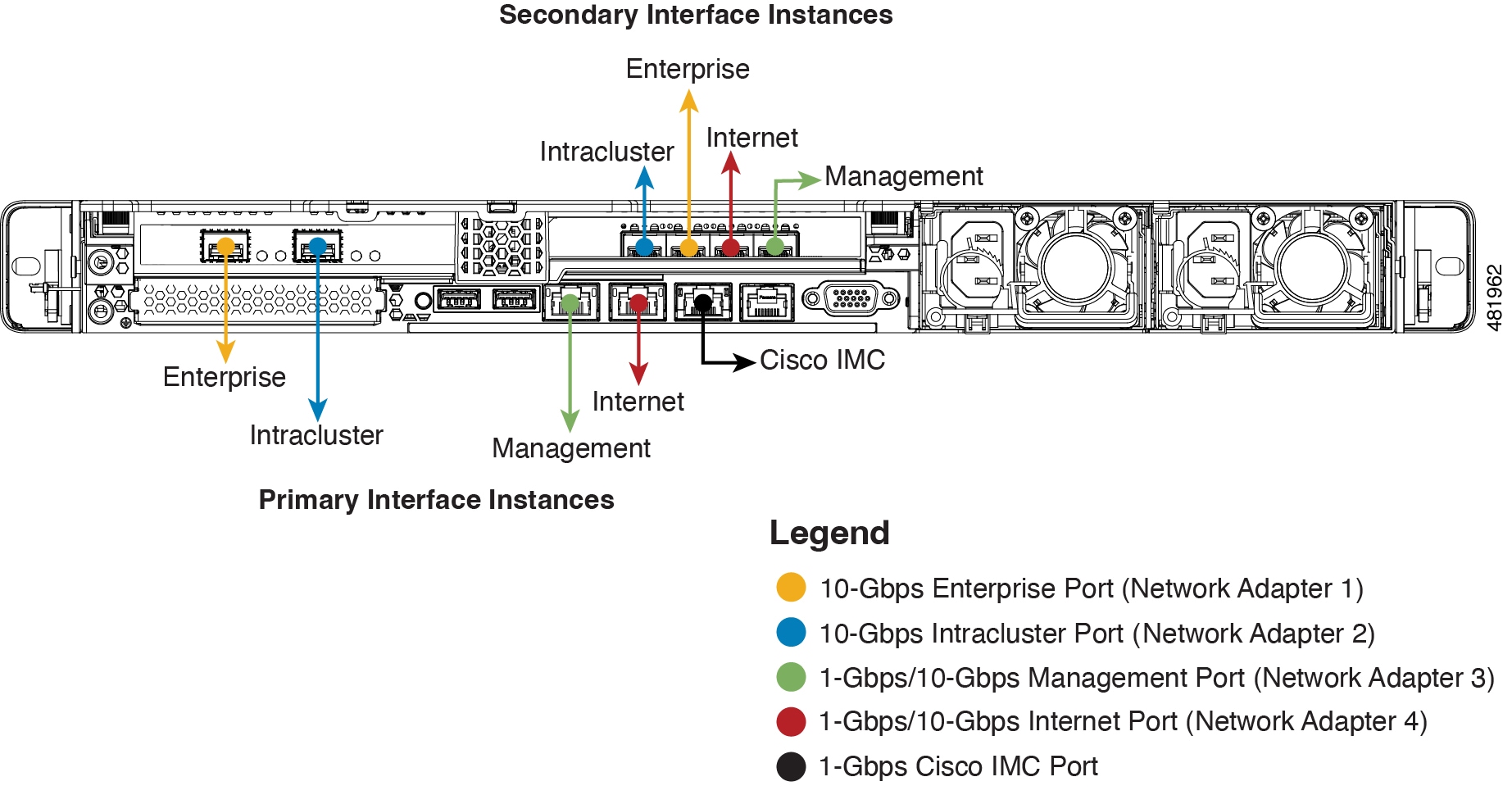
For both the management and internet interface, their primary instance has a bandwidth of 1 Gbps and their secondary instance 10 Gbps.
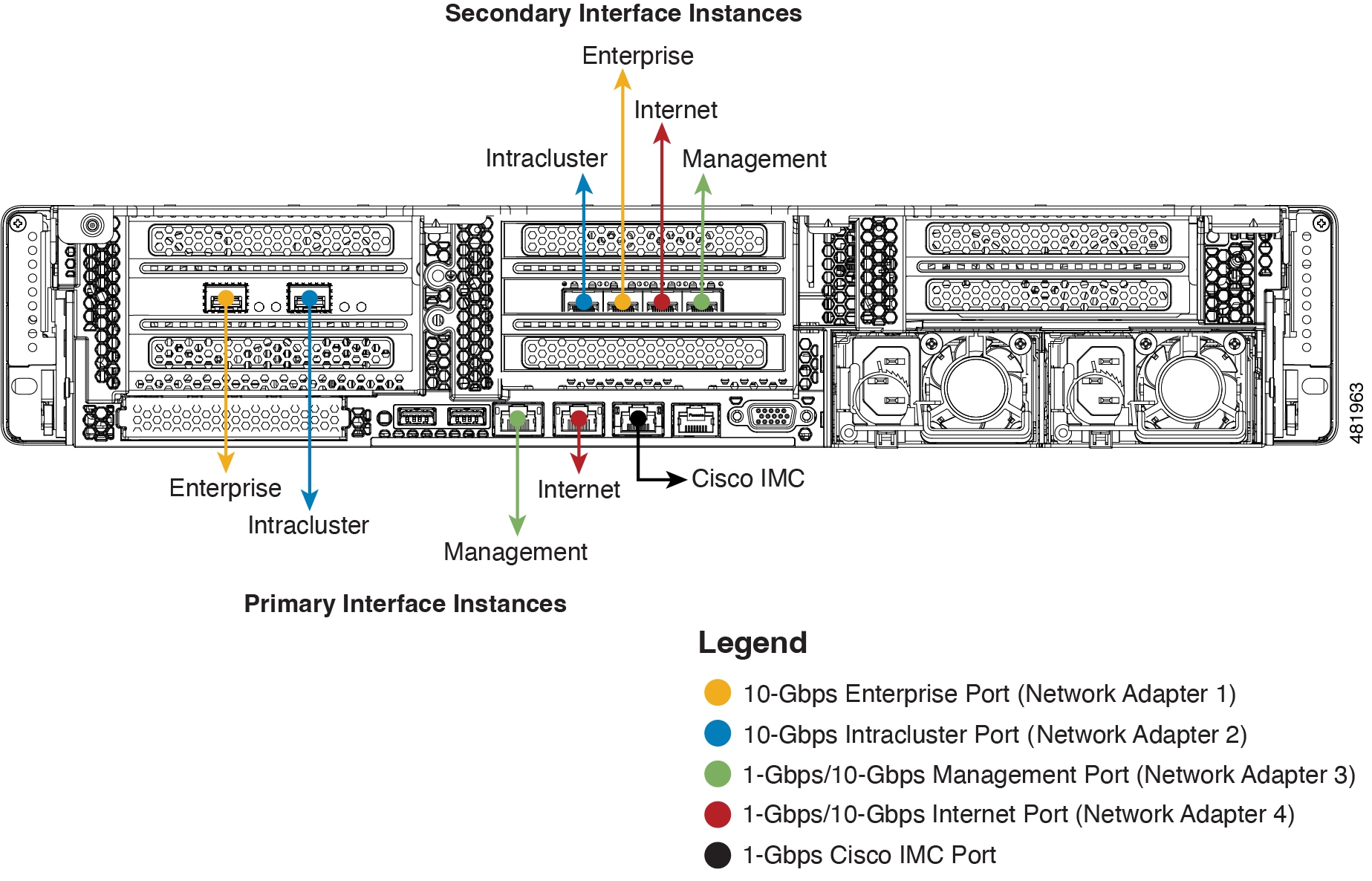
For both the Management and Internet interface, their primary instance has a bandwidth of 1 Gbps and their secondary instance 10 Gbps.
The connections for each node in a three-node Catalyst Center cluster are the same as those for a single-node cluster and use the same ports. Do this when you cable a three-node cluster:
-
Connect the primary instance of each node's Enterprise Port, Intracluster Port, Management Port, Internet Port, and the Cisco IMC port to the primary switch.
-
Connect the secondary instance of each node's Enterprise Port, Intracluster Port, Management Port, and Internet Port to the secondary switch.
For more details on each of the ports, see the rear panel diagram and accompanying descriptions for your chassis in Front and rear panels.
Multinode cluster deployments require all the member nodes to be in the same network and at the same site. The appliance does not support distribution of nodes across multiple networks or sites.
Supported media types for cabling the 10 Gbps enterprise and cluster ports include:
-
SFP-10G-SR-S (Short range, MMF)
-
SFP-10G-LR (Long range, SMF)
-
SFP-H10GB-CU1M (Twinax cable, passive, 1 meter (3.28 feet))
-
SFP-H10GB-CU3M (Twinax cable, passive, 3 meters (9.84 feet))
-
SFP-H10GB-CU5M (Twinax cable, passive, 5 meters (16.4 feet))
-
SFP-H10GB-ACU7M (Twinax cable, active, 7 meters (23 feet))