Cisco Optical Network Controller Configuration Guide, Releases 26.x.x

PDF

Cisco Optical Network Controller Configuration Guide, Releases 26.x.x

PM data retention

Want to summarize with AI?

Log in

Provides PM data retention settings, valid ranges, and controls for active and archived performance data collected at 15-minute and 24-hour intervals.


PM data retention settings control how long Cisco Optical Network Controller stores active and archived performance data.

The PM Data Retention pane provides these PM data buckets:

  • 15 Mins (Max Range 31 days): PM data collected at 15-minute intervals.

  • 24 hours (Max Range 180 days): PM data collected at daily intervals.

Retention settings

You can increase or decrease the retention values for active and archived data. These settings affect data availability across PM browse, jobs, and workspace history.
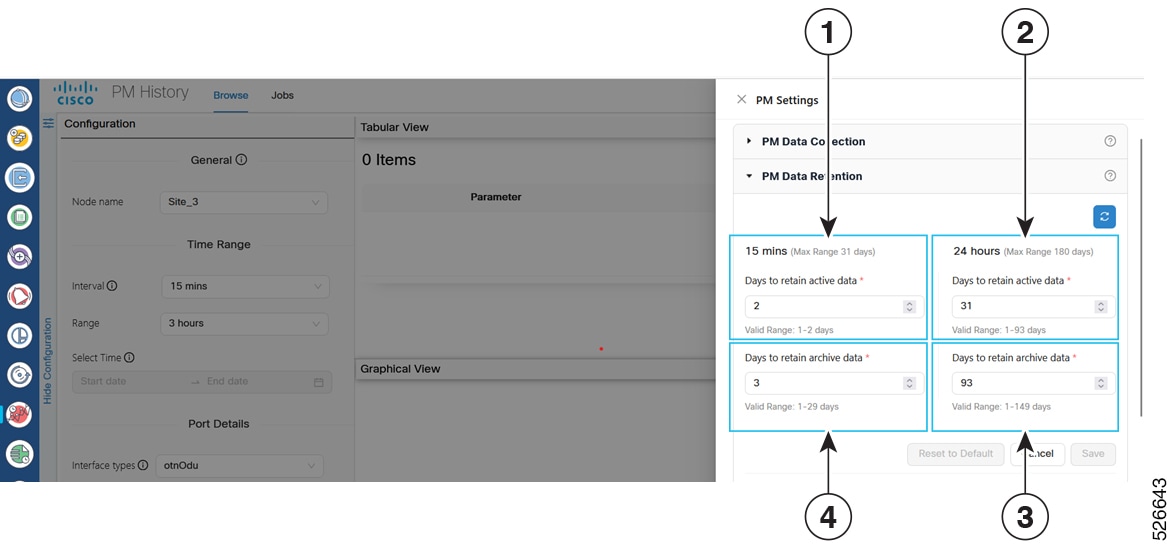
Figure 1. PM data retention
PM data retention settings for 15-minute and 24-hour data
Table 1. PM data retention settings

Label

Setting category

Data type

Default value

Valid range

1

15-minute interval

Active data

2 days

1-2 days

2

24-hour interval

Active data

31 days

1-93 days

3

24-hour interval

Archive data

93 days

1-149 days

4

15-minute interval

Archive data

3 days

1-29 days

Retention controls

The PM data retention pane provides these controls:

  • Reset to Default: Restores data retention settings to their default values.

  • Cancel: Discards changes to the PM data retention configuration.

  • Save: Saves the configuration changes.
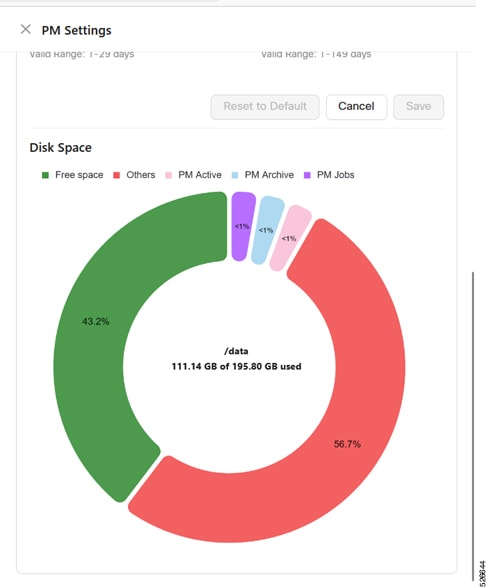

PM retention disk space

Disk-space information identifies how virtual machine storage is allocated to PM data, PM jobs, and other content.

The Disk Space pane displays virtual machine disk usage in a pie chart:

  • Free Space: Displays unused space in the virtual machine.

  • Others: Displays space used by files or data other than PM data.

  • PM Active: Displays space used by recent active PM data in PostgreSQL.

  • PM Archive: Displays space used by archived PM data in PostgreSQL.

  • PM Jobs: Displays space used by PM job results and reports.

PM retention disk usage

Figure 2. PM retention disk space
Disk-space usage for PM data and jobs

PM data retention characteristics

PM data retention characteristics describe how retention changes affect stored data, system capacity, and PM workflows.

PM data retention has these characteristics:

  • Retention decrease: Reducing the retention period can cause existing jobs to fail and move to the paused state.

  • Retention increase: Increasing the retention period increases disk-space usage. For example, 55 nodes with 2 days of 15-minute data and 180 days of 24-hour data use 3.29 GB. Increasing 15-minute retention to 10 days raises the estimated usage to approximately 3.4 GB.

  • Threshold warning: If virtual machine disk-space utilization exceeds 80%, you cannot increase PM data retention. Add storage or free disk space before increasing the retention period.

  • PM browse: You can retrieve 15-minute PM data for up to 31 days and 24-hour PM data for up to 180 days.

  • PM jobs: PM jobs update when retention settings change.

  • PM History workspace: The calendar in circuit and link workspaces changes when retention settings change. Active history includes the configured number of active retention days plus the current day.

  • Multiple user sessions: If one user updates retention values, other users in the same workspace receive a notification to refresh the page.