Provides PM data collection settings for general and Optical X Connection interfaces, including defaults, control behavior, interface availability, and disk-space constraints.
PM data collection settings control performance metric collection separately for general interfaces and Optical X Connection interfaces.
PM data collection provides separate settings for general interfaces and Optical X Connection (OXC) interfaces.
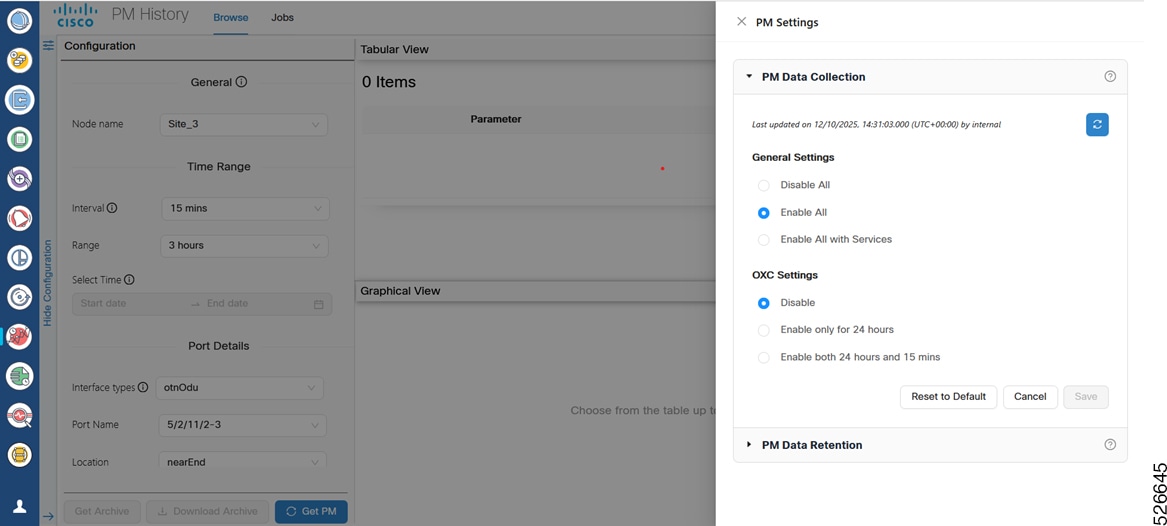
General interface settings
General interface data collection provides these options:
-
Disable All: Disables PM data collection for all general interfaces.
-
Enable All: Enables PM data collection for all general interfaces.
-
Enable All with Services: Enables data collection for all general interfaces except OXC interfaces and associated services. This option is selected by default.
SONET and SDH PM data does not require circuits. To view SONET and SDH PM counters, select Enable All.
Optical X Connection settings
OXC interface data collection provides these options:
-
Disable: Disables PM data collection for OXC interfaces. This option is selected by default.
-
Enable only for 24 hours: Enables OXC data collection at 24-hour intervals.
-
Enable both 24 hours and 15 mins: Enables OXC data collection at 24-hour and 15-minute intervals.
|
General setting |
OXC setting |
Available interface types |
|---|---|---|
|
Disable |
Disable |
No interface types are available. |
|
Enable |
Enable |
All interface types are available. |
|
Enable |
Disable |
All interface types except OpticalXConnection are available. |
|
Disable |
Enable |
All interface types except OpticalXConnection are available. |
Data collection controls
PM data collection provides these controls:
-
Reset to Default: Restores data collection settings to their default values.
-
Cancel: Discards changes to the PM data collection configuration.
-
Save: Saves the configuration changes.
Selecting Enable All displays a confirmation message about disk-space usage. If virtual machine disk-space usage exceeds 80%, add storage or free disk space.
