Cisco Crosswork Network Controller 7.2 Administration Guide

PDF

Renew certificates

Want to summarize with AI?

Log in

Kubernetes certificate renewal

Certificates are valid for one year before they expire. After you renew the certificates, ensure that the pods are healthy before resuming other operations.

Note

If you renew certificates before they expire, it is recommended to perform this activity during a maintenance window to keep the cluster in an operational state.

To renew a certificate, perform these steps:

Before you begin

  • Create a plain text file on your local machine (for example, password.txt ) that contains the SSH login password for the server.

  • Keep the management IP addresses readily available for the hybrid and worker nodes in your cluster.

Procedure

1.

Create a backup of your Crosswork Network Controller.

2.

Log in to one of your hybrid nodes.

3.

Renew the Kubernetes certificates using the renew_k8s_cert command. The required parameters depend on whether the certificates have already expired.

  • Before certificate expiry : If the certificates have not yet expired, you can renew them by running the following command. You do not need to specify the hybrid or worker node management IP addresses.

    renew_k8s_cert --user=<ssh-username> --passwdfile=<passfile-path>

    Example:

    renew_k8s_cert --user=cw-admin --passwdfile=/home/cw-admin/password.txt
  • After certificate expiry : If the Kubernetes certificates have already expired, you must specify the management IP addresses of the hybrid and (if applicable) worker nodes in your cluster.

    renew_k8s_cert --hybrid=hybridNodeMgmtIP1,hybridNodeMgmtIP2,hybridNodeMgmtIP3 
                                    --worker=workerNodeMgmtIP1,workerNodeMgmtIP2,workerNodeMgmtIP3 --user=<ssh-username> --passwdfile=<passfile-path>

    Replace the parameters as follows:

    • hybridNodeMgmtIP : Management IP of each hybrid node (comma-separated).

    • workerNodeMgmtIP : Management IP of each worker node (comma-separated, optional if you have no worker nodes).

    • ssh-username : The SSH username to use.

    • passfile-path : Path to the plain text file containing the SSH login password.

    IPv4 example for a 6-node cluster:

    renew_k8s_cert --hybrid=10.10.10.101,10.10.10.102,10.10.10.103 
                                    --worker=10.10.10.104,10.10.10.105,10.10.10.106 --user=cw-admin 
                                    --passwdfile=/home/cw-admin/password.txt

    IPv4 example for a 3-node cluster (hybrid nodes only):

    renew_k8s_cert --hybrid=10.10.10.101,10.10.10.102,10.10.10.103 --user=cw-admin 
                                    --passwdfile=/home/cw-admin/password.txt

    IPv4 example for single VM deployment:

    renew_k8s_cert --hybrid=10.10.10.101 --user=cw-admin --passwdfile=/home/cw-admin/password.txt

    IPv6 example for a dual-stack cluster:

    renew_k8s_cert --hybrid=fded:1bc1:fc3e:96d0:192:168:5:451,fded:1bc1:fc3e:96d0:192:168:5:452,
                                    fded:1bc1:fc3e:96d0:192:168:5:453 --worker=fded:1bc1:fc3e:96d0:192:168:5:454,fded:1bc1:fc3e:96d0:192:168:5:455 
                                    --user=cw-admin --passwdfile=/home/cw-admin/password.txt
    • The --worker parameter is optional if you do not have worker nodes in your cluster.

    • Line breaks in the commands above are for display only. Remove all line breaks before executing the command.

4.

(Optional) Recover cluster: If multiple pods are stuck in ContainerCreating or terminating state after you renew the Kubernetes certificate, run these commands on any hybrid node.

kubectl delete pod -n kube-system -l k8s-app=calico-kube-controllers --grace-period=0 --force

Wait for the calico-kube-controllers pods to start, and run this command:

kubectl delete pod -n kube-system -l k8s-app=calico-node --grace-period=0 --force

After all the Calico pods are up and running, all other pods will recover and enter a running state. If any pods remain in a non-running state, wait at least 10 minutes after the Calico pods started, and then run this command:

kubectl get po --all-namespaces | awk '{if ($4 != "Running") system ("kubectl -n " $1 " delete pods " $2 " --grace-period=0 " " --force ")}'

Automatic renewal of internal certificates

Crosswork CA generates TLS certificate chains, including root, intermediate CA, and leaf certificates, for day 0 deployments (Geo HA and non-Geo HA). The leaf certificates are valid for 2 years, while root and intermediate CA certificates are valid for 5 years. Customers with Crosswork deployments lasting beyond two years will face certificate expiry. This expiry disrupts TLS communication and impacts cluster operations. Auto-renewal applies to all Crosswork certificates generated internally, including NATS, Kafka, and any application-specific internal certificates.

The renewal alert is generated only when the expiry period is less than 90 days. When an internal certificate is expiring and renewed, all internal certificates of that type will be renewed. For example, when a leaf certificate is renewed, the process will also renew all other leaf certificates.

For GEO HA deployment:

  • For a Geo HA deployment, the certificate renewal is triggered in the active AZ cluster. The TLS manager determines if the cluster has geo redundancy enabled or disabled and decides whether the certificate renewal must be performed on one cluster or both geo HA clusters. After the renewal job is completed on the active cluster, the job automatically runs in the standby cluster after a delay. The standby cluster then displays job progress and alarm events.

    In a Geo HA setup with auto-arbitration, the certificate is first renewed on the active cluster, then simultaneously renewed on the standby cluster and the arbiter VM.

The certificate renewal process can cause a downtime of approximately thirty minutes to one hour. It is recommended to perform this activity during a maintenance window to avoid disrupting cluster operations.

To renew an internal certificate, perform the following:

Procedure

1.

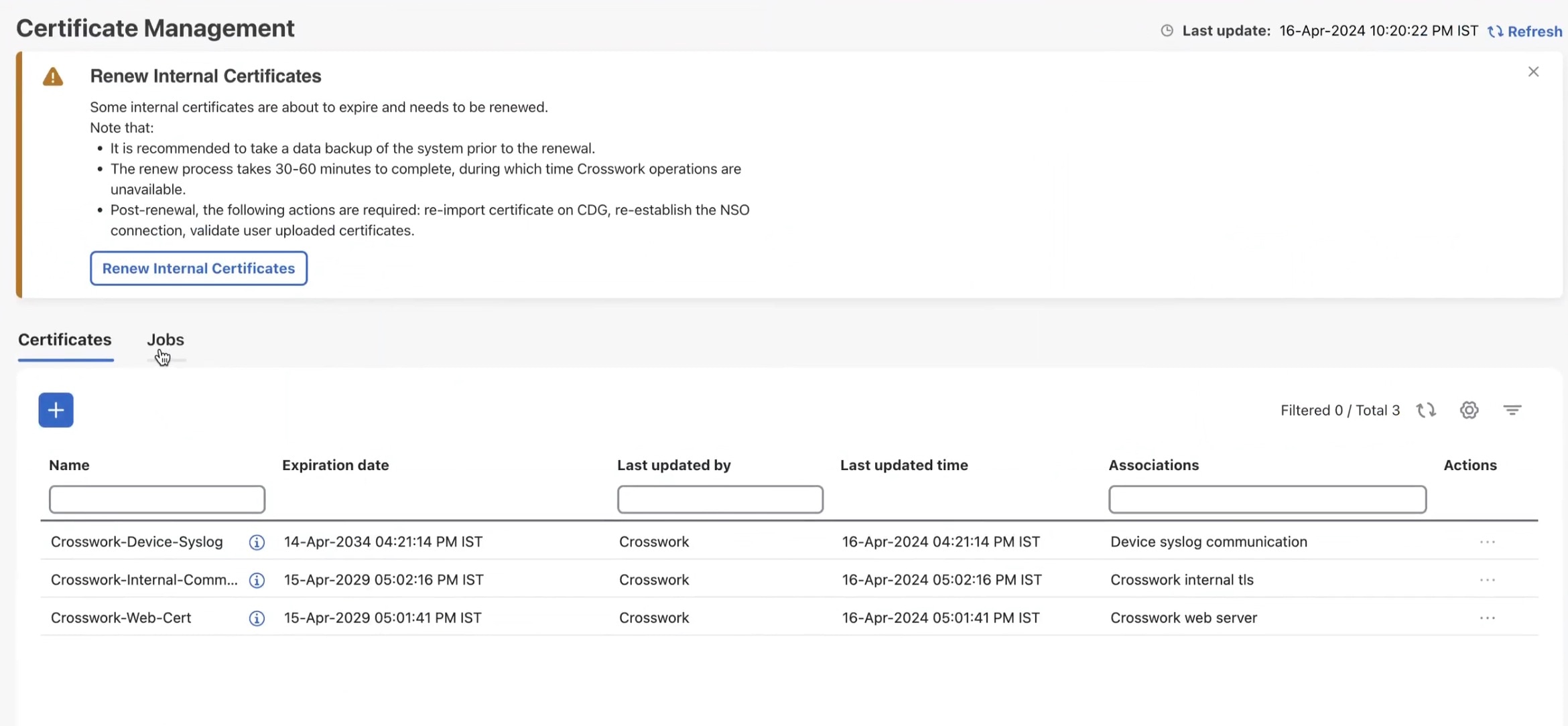
From the main menu, choose Administration > Certificate Management. The Certificate Management window appears. If an internal certificate is about to expire, a prompt appears for certificate renewal.

Note

The Crosswork dashboard displays alerts about certificate expiry when you log in. The system generates alerts at various stages of the certificate expiry, increasing severity as the expiry date approaches.

Figure 1. Renew Internal Certificate prompt
2.

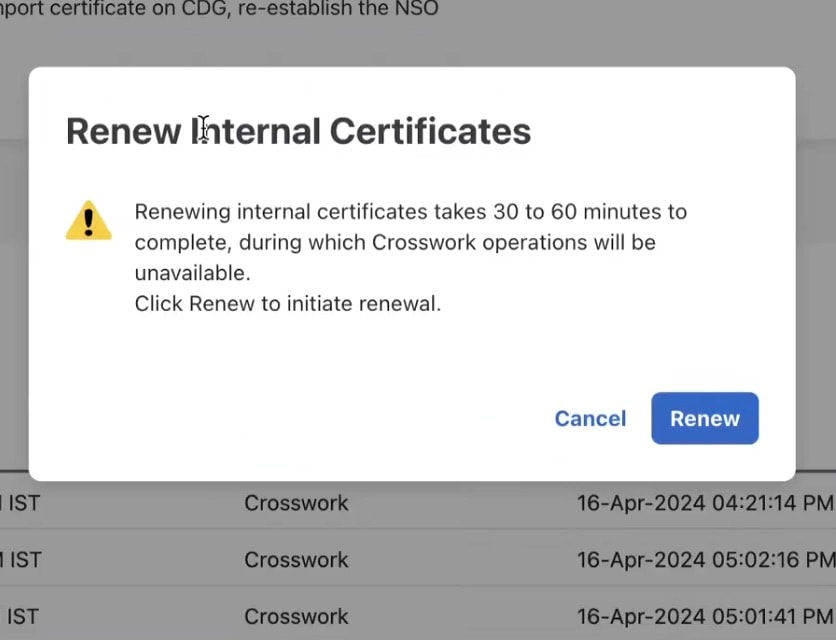
Click Renew Internal Certificate . A confirmation popup is displayed. Click Renew to confirm.

Figure 2. Renewal Confirmation Prompt
This action invokes the REST API (/v2/cert/renew) and initiates the certificate expiry check. The Certificate Management window displays a notification about the new renewal job.

Figure 3. Renewal Job Notification
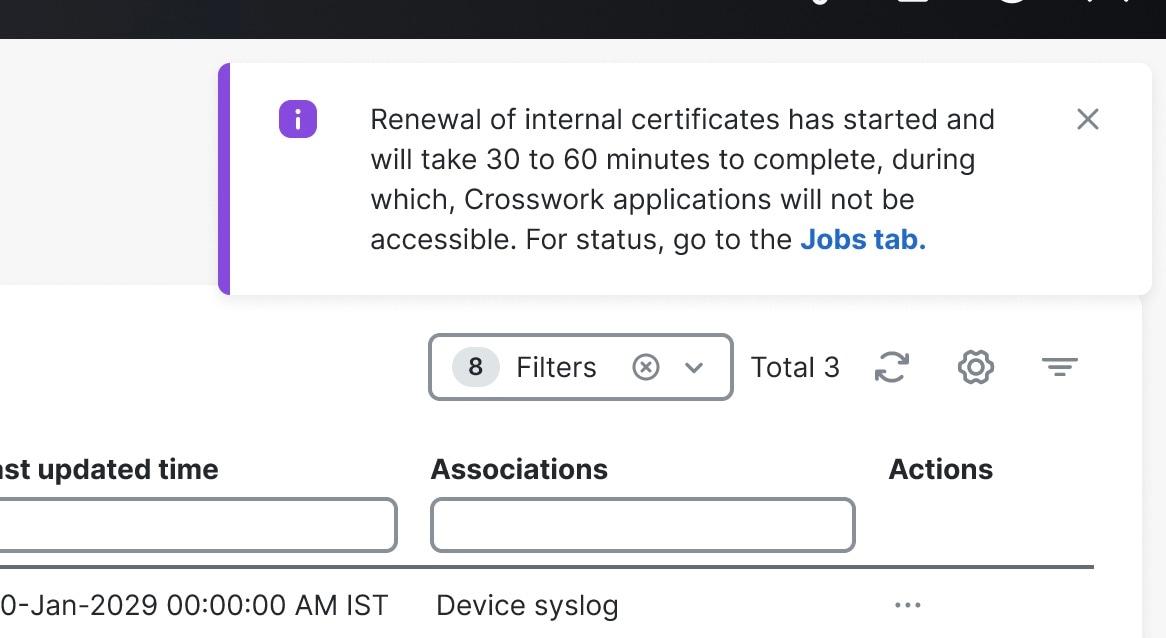
You can view progress of the renewal job from the Jobs tab. After the job completes, an Info alarm event indicates successful completion of the job. You must manually clear this alarm to acknowledge the event. Any error during the process will result in job failure. However, the job can be triggered again because the API is repeatable.

3.

In case of Geo HA deployment: After successfully completing the certificate renewal, run an on-demand or periodic sync across the active and standby clusters to ensure that asynchronous replication is re-established over a secure channel.

4.

After the renewal job completes, perform these steps to maintain TLS communication between Crosswork and other external components:

  1. Crosswork with Crosswork Data Gateway: When Crosswork certificates are renewed, it automatically pushes the updated certificates to each Crosswork Data Gateway. During the update process, Crosswork raises alarms for each Data Gateway to indicate these events:

    • Certificate update started

    • Certificate update completed

    Note

    The automatic certificate renewal happens as part of the Crosswork Data Gateway day-N enablement process.

  2. In case of Geo HA deployment:

    • The automatic certificate renewal process starts when the certificates are updated. After DG-Manager pushes the updated certificates to the Data Gateway, all the affected Data Gateways automatically restart. The restart causes a brief service interruption.

    • If certificate renewal fails, the Crosswork Data Gateway enters error state after the DG-Manager restarts. To recover, manually reimport the certificates on the affected Data Gateway. For more information, see Import a certificate.

  3. Crosswork Data Gateway and Device Syslog: If device syslog root and intermediate certificates are renewed, manually export and reconfigure these certificates on all devices. For internally generated Crosswork CA certificates, export the new device syslog root and intermediate CA certificates and configure them as CA trustpoints on IOS XR/XE devices. For more information, see the IOS XE and IOS XR instructions in Syslog collection jobs.

    If there is a renewal for device syslog root and intermediate certificates, manually export these certificates to the devices.

  4. External destination/Server Auth CA : Re-upload the External Destination and Server Auth CA certificates to Crosswork.

  5. Cisco NSO: Export the regenerated Crosswork Web server certificate from the Crosswork UI browser, configure it, and store it on the NSO server. For more information, see the Step 1b in Configure Standalone NSO.