Configure TACACS+ server settings in Crosswork Network Controller to control authentication priority and connection details for external user authentication.
Crosswork Network Controller supports authentication of users via TACACS+ servers. You can integrate Crosswork with a standalone TACACS+ server (such as open TACACS+) or with an application like Cisco ISE (Identity Services Engine). Integrating with TACACS+ servers helps centralize and control access to network resources.
Before you begin
Create a Device Access Group to manage access for AAA operations.
In the TACACS+ server (standalone or Cisco ISE), configure required parameters such as user role, device access group attribute, shared secret format, and shared secret value before adding the server to Crosswork Network Controller.
From the main menu, select Administration > AAA > Servers > TACACS+ .
To add a new TACACS+ server: Click , enter required details (see TACACS+ field descriptions), and click Add.
To edit an existing TACACS+ server: Select the server you want to edit, click , update required information, and click Update.
To delete a TACACS+ server: Select the server you want to delete, click , and confirm deletion.
Click Save to apply the configuration. When prompted with a warning about restarting the server, click Save changes to confirm.
TACACS+ authentication servers are added, updated, or removed as configured. Crosswork uses these servers for user and device authentication.
What to do next
Test user authentication with the updated TACACS+ server settings to confirm successful configuration.
TACACS+ field descriptions
The table lists the key fields required when configuring a TACACS+ server in Crosswork Network Controller.
Table 1. TACACS+ field descriptions
Field
Description
Authentication order
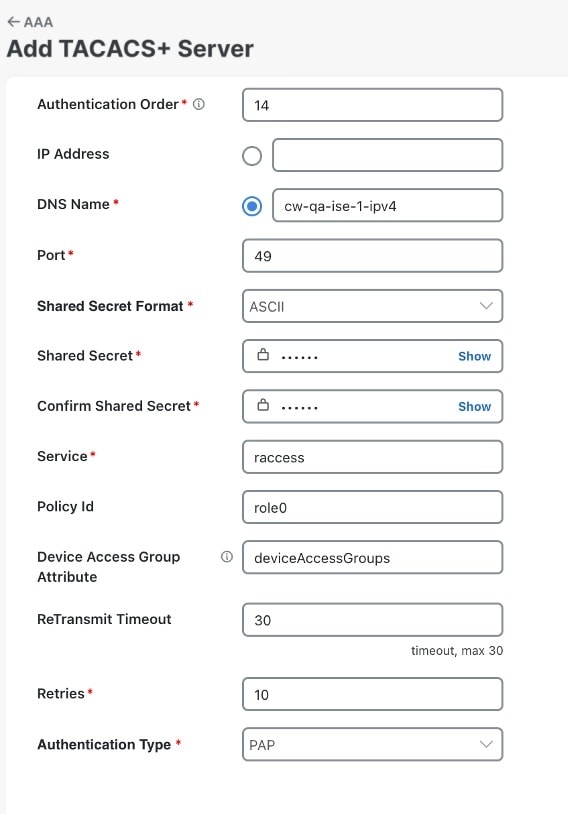
Specify a unique priority value to assign precedence in the authentication request. The order can be any number between 10 to 99. Below 10 are system reserved.
By default, 10 is selected.
IP address
Enter the IP address of the TACACS+ server (if IP address is selected).
DNS name
Enter the DNS name (if DNS name is selected). Only IPv4 DNS name is supported.
Port
The default TACACS+ port number is 49.
Shared secret format
Shared secret for the active TACACS+ server. Select ASCII or Hexadecimal.
Shared secret / Confirm shared secret
Plain-text shared secret for the active TACACS+ server. The format of the text entered must match with the format selected (ASCII or Hexadecimal).
For Crosswork to communicate with the external authentication server, the Shared Secret parameter you enter on this screen must match with the shared secret value configured on the TACACS+ server.
Service
Enter the value of the service you are attempting to gain access to. This field is verified only for standalone TACACS+. In case of Cisco ISE, you can enter any value; do not leave the field blank.
The service field is an attribute that tells the TACACS+ server what type of network service the user is trying to access. It allows the TACACS+ server to distinguish between different types of access, such as:
Login access (e.g., device CLI, SSH, console)
Network access (e.g., PPP, SLIP)
For example, the "raccess" value is a service type used in the service field of an authorization request. It stands for Remote Access and is typically used when a user is requesting remote administrative access.
Policy ID
Enter the user role that you created in the TACACS+ server. The Policy ID is a unique key used by the TACACS+ server to identify and retrieve the user role assigned to an authenticated user. This value must exactly match the user role you configured on the TACACS+ server.
In Crosswork Network Controller, this field corresponds to the policy_id.
Note
If you try to login to Crosswork Network Controller as a TACACS+ user before creating the required user role, you will get the error message: "Key not authorized: no matching policy". If this occurs, close the browser. Login as a local admin user and create the missing user roles in the TACACS+ server, and login back to Crosswork using the TACACS+ user credentials.
Device access group attribute
Enter the device access group attribute value based on the key used for the device access group in the (ISE/Standalone) TACACS+ server attributes. These values can be one or more comma-separated entries.
In a TACACS+ context, the Device Access Group attribute is typically a custom or authorization attribute that the TACACS+ server sends back to the network device. This attribute specifies which group of network devices or which level of device access policy applies to the authenticated user. The Device Access Group attribute works in sync with the policy id to define user permissions across devices.
Retransmit timeout
Enter the timeout value. Maximum timeout is 30 seconds.
Retries
Specify the number of authentication retries allowed.
Authentication type
Select the authentication type for TACACS+:
PAP: Password-based authentication is the protocol where two entities share a password in advance and use the password as the basis of authentication.
CHAP: Challenge-Handshake Authentication Protocol requires that both the client and server know the plain text of the secret, although it is never sent over the network. CHAP provides greater security than Password Authentication Protocol (PAP).
Example
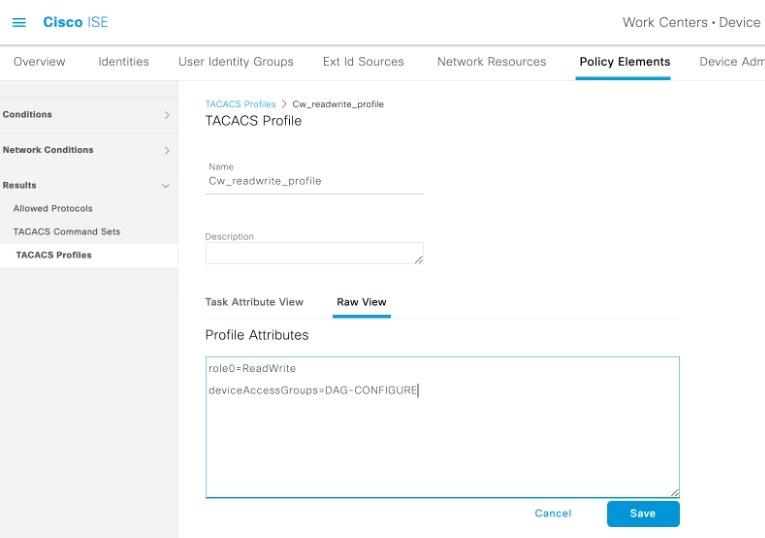
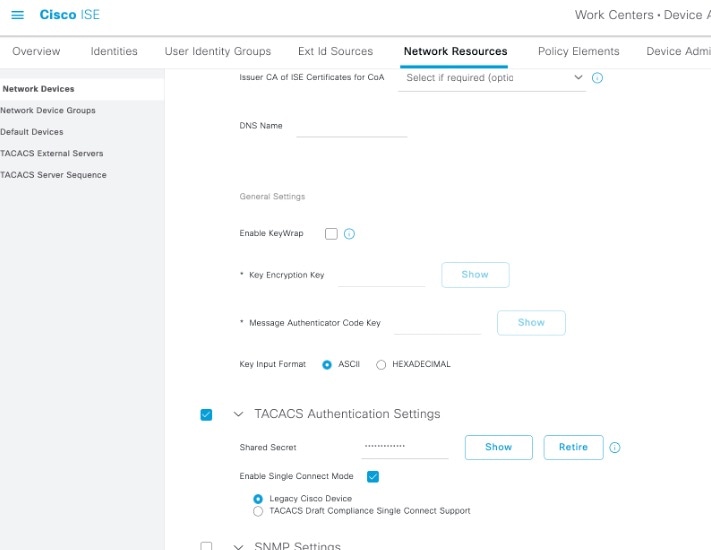
In this scenario, the TACACS+ parameters are configured in Cisco ISE.
Device Access Group has already been created in Crosswork for AAA operation access.
Relevant TACACS+ parameters configured in Cisco ISE:
User profile: role0 (referenced in the Policy Id field)
Device Access Group attribute: DAG-CONFIGURE
Shared secret format: ASCII
Figure 1. Configure TACACS+ profile attributes in Cisco ISE
Figure 2. Configure TACACS+ authentication settings in Cisco ISE
Now, the TACACS+ server is added in Crosswork Network Controller UI:
 , enter required details (see TACACS+ field descriptions), and click Add.
 , update required information, and click Update.
 , and confirm deletion.