Enable single sign-on (SSO) so users can access Crosswork Network Controller and integrated applications with a single set of credentials.
Single sign-on (SSO) is an authentication method that lets users log in once and access multiple independent systems without reentering credentials. Crosswork Network Controller acts as an Identity Provider (IdP) and supports SSO integration for service provider applications. You can enable SSO for users authenticated via TACACS+, LDAP, and RADIUS. When SSO is configured, users benefit from seamless access and improved security management.
Crosswork Network Controller also supports SSO cross-launch, so users can move easily between Crosswork Network Controller and integrated applications. Once configured, the URL can be launched using the launch icon ( ) located at the top right corner of the window.
Note that the Crosswork Network Controller login page is not shown if the Central Authentication Service (CAS) pod is restarting or offline.
When Crosswork Network Controller’s CAS pod is restarting or not running, the login page is not available.
The SSO URL from the Identity Provider (IdP) is https://<IP>:30603/crosswork/sso/idp/profile/SAML2/Redirect/SSO, where <IP> represents the Crosswork Network Controller's IP address or hostname.
Before you begin
-
Select Enable source IP for auditing check box on the page.
-
Ensure you have the latest service provider metadata to integrate with Crosswork Network Controller SSO.
-
Confirm that network connectivity exists between Crosswork Network Controller (IdP) and each service provider application.
-
Verify the CAS pod is running and stable.
Procedure
-
From the main menu, choose . The Identity Provider window appears. You can add, edit or delete SSO providers here.
Figure 1. Identity Provider window 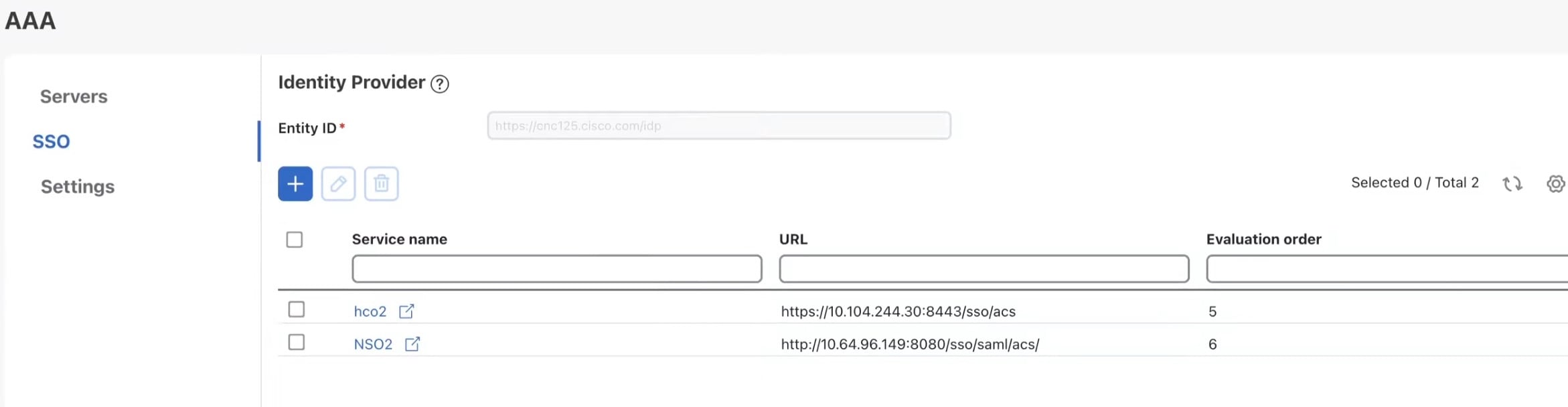
-
To add a new service provider:
- Click the
 icon.
icon.
- Click the
-
To edit a service provider:
- Select the check box next to the service provider, then click the
 icon.
icon. - Update evaluation order or metadata information as needed.
- Click Update to apply changes.
- Select the check box next to the service provider, then click the
-
To delete a service provider:
- Select the check box next to the service provider, then click the
 icon.
icon. - Click Delete to confirm removal.
- Select the check box next to the service provider, then click the
What to do next
-
If Crosswork Network Controller is reinstalled or migrated, update the Identity Provider (IdP) metadata in all service provider applications to avoid authentication errors due to metadata mismatch.
-
For first-time users, ensure password change is completed before attempting to log in with a different username. To reset an incomplete session, an administrator must terminate it.