Cisco Crosswork Network Controller 7.2 Administration Guide

PDF

Configure LDAP servers

Want to summarize with AI?

Log in

Manage authentication connections by adding, editing, or deleting LDAP servers used for user authentication in Crosswork Network Controller.


Lightweight Directory Access Protocol (LDAP) servers, including OpenLDAP, Active Directory, and secure LDAP, are used to authenticate users for network management. Crosswork Network Controller can use these servers to centralize directory management and enforce access policies. Secure LDAP requires a certificate to enable encrypted communication.

Crosswork Network Controller supports two LDAP authentication modes:

  • LDAP without Device Access Groups — LDAP returns a user-role attribute only.

  • LDAP with Device Access Groups — LDAP returns both a user-role attribute and a device access group attribute. Crosswork Network Controller maps these values to configured roles and Device Access Groups.

LDAP attribute names shown in examples are for illustration only. Actual attribute names depend on your LDAP directory schema.

Before you begin

  • Create a Device Access Group to manage access for AAA operations. For more information, see Create Device Access Groups.

  • Configure necessary parameters (such as bind DN, policy base DN, policy ID, and device access group attribute) on your LDAP server.

  • For secure LDAP, add a "Secure LDAP Communication" certificate before proceeding. For details, see Add a new certificate.

  • Ensure your LDAP server is already configured to return the required attributes (role and, if applicable, device access group) before setting up LDAP in Crosswork Network Controller.

  • LDAP attribute names vary across deployments; the attribute names shown in examples (such as sAMAccountName) come from an engineering test environment and may not exist in your LDAP setup.

  • DN values shown in this guide (such as OU=ouUsers1, dc=DSEENIVA, etc.) reflect the example LDAP directory structure. Use DN values from your own LDAP environment.

  • The device access group attribute returned by LDAP must match the configured Device Access Group name in Crosswork Network Controller.

Follow these steps to configure LDAP servers:

Procedure

1.

From the main menu, select Administration > AAA > Servers > LDAP .

2.

To add a new LDAP server: Click Add icon, enter required details (see TACACS+ field descriptions), and click Add.

3.

To edit an existing LDAP server: Select the server you want to edit, click Edit icon, update required information, and click Update.

4.

To delete a LDAP server: Select the server you want to delete, click Delete icon, and confirm deletion.

5.

Click Save to apply the configuration. When prompted with a warning about restarting the server, click Save changes to confirm.
LDAP authentication servers are added, updated, or removed, and the changes are applied to authentication services in Crosswork Network Controller.

What to do next

Confirm the server is correctly listed and test user authentication if applicable.

LDAP field descriptions

The table lists the key fields that are required when you configure an LDAP server in Crosswork Network Controller.
Table 1. LDAP field descriptions

Field

Description

Authentication order

Defines the priority used when processing authentication requests. Accepts values from 10 to 99; values below 10 are reserved for system use. The default value is 10.

Name

A label used to identify the LDAP handler.

IP address/host name

The IP address or fully qualified hostname of the LDAP server.

Secure connection

Enables SSL-based LDAP communication. When selected, you must choose a Secure LDAP Communication certificate from the drop-down list. This field is disabled by default.

Note

The certificate must already exist in the Certificate Management screen before enabling secure LDAP.

Port

Specifies the port used to connect to the LDAP server. The default LDAP port is 389. When secure LDAP is enabled, the default port is 636.

Bind DN

The distinguished name (DN) used by Crosswork Network Controller to bind to the LDAP server for authentication queries.

Bind credential / Confirm bind credential

The username and password used to authenticate the Bind DN with the LDAP server.

Base DN

The starting point in the LDAP directory tree where Crosswork performs its user search operations.

User filter

The LDAP search filter used to locate user entries within the Base DN.

DN format

Specifies how user names are represented within the Base DN. This determines how Crosswork constructs the full DN for authentication queries.

Principal attribute ID

The attribute in the LDAP user profile that stores the user identifier (UID).

Policy base DN

The directory location used for role lookup and role mapping.

Policy map attribute

Identifies the attribute in the Policy base DN used to map a user to a specific role. This corresponds to the userFilter attribute on the LDAP server.

Policy ID

Specifies the role value returned by LDAP for the authenticated user. This value must match a corresponding user role configured on the LDAP server. In Crosswork Network Controller, this field maps to policy_id.

Note

If a user logs into Crosswork Network Controller before the required role exists on the LDAP server, authentication fails with: “Login failed, policy not found. Please contact the Network Administrator for assistance.” Ensure LDAP roles are created before adding the LDAP server configuration in Crosswork Network Controller.

Device access group attribute

Specifies the LDAP attribute used to identify the user’s device access group. This may include one or more comma-separated values. In LDAP environments, this attribute is typically a custom authorization value returned to the client. The returned value must correspond to an existing Device Access Group in Crosswork.

Connection timeout

Time (in seconds) allowed for LDAP operations to complete. The maximum allowed value is 30 seconds.


LDAP example

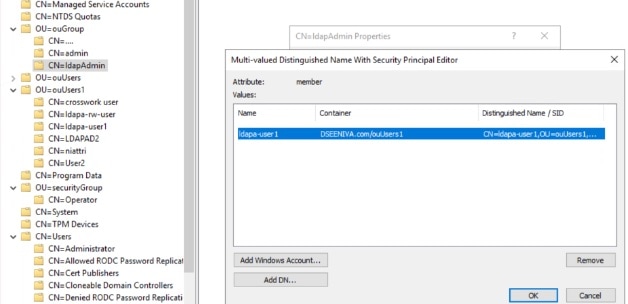
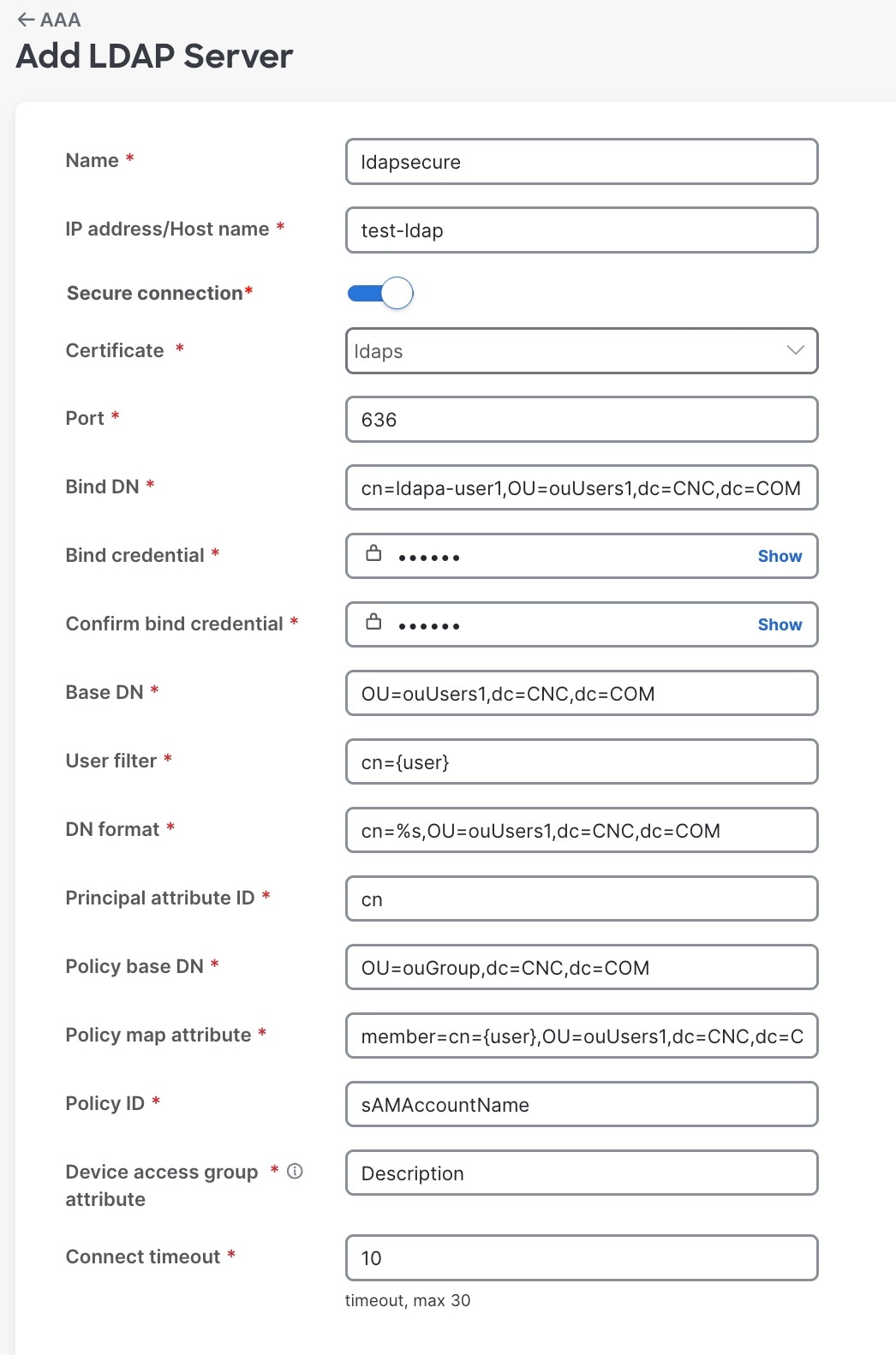
This example shows parameters used for secure LDAP configuration. A Device Access Group named "ALL-ACCESS" is already configured in Crosswork Network Controller and referenced in LDAP.

Key points from the LDAP server configuration:

  • The user/account name is ldapa-user1, part of the ldapAdmin group.

  • The Domain component is CNC and top level component is COM.

  • The policy ID returned by LDAP is sAMAccountName.

  • ldapUrl contains the server hostname and port.

  • In ldap_attr_server fields:

    • baseDN corresponds to Policy base DN.

    • userFilter corresponds to Policy map attribute.

  • Device access group is returned via: Description='ALL-ACCESS'.

API payload example

DN samples used in the example (such as dc=CNC,dc=COM or OU=ouUsers1) reflect only the example directory’s structure. Use the DN values from your LDAP environment.

The following example is the LDAP server’s response used during testing. It is not the CNC API request payload. Attribute names and DN structure are specific to that test environment. Use your own directory’s attribute names and values when configuring LDAP.

json:Y

{   "ldap": {
    "ldap_servers": {
      "ldap_server": [{
          "type": "DIRECT",
          "bindDn": "cn=ldapa-user1,OU=ouUsers1,dc=CNC,dc=COM",  
          "connectionStrategy": "",
          "useSsl": false,
          "useStartTls": false,
          "connectTimeout": 10,
          "baseDn": "OU=ouUsers1,dc=CNC,dc=COM",  
          "userFilter": "cn={user}",   
          "subtreeSearch": true,
          "usePasswordPolicy": false,
          "dnFormat": "cn=%s,OU=ouUsers1,dc=CNC,dc=COM",  
          "principalAttributeId": "cn",
          "policyId": "Description",
          "minPoolSize": 1,
          "maxPoolSize": 1,
          "validateOnCheckout": false,
          "validatePeriodically": true,
          "validatePeriod": 600,
          "idleTime": 5000,
          "prunePeriod": 5000,
          "blockWaitTime": 5000,
          "providerClass": "org.ldaptive.provider.unboundid.UnboundIDProvider",
          "allowMultipleDns": false,
          "order": 16,
          "trustStore": "ldaps",
          "name": "ldapsecure",
          "ldapUrl": "ldaps://test-ldap:636",   
          "bindCredential": "<>"
        }
      ],
      "ldap_attr_servers": {
        "ldap_attr_server": [
          {
            "baseDn": "OU=ouGroup,dc=CNC,dc=COM",   
            "trustStore": "ldaps",
            "ldapUrl": "ldaps://test-ldap:636",
            "bindDn": "cn=ldapa-user1,OU=ouUsers1,dc=CNC,dc=COM",
            "bindCredential": "<>",
            "userFilter": "member=cn={user},OU=ouUsers1,dc=CNC,dc=COM", 
            "failFast": false,
            "attributes": {
            "policy_id":"sAMAccountName"
            }}]}}}}

The user group and user/account name mapping configured in LDAP server:

Figure 1. Map user group and user/account name in LDAP server

Here is the corresponding LDAP configuration in the Crosswork Network Controller UI:

Figure 2. Add LDAP server