Important.
Results generated by AI. Before using results, verify accuracy and completeness.
Copy
Details the procedure for viewing system configurations in Crosswork Data Gateway, including vNIC addresses, NTP, DNS, proxy settings, UUID, syslog, certificates, first boot logs, timezone, and enrollment tokens.
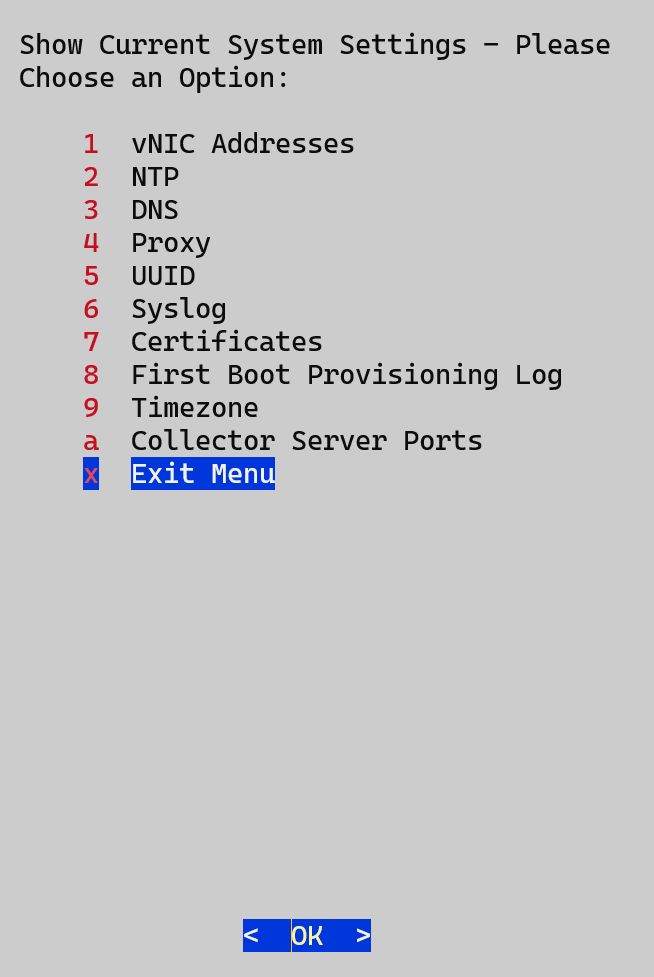
You can view various system settings through Crosswork Data Gateway.
Figure 1. Show current system settings menu
Complete these steps to view the current system configuration.
Procedure
From the Main Menu, select Show System Settings.
In the prompt, click OK to open the Show Current System Settings menu.
Select the setting that you want to view.
Setting option
Description
vNIC Addresses
Displays the vNIC configuration, including address information.
NTP
Displays the details of the currently configured Network Time Protocol (NTP) server.
DNS
Displays the details of the Domain Name System (DNS) server configuration.
Proxy
Displays the proxy server details (if any proxy is configured).
UUID
Displays the system UUID.
Syslog
Displays the syslog forwarding configuration. If the forwarding configuration is not set, only the message "# Forwarding configuration follows" is displayed.
Certificates
You can view certificate files such as:
Crosswork Data Gateway signing certificate file
controller signing certificate file
controller SSL/TLS certificate file
syslog certificate, and
collector certificate.
First Boot Provisioning Log
Displays the content of the first boot log file.
Timezone
Displays the current timezone setting.
Enrollment Token
This menu option is for users of Crosswork Data Gateway for Cloud applications.
Displays the token that is used by Crosswork Data Gateway to enroll with Crosswork Cloud.
Collector Server Ports
Displays the SNMP trap, Syslog UDP, Syslog TCP, and Syslog TLS ports.