- Preface
- Basic Functionality
- Basic Configurations
- Configuring System
- Configuring Green Ethernet
- Configuring Thermal Protection
- Configuring Ports
- Configuring Security
- Configuring Aggregation
- Configuring Link OAM
- Configuring Loop Protection
- Configuring Spanning Tree
- Configuring MVR
- Configuring LLDP
- Configuring SyncE
- Configuring EPS
- Configuring MEP
- Configuring ERPS
- Configuring MAC Table
- Configuring VLANs
- Configuring VLAN Translation
- Configuring Ethernet Services
- Configuring Performance Monitor
- Configuring QoS
- Configuring HQoS
- Configuring Mirroring
- Configuring PTP
- Configuring sFlow
- Configuring Traffic Test
- Configuring Traffic Test Loops
- Configuring DDMI
- Configuring UDLD
- Configuring Flex Links
- Monitoring System
- Monitoring Green Ethernet
- Monitoring Thermal Protection
- Monitoring Ports
- Monitoring Link OAM
- Monitoring Security
- Monitoring Aggregation
- Monitoring Loop Protection
- Monitoring Spanning Tree
- Monitoring MVR
- Monitoring LLDP
- Monitoring Ethernet Services
- Monitoring Performance Monitor
- Monitoring PTP
- Monitoring MAC Table
- Monitoring VLANs
- Monitoring sFlow
- Monitoring DDMI
- Monitoring UDLD
- Monitoring Flex Links
- Diagnostics
- Maintenance
- Use Cases
Diagnostics
The Diagnostics feature available on the ME 1200 Web GUI allows you to perform diagnostic procedures on the ME 1200 switch.
Ping
This option allows you
to issue ICMP PING packets to troubleshoot IP connectivity issues.
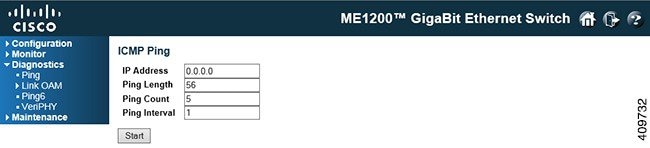
PING server 10.10.132.20, 56 bytes of data.
64 bytes from 10.10.132.20: icmp_seq=0, time=0ms
64 bytes from 10.10.132.20: icmp_seq=1, time=0ms
64 bytes from 10.10.132.20: icmp_seq=2, time=0ms
64 bytes from 10.10.132.20: icmp_seq=3, time=0ms
64 bytes from 10.10.132.20: icmp_seq=4, time=0ms
Sent 5 packets, received 5 OK, 0 bad
Link OAM MIB Retrieval
This option allows you
to retrieve the local or remote OAM MIB variable data on a particular port.
Select the appropriate radio button and enter the port number of the switch to
retrieve the content of interest. Click on the
Start button to retrieve the content. Click on the
New
Retrieval
button to retrieve another content of interest.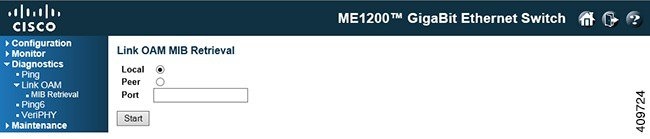
Ping6
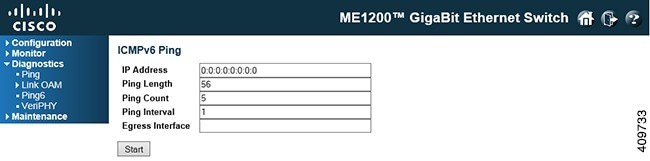
PING6 server ff02::2, 56 bytes of data.
64 bytes from fe80::219:5bff:fe2f:b47: icmp_seq=0, time=10ms
64 bytes from fe80::215:58ff:feed:69dd: icmp_seq=0, time=10ms
64 bytes from fe80::219:5bff:fe2f:b47: icmp_seq=1, time=0ms
64 bytes from fe80::215:58ff:feed:69dd: icmp_seq=1, time=0ms
64 bytes from fe80::219:5bff:fe2f:b47: icmp_seq=2, time=0ms
64 bytes from fe80::215:58ff:feed:69dd: icmp_seq=2, time=0ms
64 bytes from fe80::219:5bff:fe2f:b47: icmp_seq=3, time=0ms
64 bytes from fe80::215:58ff:feed:69dd: icmp_seq=3, time=0ms
64 bytes from fe80::219:5bff:fe2f:b47: icmp_seq=4, time=0ms
64 bytes from fe80::215:58ff:feed:69dd: icmp_seq=4, time=0ms
Sent 5 packets, received 10 OK, 0 bad
-
IP Address: The destination IP Address.
-
Ping Length: The payload size of the ICMP packet. Values range from 2 bytes to 1452 bytes.
-
Ping Count: The count of the ICMP packet. Values range from 1 time to 60 times.
-
Ping Interval: The interval of the ICMP packet. Values range from 0 second to 30 seconds
-
Egress Interface (Only for IPv6): The VLAN ID (VID) of the specific egress IPv6 interface which ICMP packet goes.The given VID ranges from 1 to 4094 and will be effective only when the corresponding IPv6 interface is valid. When the egress interface is not given, PING6 finds the best match interface for destination.
Do not specify egress interface for loopback address.
Do specify egress interface for link-local or multicast address.
VeriPHY
This option is used
for running the VeriPHY Cable Diagnostics for 10/100 and 1G copper ports.
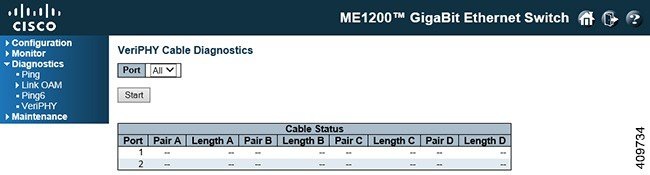
Press the Start button to run the diagnostics. This will take approximately 5 seconds. If all ports are selected, this can take approximately 15 seconds. When completed, the page refreshes automatically, and you can view the cable diagnostics results in the cable status table. Note that VeriPHY is only accurate for cables of length 7 - 140 meters.
-
Port: The port where you are requesting VeriPHY Cable Diagnostics.
-
Port: Port number.
-
Pair: The status of the cable pair. OK Correctly terminated pair Open Open pair Short Shorted pair Short A Cross-pair short to pair A Short B Cross-pair short to pair B Short C Cross-pair short to pair C Short D Cross-pair short to pair D Cross A Abnormal cross-pair coupling with pair A Cross B Abnormal cross-pair coupling with pair B Cross C Abnormal cross-pair coupling with pair C Cross D Abnormal cross-pair coupling with pair D -
Length: The length (in meters) of the cable pair. The resolution is 3 meters.
 Feedback