- Preface
- Basic Functionality
- Basic Configurations
- Configuring System
- Configuring Green Ethernet
- Configuring Thermal Protection
- Configuring Ports
- Configuring Security
- Configuring Aggregation
- Configuring Link OAM
- Configuring Loop Protection
- Configuring Spanning Tree
- Configuring MVR
- Configuring LLDP
- Configuring SyncE
- Configuring EPS
- Configuring MEP
- Configuring ERPS
- Configuring MAC Table
- Configuring VLANs
- Configuring VLAN Translation
- Configuring Ethernet Services
- Configuring Performance Monitor
- Configuring QoS
- Configuring HQoS
- Configuring Mirroring
- Configuring PTP
- Configuring sFlow
- Configuring Traffic Test
- Configuring Traffic Test Loops
- Configuring DDMI
- Configuring UDLD
- Configuring Flex Links
- Monitoring System
- Monitoring Green Ethernet
- Monitoring Thermal Protection
- Monitoring Ports
- Monitoring Link OAM
- Monitoring Security
- Monitoring Aggregation
- Monitoring Loop Protection
- Monitoring Spanning Tree
- Monitoring MVR
- Monitoring LLDP
- Monitoring Ethernet Services
- Monitoring Performance Monitor
- Monitoring PTP
- Monitoring MAC Table
- Monitoring VLANs
- Monitoring sFlow
- Monitoring DDMI
- Monitoring UDLD
- Monitoring Flex Links
- Diagnostics
- Maintenance
- Use Cases
Monitoring Green
Ethernet
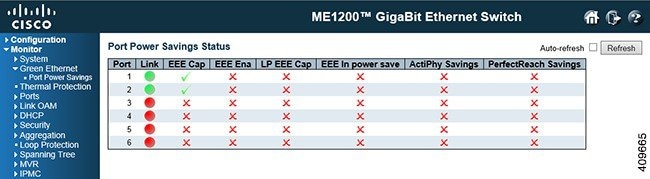
The Green Ethernet feature available on the ME 1200 Web GUI allows you to monitor the port power savings on the ME 1200 switch.
EEE Status
-
Local Port: This is the logical port number for this row.
-
Link: Shows if the link is up for the port (green = link up, red = link down).
-
EEE cap: Shows if the port is EEE capable.
-
EEE Ena: Shows if EEE is enabled for the port (reflects the settings at the Port Power Savings configuration page).
-
LP EEE cap: Shows if the link partner is EEE capable.
-
EEE In power save: Shows if the system is currently saving power due to EEE. When EEE is enabled, the system will powered down if no frame has been received or transmitted in 5 microseconds.
-
Actiphy Savings: Shows if the system is currently saving power due to ActiPhy.
-
PerfectReach Savings: Shows if the system is currently saving power due to PerfectReach.
 Feedback