- Preface
- Basic Functionality
- Basic Configurations
- Configuring System
- Configuring Green Ethernet
- Configuring Thermal Protection
- Configuring Ports
- Configuring Security
- Configuring Aggregation
- Configuring Link OAM
- Configuring Loop Protection
- Configuring Spanning Tree
- Configuring MVR
- Configuring LLDP
- Configuring SyncE
- Configuring EPS
- Configuring MEP
- Configuring ERPS
- Configuring MAC Table
- Configuring VLANs
- Configuring VLAN Translation
- Configuring Ethernet Services
- Configuring Performance Monitor
- Configuring QoS
- Configuring HQoS
- Configuring Mirroring
- Configuring PTP
- Configuring sFlow
- Configuring Traffic Test
- Configuring Traffic Test Loops
- Configuring DDMI
- Configuring UDLD
- Configuring Flex Links
- Monitoring System
- Monitoring Green Ethernet
- Monitoring Thermal Protection
- Monitoring Ports
- Monitoring Link OAM
- Monitoring Security
- Monitoring Aggregation
- Monitoring Loop Protection
- Monitoring Spanning Tree
- Monitoring MVR
- Monitoring LLDP
- Monitoring Ethernet Services
- Monitoring Performance Monitor
- Monitoring PTP
- Monitoring MAC Table
- Monitoring VLANs
- Monitoring sFlow
- Monitoring DDMI
- Monitoring UDLD
- Monitoring Flex Links
- Diagnostics
- Maintenance
- Use Cases
Basic
Configurations
This section describes the basic configurations that are available for the ME 1200 Web GUI interface.
- Set Device Hostname and admin User Password
- Set VLAN IP Address
- Physical Port Configuration and Status
- L2 Switching
- Ethernet Services
Set Device Hostname and admin User Password
In the left panel, click .
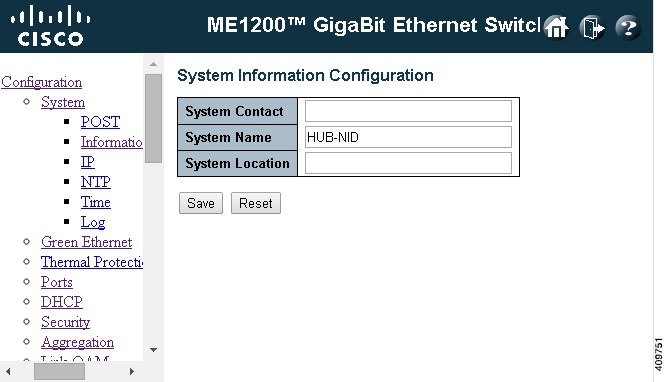
Enter the new hostname in the System Name box.
To change the password for a user, click .
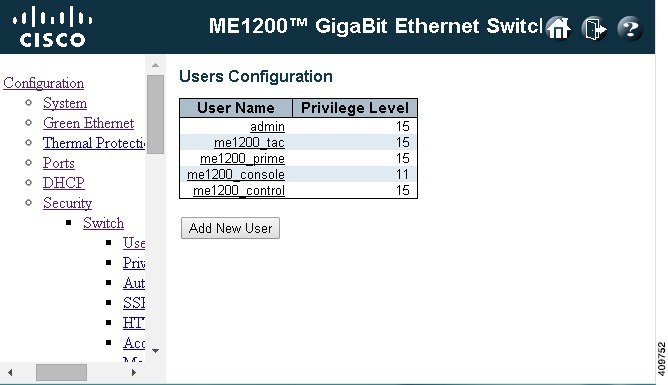
Click on the user whose password you wish to change, and enter the new password into the Password and Password (again) fields. Click Save.

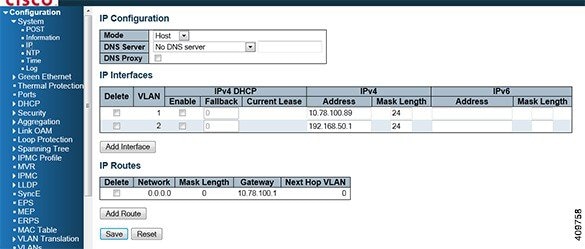
Set VLAN IP Address
To set an address on a VLAN, first click .

To create a new VLAN, click Add interface. To add an address or alter the address on an existing VLAN, simply type the new address into the appropriate text box along with the subnet mask.
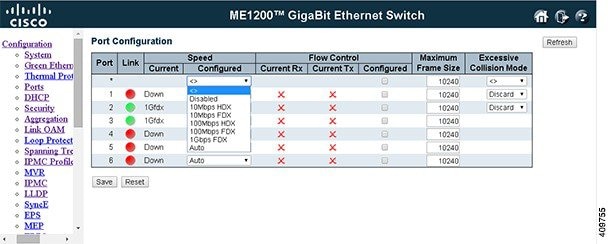
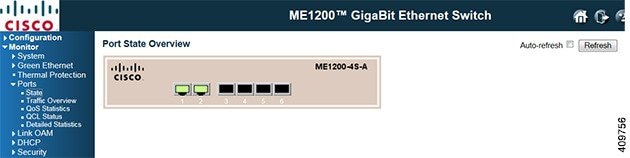
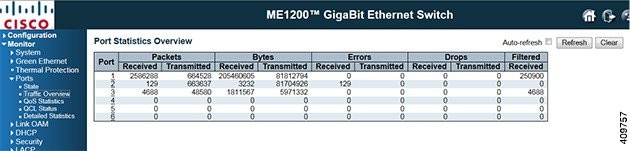
Physical Port Configuration and Status
L2 Switching
 Note | 1 is always reserved for the default VLAN. The range of the VLAN ID is 2 to 4095. |
Configuring VLAN for UNI and NNI Ports
Note | It is recommended that you retain both ports as trunk ports with the range of all allowed VLANS. |
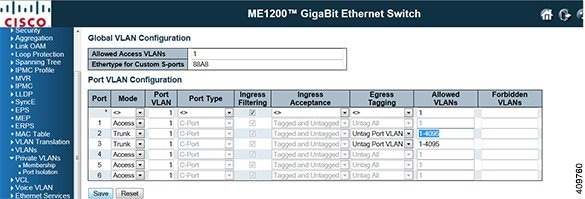
For more information on configuring a private VLAN, see the Configuring Private VLANs section. .
Port Mode
The port mode (default is Access) determines the fundamental behavior of the port in question. A port can be in one of three modes as described below.
-
Access
Access ports are normally used to connect to end stations. Dynamic features like Voice VLAN may add the port to more VLANs behind the scenes. Access ports have the following characteristics:
- Trunk
Trunk ports can carry traffic on multiple VLANs simultaneously, and are normally used to connect to other switches. Trunk ports have the following characteristics:
-
By default, a trunk port is member of all existing VLANs. This may be limited by the use of Allowed VLANs.
-
By default, all frames but frames classified to the Port VLAN (also called as Native VLAN) get tagged on egress. Frames classified to the Port VLAN do not get C-tagged on egress.
-
Egress tagging can be changed to tag all frames, in which case only tagged frames are accepted on ingress.
-
-
Hybrid
Hybrid ports do resemble trunk ports in many ways, but adds additional port configuration features. In addition to the characteristics described for trunk ports, hybrid ports have these abilities:
Port Type
Ports in hybrid mode allow for changing the port type, that is, whether a frame's VLAN tag is used to classify the frame on ingress to a particular VLAN, and if so, which TPID it reacts on. Likewise, on egress, the Port Type determines the TPID of the tag, if a tag is required.
Unaware: On ingress, all frames, whether carrying a VLAN tag or not, get classified to the Port VLAN, and possible tags are not removed on egress.
C-Port: On ingress, frames with a VLAN tag with TPID = 0x8100 get classified to the VLAN ID embedded in the tag. If a frame is untagged or priority tagged, the frame gets classified to the Port VLAN. If frames must be tagged on egress, they will be tagged with a C-tag.
S-Port: On ingress, frames with a VLAN tag with TPID = 0x8100 or 0x88A8 get classified to the VLAN ID embedded in the tag. If a frame is untagged or priority tagged, the frame gets classified to the Port VLAN. If frames must be tagged on egress, they will be tagged with an S-tag.
S-Custom-Port: On ingress, frames with a VLAN tag with a TPID = 0x8100 or equal to the Ethertype configured for Custom-S ports get classified to the VLAN ID embedded in the tag. If a frame is untagged or priority tagged, the frame gets classified to the Port VLAN. If frames must be tagged on egress, they will be tagged with the custom S-tag.
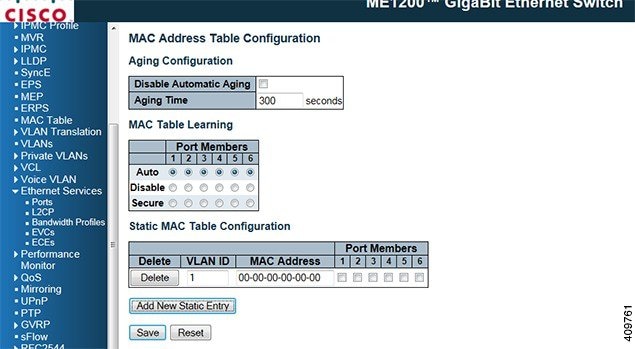
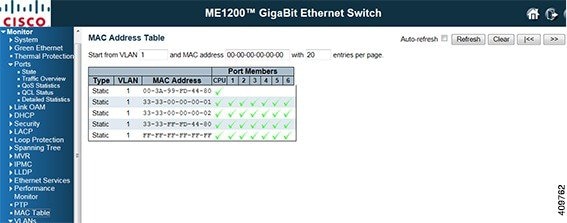
MAC Table Configuration
The static entries can be configured in the MAC table for forwarding and the below parameters are allowed. The static MAC table can contain 64 entries.
To configure the MAC table, .
To view the MAC table, .
Ethernet Services
MEF standards describe services provided to customers at User Network Interfaces (UNIs). Inside provider networks, nodes are connected using Internal Network-to-Network Interfaces (I-NNIs). Connections between service providers are done using External Network-to-Network Interfaces (E-NNIs). An Ethernet Virtual Connection (EVC) is an association of two or more UNIs.
- Port Configuration
- Bandwidth Profiles Configuration
- EVC
- ECE
- EPL Service between UNI and NNI
- EVPL Service between UNI and NNI (bundle #1)
- EVPL service between UNI and NNI (bundle #2), same UNI, NNI as above
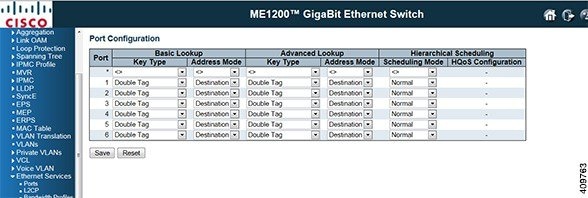
Port Configuration
The EVC per Port configurations that are allowed are as shown below. Retain the default configuration for the MEF services.
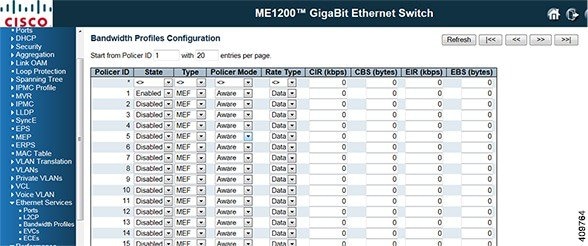
Bandwidth Profiles Configuration
| Policer Mode | Coupled , Aware |
|---|---|
| CIR | 0 to 10000000 kbps |
| CBS | 0 to 100000 bytes |
| EIR | 0 to 10000000 kbps |
| EBS | 0 to 100000 bytes |
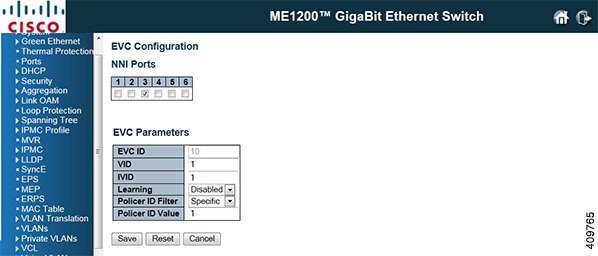
EVC
| Configurable Parameter | Allowed Range |
|---|---|
| NNI Port | Any port number of the switch |
| EVC ID | 1 to 128 |
| VLAN ID | 1 to 4095 |
| Internal/ Classified VLAN ID | 1 to 4095 |
ECE
The EVC Control Entry configurations that are allowed are as shown below.
These parameters vary according to the Tag type selected. The User Network Interface (UNI) port(s) needs to be selected for the ECE, and then the Tag type. Different parameter options are displayed depending on the Tag type selected.
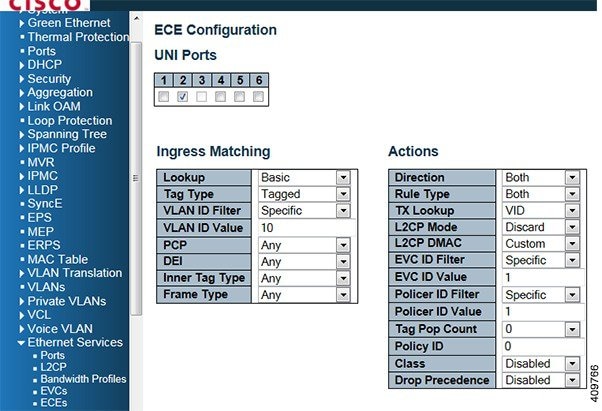
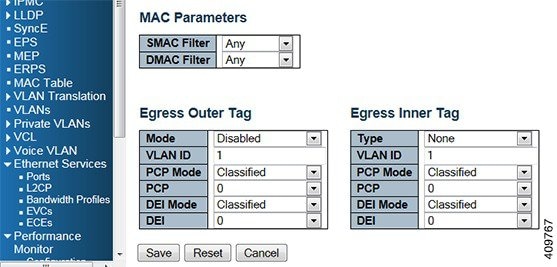
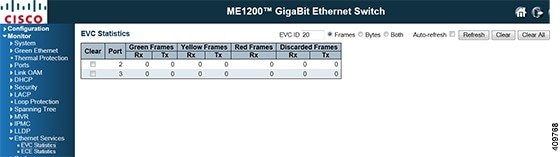
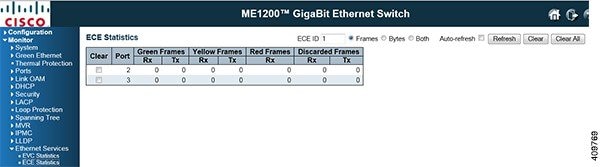
For details of each parameter, refer to the Help section on the GUI. The EVC/ECE Service statistics can be viewed via the Monitor pages.
EVC Statistics
ECE Statistics
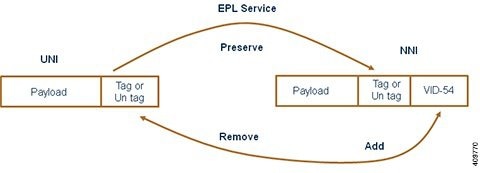
EPL Service between UNI and NNI
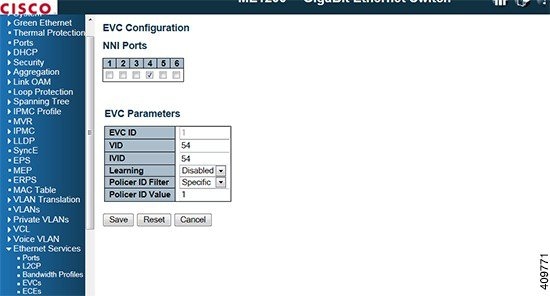
First, create EVC as shown below. VID is 54, for IVID, that is, the internal VID used for internal classification is also set to 54, but any unique value can be used. Learning is disabled because this is a point to point service and the NNI port is 4. Double VLAN tagging on the NNI is not used, so no inner tag is specified. The Outer Tag VID used for uni-directional NNI to UNI service and is not used here.
-
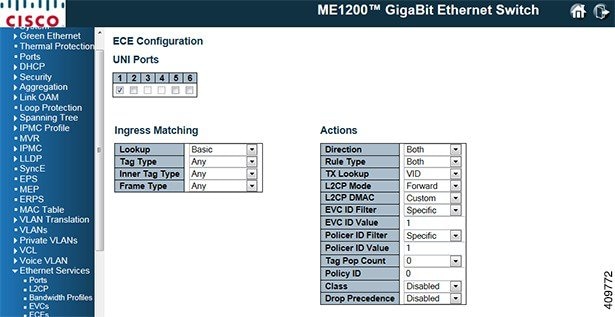
UNI port is port 1.
-
UNI matching is any for all to one bundling.
-
MAC parameters are set to any.
-
NNI outer tag allows inserting a tag on the UNI. This is for unidirectional services only.
Actions: EVC ID is 1.
-
Direction is both equal to a bidirectional service.
-
Tag Pop Count is 0 for EPL service, that is, all frames are passed to the EVC without popping any tags.
-
The policy ID is used to point to an ACL. The ACL can then be used to select an EVC policer. This service is not using any policer, policy ID 0 is used.
-

EVPL Service between UNI and NNI (bundle #1)
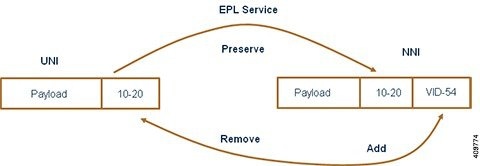
EVC configuration is the same as the first example.
ECE Configuration
Create ECE (EVC Control Entry)
-
Direction is both equal to a bidirectional service.
-
Tag Pop Count is 0 for EVPL service, that is, all frames are passed to the EVC without popping any tags. The UNI tag is preserved.
-
The policy ID is used to point to an ACL. The ACL can then be used to select an EVC policer. This service is not using any policer, policy ID 0 is used.
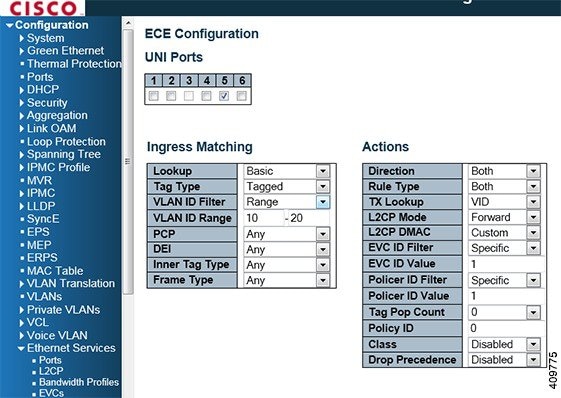
EVPL service between UNI and NNI (bundle #2), same UNI, NNI as above
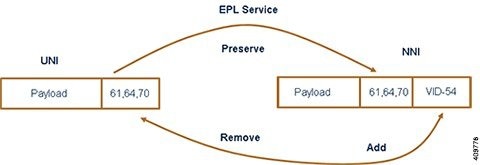
First, create EVC as shown in figure. VID is 54, Inner VID is 54. Learning is disabled because this is a point-to-point service and the NNI port is 4. Then, create ECE (EVC Control Entry).
-
Direction is both equal to a bidirectional service.
-
Tag Pop Count is 0 for EVPL service, that is, all frames are passed to the EVC without popping any tags. The UNI tag is preserved. - The policy ID is used to point to an ACL. The ACL can then be used to select an EVC policer. This service is not using any policer, policy ID 0 is used.
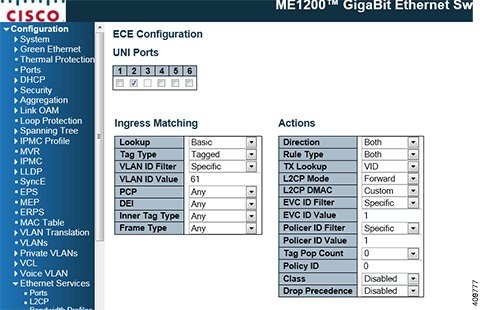
Create similar ECE for 64 and 70 with the same EVC ID.
 Feedback