- Preface
- Basic Functionality
- Basic Configurations
- Configuring System
- Configuring Green Ethernet
- Configuring Thermal Protection
- Configuring Ports
- Configuring Security
- Configuring Aggregation
- Configuring Link OAM
- Configuring Loop Protection
- Configuring Spanning Tree
- Configuring MVR
- Configuring LLDP
- Configuring SyncE
- Configuring EPS
- Configuring MEP
- Configuring ERPS
- Configuring MAC Table
- Configuring VLANs
- Configuring VLAN Translation
- Configuring Ethernet Services
- Configuring Performance Monitor
- Configuring QoS
- Configuring HQoS
- Configuring Mirroring
- Configuring PTP
- Configuring sFlow
- Configuring Traffic Test
- Configuring Traffic Test Loops
- Configuring DDMI
- Configuring UDLD
- Configuring Flex Links
- Monitoring System
- Monitoring Green Ethernet
- Monitoring Thermal Protection
- Monitoring Ports
- Monitoring Link OAM
- Monitoring Security
- Monitoring Aggregation
- Monitoring Loop Protection
- Monitoring Spanning Tree
- Monitoring MVR
- Monitoring LLDP
- Monitoring Ethernet Services
- Monitoring Performance Monitor
- Monitoring PTP
- Monitoring MAC Table
- Monitoring VLANs
- Monitoring sFlow
- Monitoring DDMI
- Monitoring UDLD
- Monitoring Flex Links
- Diagnostics
- Maintenance
- Use Cases
Configuring
Performance Monitor
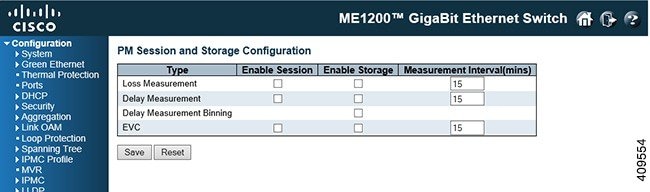
The Performance Monitor feature available on the ME 1200 Web GUI allows you to configure the Performance Monitor and the Performance Monitor Transfer.
Performance Monitor Configuration
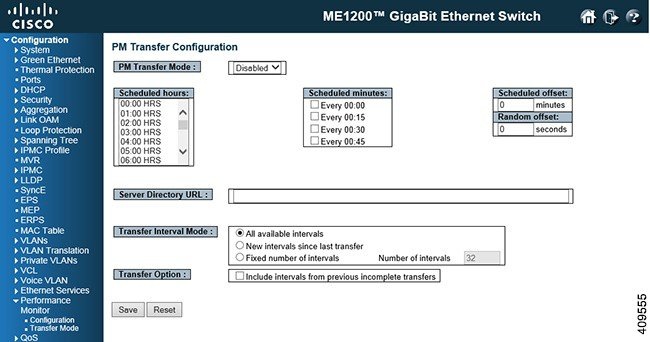
Performance Monitor Transfer Configuration
-
PM Transfer Mode: Configure the operation mode per system. Possible modes are:
-
Scheduled Hours: It is possible to select one or more of the 24 hours in a day, when PM data transfer will happen. Default is none selected.
-
Scheduled Minutes: It is possible to select one or more of the four 15 minutes in an hour, when PM data transfer will happen. Default is none selected.
-
Scheduled Offset: It is possible to configure a fixed offset that is added to the scheduled transfer time.
The range is 0-15 minutes. Default is 0 minute.
The sum of Scheduled Fixed Offset and Scheduled Random Offset must not exceed 15 minutes.
-
Random Offset: It is possible to configure a random offset that is added to the scheduled transfer time.
The offset added to the scheduled transfer time must be a random value in the range 0-Scheduled Offset.
The range is 0-900 seconds. Default is 0 sec. The sum of Scheduled Offset and Random Offset must not exceed 15 minutes.
-
Server Directory URL: It is possible to configure the full URL of the server and the corresponding directory (if any) for uploading.
The supported protocols are HTTP and TFTP.
To enable HTTP, enter http:// followed by the domain name or IP address.
To enable TFTP, enter tftp:// followed by the domain name or IP address.
 Feedback