- Preface
- Basic Functionality
- Basic Configurations
- Configuring System
- Configuring Green Ethernet
- Configuring Thermal Protection
- Configuring Ports
- Configuring Security
- Configuring Aggregation
- Configuring Link OAM
- Configuring Loop Protection
- Configuring Spanning Tree
- Configuring MVR
- Configuring LLDP
- Configuring SyncE
- Configuring EPS
- Configuring MEP
- Configuring ERPS
- Configuring MAC Table
- Configuring VLANs
- Configuring VLAN Translation
- Configuring Ethernet Services
- Configuring Performance Monitor
- Configuring QoS
- Configuring HQoS
- Configuring Mirroring
- Configuring PTP
- Configuring sFlow
- Configuring Traffic Test
- Configuring Traffic Test Loops
- Configuring DDMI
- Configuring UDLD
- Configuring Flex Links
- Monitoring System
- Monitoring Green Ethernet
- Monitoring Thermal Protection
- Monitoring Ports
- Monitoring Link OAM
- Monitoring Security
- Monitoring Aggregation
- Monitoring Loop Protection
- Monitoring Spanning Tree
- Monitoring MVR
- Monitoring LLDP
- Monitoring Ethernet Services
- Monitoring Performance Monitor
- Monitoring PTP
- Monitoring MAC Table
- Monitoring VLANs
- Monitoring sFlow
- Monitoring DDMI
- Monitoring UDLD
- Monitoring Flex Links
- Diagnostics
- Maintenance
- Use Cases
Configuring Flex
Links
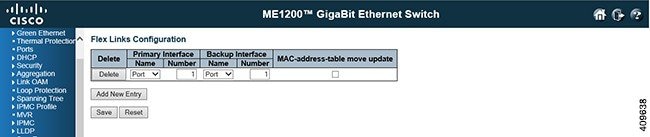
Flex Links Configuration
-
Delete: To delete an existing flex links pair, check this check box and click Save. The entry will be deleted from the switch.
-
Primary Interface: This defines the primary interface in Name and Number. Name can be chosen as a port or LLAG (port channel), and Number can be a valid ID. For example, for port number can be 1 to 6, and LLAG number can be any existing LLAG group id. 
Note
After adding a primary interface, the primary interface entry can only be deleted but not edited.
-
Backup Interface: This defines the backup interface in Name and Number, as described in primary interface. The backup interface entry can be edited
-
MAC-address-table move update: A check box for enabling or disabling the mac-address-move update transmit feature for the particular flex links entry. To enable the mac-address-move update transmit feature, check the check box. The check box is unchecked by default.
-
Add New Entry: Click this button to add a new Flex Links entry. An empty row is added to the table, and the flex links pair can be configured as needed. Legal values for a interface port number are 1 through 6. Legal values for a interface LLAG number are any existing LLAG group ids.
An entry with any members duplicating the existing entries in either port interface or LLAG groups will not be added when you click Save. The port interface that is included in an LLAG group is not allowed to be used alone.
The Delete button can be used to undo the addition of new entries. The maximum possible entries number are limited to port array size.
 Feedback