- Preface
- Basic Functionality
- Basic Configurations
- Configuring System
- Configuring Green Ethernet
- Configuring Thermal Protection
- Configuring Ports
- Configuring Security
- Configuring Aggregation
- Configuring Link OAM
- Configuring Loop Protection
- Configuring Spanning Tree
- Configuring MVR
- Configuring LLDP
- Configuring SyncE
- Configuring EPS
- Configuring MEP
- Configuring ERPS
- Configuring MAC Table
- Configuring VLANs
- Configuring VLAN Translation
- Configuring Ethernet Services
- Configuring Performance Monitor
- Configuring QoS
- Configuring HQoS
- Configuring Mirroring
- Configuring PTP
- Configuring sFlow
- Configuring Traffic Test
- Configuring Traffic Test Loops
- Configuring DDMI
- Configuring UDLD
- Configuring Flex Links
- Monitoring System
- Monitoring Green Ethernet
- Monitoring Thermal Protection
- Monitoring Ports
- Monitoring Link OAM
- Monitoring Security
- Monitoring Aggregation
- Monitoring Loop Protection
- Monitoring Spanning Tree
- Monitoring MVR
- Monitoring LLDP
- Monitoring Ethernet Services
- Monitoring Performance Monitor
- Monitoring PTP
- Monitoring MAC Table
- Monitoring VLANs
- Monitoring sFlow
- Monitoring DDMI
- Monitoring UDLD
- Monitoring Flex Links
- Diagnostics
- Maintenance
- Use Cases
Configuring MAC
Table
MAC Address Table Configuration
This feature allows you to set the MAC Address Table configuration. Set timeouts for entries in the dynamic MAC Table and configure the static MAC table here.
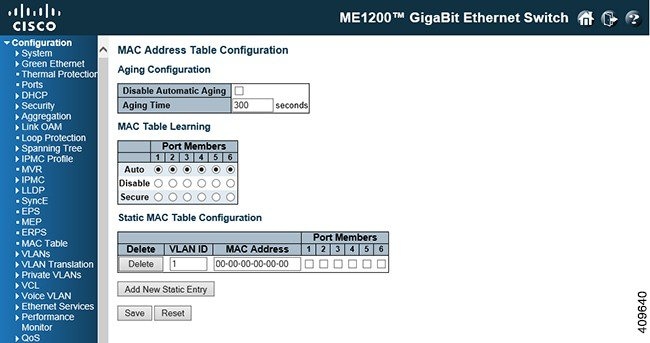
Aging Configuration
By default, dynamic entries are removed from the MAC table after 300 seconds. This removal is also called aging. Configure aging time by entering a value in seconds.
To disable the automatic aging of dynamic entries, check the Disable Automatic Aging checkbox.
MAC Table Learning
If the learning mode for a given port is greyed out, another module is in control of the mode, so that it cannot be changed by the user. An example of such a module is the MAC-Based Authentication under 802.1X.
-
Auto: Learning is done automatically as soon as a frame with unknown SMAC is received.
-
Disable: No learning is done.
-
Secure: Only static MAC entries are learned, all other frames are dropped. 
Note
Make sure that the link used for managing the switch is added to the Static Mac Table before changing to secure learning mode, otherwise the management link is lost and can only be restored by using another non-secure port or by connecting to the switch through the serial interface.
Static MAC Table Configuration
-
Delete: Check to delete the entry. It will be deleted during the next save.
-
VLAN ID: The VLAN ID of the entry.
-
MAC Address: The MAC address of the entry.
-
Port Members: Checkmarks indicate which ports are members of the entry. Check or uncheck as needed to modify the entry.
-
Add New Static Entry: Click this button to add a new entry to the static MAC table. Specify the VLAN ID, MAC address, and port members for the new entry. Click Save.
 Feedback