- Preface
- Basic Functionality
- Basic Configurations
- Configuring System
- Configuring Green Ethernet
- Configuring Thermal Protection
- Configuring Ports
- Configuring Security
- Configuring Aggregation
- Configuring Link OAM
- Configuring Loop Protection
- Configuring Spanning Tree
- Configuring MVR
- Configuring LLDP
- Configuring SyncE
- Configuring EPS
- Configuring MEP
- Configuring ERPS
- Configuring MAC Table
- Configuring VLANs
- Configuring VLAN Translation
- Configuring Ethernet Services
- Configuring Performance Monitor
- Configuring QoS
- Configuring HQoS
- Configuring Mirroring
- Configuring PTP
- Configuring sFlow
- Configuring Traffic Test
- Configuring Traffic Test Loops
- Configuring DDMI
- Configuring UDLD
- Configuring Flex Links
- Monitoring System
- Monitoring Green Ethernet
- Monitoring Thermal Protection
- Monitoring Ports
- Monitoring Link OAM
- Monitoring Security
- Monitoring Aggregation
- Monitoring Loop Protection
- Monitoring Spanning Tree
- Monitoring MVR
- Monitoring LLDP
- Monitoring Ethernet Services
- Monitoring Performance Monitor
- Monitoring PTP
- Monitoring MAC Table
- Monitoring VLANs
- Monitoring sFlow
- Monitoring DDMI
- Monitoring UDLD
- Monitoring Flex Links
- Diagnostics
- Maintenance
- Use Cases
Monitoring
DDMI
The DDMI feature available on the ME 1200 Web GUI allows you to monitor the DDMI information for the ME 1200 switch.
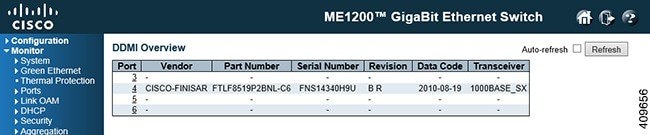
DDMI Overview
-
Port: DDMI port.
-
Vendor: Indicates Vendor name SFP vendor name.
-
Part Number: Indicates Vendor PN Part number provided by SFP vendor.
-
Serial Number: Indicates Vendor SN Serial number provided by vendor.
-
Revision: Indicates Vendor rev Revision level for part number provided by vendor.
-
Data Code: Indicates Date code Vendor¡¦s manufacturing date code.
-
Transeiver: Indicates Transceiver compatibility.
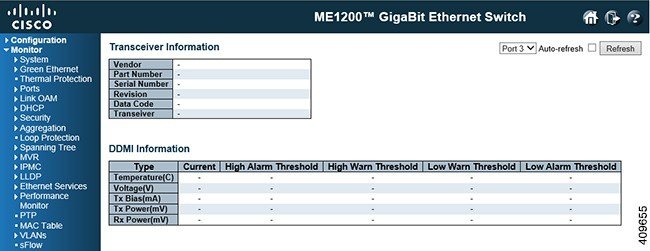
DDMI Detailed
This option explains
information on the DDMI feature in detail.
-
Vendor: Indicates Vendor name SFP vendor name.
-
Part Number: Indicates Vendor PN Part number provided by SFP vendor.
-
Serial Number: Indicates Vendor SN Serial number provided by vendor.
-
Revision: Indicates Vendor rev Revision level for part number provided by vendor.
-
Data Code: Indicates Date code Vendor¡¦s manufacturing date code.
-
Transeiver: Indicates Transceiver compatibility.
-
Current: The current value of temperature, voltage, TX bias, TX power, and RX power.
-
High Alarm Threshold: The high alarm threshold value of temperature, voltage, TX bias, TX power, and RX power.
-
High Warn Threshold: The high warn threshold value of temperature, voltage, TX bias, TX power, and RX power.
-
Low Warn Threshold: The low warn threshold value of temperature, voltage, TX bias, TX power, and RX power.
-
Low Alarm Threshold: The low alarm threshold value of temperature, voltage, TX bias, TX power, and RX power.
 Feedback