- Preface
- Basic Functionality
- Basic Configurations
- Configuring System
- Configuring Green Ethernet
- Configuring Thermal Protection
- Configuring Ports
- Configuring Security
- Configuring Aggregation
- Configuring Link OAM
- Configuring Loop Protection
- Configuring Spanning Tree
- Configuring MVR
- Configuring LLDP
- Configuring SyncE
- Configuring EPS
- Configuring MEP
- Configuring ERPS
- Configuring MAC Table
- Configuring VLANs
- Configuring VLAN Translation
- Configuring Ethernet Services
- Configuring Performance Monitor
- Configuring QoS
- Configuring HQoS
- Configuring Mirroring
- Configuring PTP
- Configuring sFlow
- Configuring Traffic Test
- Configuring Traffic Test Loops
- Configuring DDMI
- Configuring UDLD
- Configuring Flex Links
- Monitoring System
- Monitoring Green Ethernet
- Monitoring Thermal Protection
- Monitoring Ports
- Monitoring Link OAM
- Monitoring Security
- Monitoring Aggregation
- Monitoring Loop Protection
- Monitoring Spanning Tree
- Monitoring MVR
- Monitoring LLDP
- Monitoring Ethernet Services
- Monitoring Performance Monitor
- Monitoring PTP
- Monitoring MAC Table
- Monitoring VLANs
- Monitoring sFlow
- Monitoring DDMI
- Monitoring UDLD
- Monitoring Flex Links
- Diagnostics
- Maintenance
- Use Cases
Configuring Spanning
Tree
The Spanning Tree feature available on the ME 1200 Web GUI allows you to configure the Bridge, MSTI, and CIST settings.
- STP Bridge Configuration
- STP MSTI Configuration
- STP MSTI Priority Configuration
- STP CIST Port Configuration
- STP MSTI Port Configuration
STP Bridge Configuration
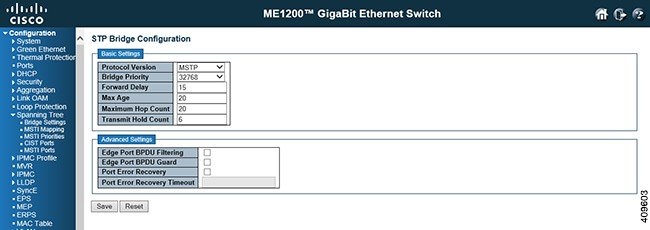
This option allows you to configure STP system settings. The settings are used by all STP Bridge instances in the switch.
-
Protocol Version: The MSTP/RSTP/STP protocol version setting. Valid values are STP, RSTP, and MSTP.
-
Bridge Priority: Controls the bridge priority. Lower numeric values have better priority. The bridge priority plus the MSTI instance number, concatenated with the 6-byte MAC address of the switch forms a Bridge Identifier.
For MSTP operation, this is the priority of the CIST. Otherwise, this is the priority of the STP/RSTP bridge.
-
Forward Delay: The delay used by STP Bridges to transit Root and Designated Ports to Forwarding (used in STP compatible mode). Valid values are in the range 4 to 30 seconds.
-
Max Age: The maximum age of the information transmitted by the Bridge when it is the Root Bridge. Valid values are in the range 6 to 40 seconds, and MaxAge must be <= (FwdDelay-1)*2.
-
Maximum Hop Count: This defines the initial value of remaining Hops for MSTI information generated at the boundary of an MSTI region. It defines how many bridges a root bridge can distribute its BPDU information to. Valid values are in the range 6 to 40 hops.
-
Transmit Hold Count: The number of BPDUs a bridge port can send per second. When exceeded, transmission of the next BPDU will be delayed. Valid values are in the range 1 to 10 BPDUs per second.
-
Edge Port BPDU Filtering: Control whether a port explicitly configured as Edge will transmit and receive BPDUs.
-
Edge Port BPDU Guard: Control whether a port explicitly configured as Edge will disable itself upon reception of a BPDU. The port will enter the error-disabled state and will be removed from the active topology.
-
Port Error Recovery: Control whether a port in the error-disabled state automatically will be enabled after a certain time. If recovery is not enabled, ports have to be disabled and re-enabled for normal STP operation. The condition is also cleared by a system reboot.
-
Port Error Recovery Timeout: The time to pass before a port in the error-disabled state can be enabled. Valid values are between 30 and 86400 seconds (24 hours).
STP MSTI Configuration
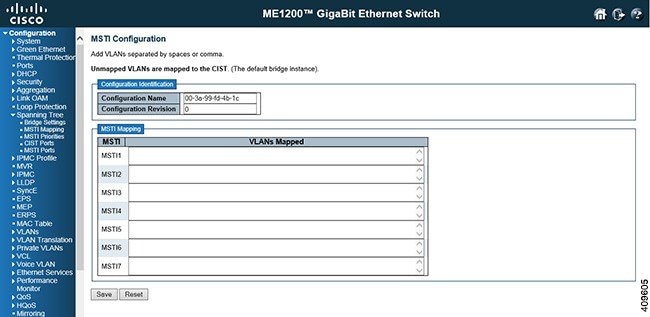
This option allows you to inspect the current STP MSTI bridge instance priority configurations and change them.
-
Configuration Name: The name identifying the VLAN to MSTI mapping. Bridges must share the name and revision (see below), as well as the VLAN-to-MSTI mapping configuration to share spanning trees for MSTIs (Intra-region). The name is at most 32 characters.
-
Configuration Revision: The revision of the MSTI configuration named above. This must be an integer between 0 and 65535.
-
MSTI: The bridge instance. The CIST is not available for explicit mapping, as it will receive the VLANs not explicitly mapped.
-
VLANs Mapped: The list of VLANs mapped to the MSTI. The VLANs can be given as a single (xx, xx being between 1 and 4094) VLAN, or a range (xx-yy), each of which must be separated with comma and/or space. A VLAN can only be mapped to one MSTI. An unused MSTI should just be left empty. (that is, not having any VLANs mapped to it.) For example: 2, 5, 20-40.
STP MSTI Priority Configuration
-
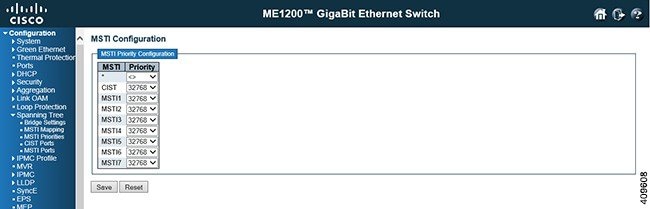
MSTI: The bridge instance. The CIST is the default instance, which is always active.
-
Priority: Controls the bridge priority. Lower numeric values have better priority. The bridge priority plus the MSTI instance number, concatenated with the 6-byte MAC address of the switch, forms a Bridge Identifier.
STP CIST Port Configuration
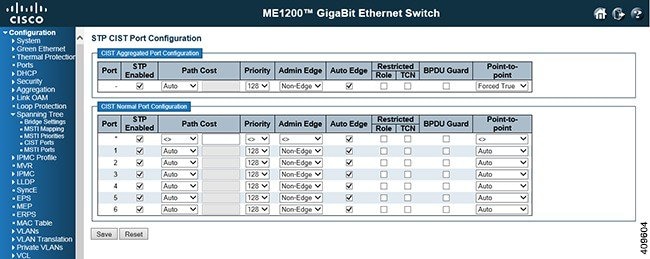
This option allows you to inspect the current STP CIST port configurations and change them.
-
Port: The switch port number of the logical STP port.
-
STP Enabled: Controls whether STP is enabled on this switch port.
-
Path Cost: Controls the path cost incurred by the port. The Auto setting will set the path cost as appropriate by the physical link speed, using the 802.1D recommended values. Using the Specific setting, a user-defined value can be entered. The path cost is used when establishing the active topology of the network. Lower path cost ports are chosen as forwarding ports in favor of higher path cost ports. Valid values are in the range 1 to 200000000.
-
Priority: Controls the port priority. This can be used to control priority of ports having identical port cost. (See above).
-
operEdge (state flag): Operational flag describing whether the port is connecting directly to edge devices. (No Bridges attached). Transition to the forwarding state is faster for edge ports (having operEdge true) than for other ports. The value of this flag is based on AdminEdge and AutoEdge fields. This flag is displayed as Edge in .
-
AdminEdge: Controls whether the operEdge flag should start as set or cleared. (The initial operEdge state when a port is initialized).
-
AutoEdge: Controls whether the bridge should enable automatic edge detection on the bridge port. This allows operEdge to be derived from whether BPDUs are received on the port or not.
-
Restricted Role: If enabled, causes the port not to be selected as Root Port for the CIST or any MSTI, even if it has the best spanning tree priority vector. Such a port will be selected as an Alternate Port after the Root Port has been selected. If set, it can cause lack of spanning tree connectivity. It can be set by a network administrator to prevent bridges external to a core region of the network influence the spanning tree active topology, possibly because those bridges are not under the full control of the administrator. This feature is also known as Root Guard.
-
Restricted TCN: If enabled, causes the port not to propagate received topology change notifications and topology changes to other ports. If set it can cause temporary loss of connectivity after changes in a spanning tree's active topology as a result of persistently incorrect learned station location information. It is set by a network administrator to prevent bridges external to a core region of the network, causing address flushing in that region, possibly because those bridges are not under the full control of the administrator or the physical link state of the attached LANs transits frequently.
STP MSTI Port Configuration
This option allows you to inspect the current STP MSTI port configurations and change them.

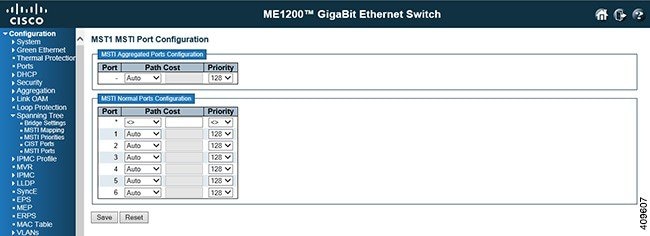
An MSTI port is a virtual port, which is instantiated separately for each active CIST (physical) port for each MSTI instance configured on and applicable to the port. To view the actual MSTI port configuration options, shown in the below figure, select the MSTI instance and click Get.
-
Port: The switch port number of the corresponding STP CIST (and MSTI) port.
-
Path Cost: Controls the path cost incurred by the port. The Auto setting will set the path cost as appropriate by the physical link speed, using the 802.1D recommended values. Using the Specific setting, a user-defined value can be entered. The path cost is used when establishing the active topology of the network. Lower path cost ports are chosen as forwarding ports in favor of higher path cost ports. Valid values are in the range 1 to 200000000.
-
Priority: Controls the port priority. This can be used to control priority of ports having identical port cost. (See above).
 Feedback