- Preface
- Basic Functionality
- Basic Configurations
- Configuring System
- Configuring Green Ethernet
- Configuring Thermal Protection
- Configuring Ports
- Configuring Security
- Configuring Aggregation
- Configuring Link OAM
- Configuring Loop Protection
- Configuring Spanning Tree
- Configuring MVR
- Configuring LLDP
- Configuring SyncE
- Configuring EPS
- Configuring MEP
- Configuring ERPS
- Configuring MAC Table
- Configuring VLANs
- Configuring VLAN Translation
- Configuring Ethernet Services
- Configuring Performance Monitor
- Configuring QoS
- Configuring HQoS
- Configuring Mirroring
- Configuring PTP
- Configuring sFlow
- Configuring Traffic Test
- Configuring Traffic Test Loops
- Configuring DDMI
- Configuring UDLD
- Configuring Flex Links
- Monitoring System
- Monitoring Green Ethernet
- Monitoring Thermal Protection
- Monitoring Ports
- Monitoring Link OAM
- Monitoring Security
- Monitoring Aggregation
- Monitoring Loop Protection
- Monitoring Spanning Tree
- Monitoring MVR
- Monitoring LLDP
- Monitoring Ethernet Services
- Monitoring Performance Monitor
- Monitoring PTP
- Monitoring MAC Table
- Monitoring VLANs
- Monitoring sFlow
- Monitoring DDMI
- Monitoring UDLD
- Monitoring Flex Links
- Diagnostics
- Maintenance
- Use Cases
Configuring
Mirroring
Mirroring and Remote Mirroring Configuration
Mirroring is a feature for switched port analyzer. The administrator can use the Mirroring to debug network problems. The selected traffic can be mirrored or copied on a destination port where a network analyzer can be attached to analyze the network traffic.
Remote Mirroring is an extend function of Mirroring. It can extend the destination port in other switch. So the administrator can analyze the network traffic on the other switches.
If a frame is mirrored by more than one mirror probe, then the highest numbered probe is selected. This implies that only one mirror copy is made per frame even if multiple probes are active.
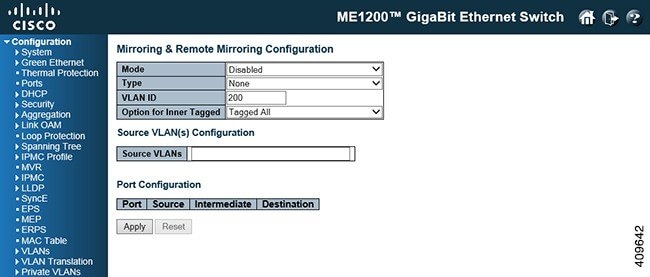
-
Mode: Enables or disables the mirror or Remote Mirroring function.
-
Type: Selects switch type. -
Mirror: The switch is running on mirror mode. The source port(s) and destination port are located on this switch.
-
Source: The switch is a source node for monitor flow. The source port(s) and intermediate port(s) are located on this switch.
-
Intermediate: The switch is a forwarding node for monitor flow and the switch is an option node. The object is to forward traffic from source switch to destination switch. The intermediate ports are located on this switch.
-
Destination: The switch is an end node for monitor flow. The destination port(s) and intermediate port(s) are located on this switch.
-
-
VLAN ID: The VLAN ID points out where the monitor packet will copy to. The default VLAN ID is 200.
-
Option for Inner Tagged: Select an inner tagged or an inner untagged type.
 Note | The Mirroring session shall have either ports or VLANs as sources, but not both. |
-
Port: The logical port for the settings contained in the same row. The CPU also can be selected
-
Source: Selects mirror mode.
-
Disabled: Neither frames transmitted nor frames received are mirrored.
-
Both: Frames received and frames transmitted are mirrored on the Intermediate/Destination port.
-
Rx only: Frames received on this port are mirrored on the Intermediate/Destination port. Frames transmitted are not mirrored.
-
Tx only: Frames transmitted on this port are mirrored on the Intermediate/Destination port. Frames received are not mirrored.
-
-
Intermediate: Select intermediate port. This checkbox is designed for Remote Mirroring. The intermediate port is a switched port to connect to other switch. All packets that are going through intermediate port will be tagged when the rmirror function is enabled.
Note
The intermediate port needs to disable MAC Table learning.
-
Destination: Select destination port. This checkbox is designed for mirror or Remote Mirroring. The destination port is a switched port that you receive a copy of traffic from the source port.
Note
On mirror mode, the device only supports one destination port.
Note
The destination port needs to disable MAC Table learning.
Configuration Guideline for All Features
|
Feature |
Impact |
source port |
intermediate port |
destination port |
Remote Mirroring VLAN |
|
arp_inspection |
High |
* disabled |
|||
|
acl |
Critical |
* disabled |
* disabled |
||
|
dhcp_relay |
High |
* disabled |
|||
|
dhcp_snooping |
High |
* disabled |
|||
|
ip_source_guard |
Critical |
* disabled |
* disabled |
||
|
ipmc/igmpsnp |
Critical |
un-conflict |
|||
|
ipmc/mldsnp |
Critical |
un-conflict |
|||
|
lacp |
Low |
o disabled |
|||
|
lldp |
Low |
o disabled |
|||
|
mac learning |
Critical |
* disabled |
* disabled |
||
|
mstp |
Critical |
o disabled |
|||
|
mvr |
Critical |
un-conflict |
|||
|
nas |
Critical |
* authorized |
* authorized |
||
|
psec |
Critical |
* disabled |
* disabled |
||
|
qos |
Critical |
* unlimited |
* unlimited |
||
|
upnp |
Low |
o disabled |
|||
|
mac-based vlan |
Critical |
* disabled |
|||
|
protocol-based vlan |
Critical |
* disabled |
|||
|
vlan_translation |
Critical |
* disabled |
* disabled |
||
|
voice_vlan |
Critical |
* disabled |
|||
|
mrp |
Low |
o disabled |
|||
|
mvrp |
Low |
o disabled |
Note |
 Feedback