- Preface
- Basic Functionality
- Basic Configurations
- Configuring System
- Configuring Green Ethernet
- Configuring Thermal Protection
- Configuring Ports
- Configuring Security
- Configuring Aggregation
- Configuring Link OAM
- Configuring Loop Protection
- Configuring Spanning Tree
- Configuring MVR
- Configuring LLDP
- Configuring SyncE
- Configuring EPS
- Configuring MEP
- Configuring ERPS
- Configuring MAC Table
- Configuring VLANs
- Configuring VLAN Translation
- Configuring Ethernet Services
- Configuring Performance Monitor
- Configuring QoS
- Configuring HQoS
- Configuring Mirroring
- Configuring PTP
- Configuring sFlow
- Configuring Traffic Test
- Configuring Traffic Test Loops
- Configuring DDMI
- Configuring UDLD
- Configuring Flex Links
- Monitoring System
- Monitoring Green Ethernet
- Monitoring Thermal Protection
- Monitoring Ports
- Monitoring Link OAM
- Monitoring Security
- Monitoring Aggregation
- Monitoring Loop Protection
- Monitoring Spanning Tree
- Monitoring MVR
- Monitoring LLDP
- Monitoring Ethernet Services
- Monitoring Performance Monitor
- Monitoring PTP
- Monitoring MAC Table
- Monitoring VLANs
- Monitoring sFlow
- Monitoring DDMI
- Monitoring UDLD
- Monitoring Flex Links
- Diagnostics
- Maintenance
- Use Cases
Monitoring
MVR
The MVR feature available on the ME 1200 Web GUI allows you to monitor the MVR Channels and view the MVR SFM Information Table.
MVR Statistics Table

-
VLAN ID: The Multicast VLAN ID.
-
IGMP/MLD Queries Received: The number of Received Queries for IGMP and MLD, respectively.
-
IGMP/MLD Queries Transmitted: The number of Transmitted Queries for IGMP and MLD, respectively.
-
IGMPv1 Joins Received: The number of Received IGMPv1 Join's.
-
IGMPv2/MLDv1 Report's Received: The number of Received IGMPv2 Join's and MLDv1 Report's, respectively.
-
IGMPv3/MLDv2 Report's Received: The number of Received IGMPv1 Join's and MLDv2 Report's, respectively.
-
IGMPv2/MLDv1 Leave's Received: The number of Received IGMPv2 Leave's and MLDv1 Done's, respectively.
MVR Channels (Groups) Information Table
This option displays
the entries in the MVR Channels (Groups) Information Table.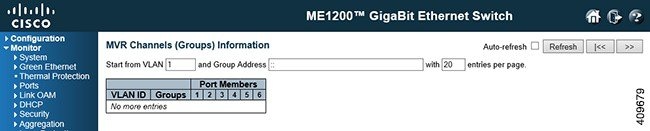
The MVR Channels (Groups) Information Table is sorted first by VLAN ID, and then by group.
Navigating the MVR Channels (Groups) Information Table
Each page shows up to 99 entries from the MVR Group table, default being 20, selected through the entries per page input field. When first visited, the web page will show the first 20 entries from the beginning of the MVR Channels (Groups) Information Table.
The Start from VLAN, and Group Address input fields allow the user to select the starting point in the MVR Channels (Groups) Information Table.
Clicking the Refresh button will update the displayed table starting from that or the closest next MVR Channels (Groups) Information Table match. In addition, the two input fields will - upon a Refresh button click - assume the value of the first displayed entry, allowing for continuous refresh with the same start address. The >> will use the last entry of the currently displayed table as a basis for the next lookup. When the end is reached the text No more entries is shown in the displayed table. Use the |<< button to start over.
MVR SFM Information Table
This option displays
the entries in the MVR SFM Information Table.

The MVR SFM (Source-Filtered Multicast) Information Table also contains the SSM (Source-Specific Multicast) information. This table is sorted first by VLAN ID, then by group, and then by Port. Different source addresses belong to the same group are treated as single entry.
Navigating the MVR SFM Information Table
Each page shows up to 99 entries from the MVR SFM Information Table, default being 20, selected through the entries per page input field. When first visited, the web page will show the first 20 entries from the beginning of the MVR SFM Information Table.
The Start from VLAN, and Group Address input fields allow the user to select the starting point in the MVR SFM Information Table. Clicking the Refresh button will update the displayed table starting from that or the closest next MVR SFM Information Table match. In addition, the two input fields will - upon a Refresh button click - assume the value of the first displayed entry, allowing for continuous refresh with the same start address.
The >> will use the last entry of the currently displayed table as a basis for the next lookup. When the end is reached the text No more entries is shown in the displayed table. Use the |<< button to start over.
-
VLAN ID: VLAN ID of the group.
-
Group: Group address of the group displayed.
-
Port: Switch port number.
-
Mode: Indicates the filtering mode maintained per (VLAN ID, port number, Group Address) basis. It can be either Include or Exclude.
-
Source Address: IP Address of the source.
Currently, the maximum number of IP source address for filtering (per group) is 8.
When there is no any source filtering address, the text None is shown in the Source Address field.
-
Type: Indicates the Type. It can be either Allow or Deny.
-
Hardware Filter/Switch: Indicates whether data plane destined to the specific group address from the source IPv4/IPv6 address could be handled by chip or not.
 Feedback