- Preface
- Basic Functionality
- Basic Configurations
- Configuring System
- Configuring Green Ethernet
- Configuring Thermal Protection
- Configuring Ports
- Configuring Security
- Configuring Aggregation
- Configuring Link OAM
- Configuring Loop Protection
- Configuring Spanning Tree
- Configuring MVR
- Configuring LLDP
- Configuring SyncE
- Configuring EPS
- Configuring MEP
- Configuring ERPS
- Configuring MAC Table
- Configuring VLANs
- Configuring VLAN Translation
- Configuring Ethernet Services
- Configuring Performance Monitor
- Configuring QoS
- Configuring HQoS
- Configuring Mirroring
- Configuring PTP
- Configuring sFlow
- Configuring Traffic Test
- Configuring Traffic Test Loops
- Configuring DDMI
- Configuring UDLD
- Configuring Flex Links
- Monitoring System
- Monitoring Green Ethernet
- Monitoring Thermal Protection
- Monitoring Ports
- Monitoring Link OAM
- Monitoring Security
- Monitoring Aggregation
- Monitoring Loop Protection
- Monitoring Spanning Tree
- Monitoring MVR
- Monitoring LLDP
- Monitoring Ethernet Services
- Monitoring Performance Monitor
- Monitoring PTP
- Monitoring MAC Table
- Monitoring VLANs
- Monitoring sFlow
- Monitoring DDMI
- Monitoring UDLD
- Monitoring Flex Links
- Diagnostics
- Maintenance
- Use Cases
Configuring Green
Ethernet
The Green Ethernet feature available on the ME 1200 Web GUI allows you to set the port power savings configuration.
Port Power Savings Configuration
EEE is a power saving option that reduces the power usage when there is low or no traffic utilization.
EEE works by powering down circuits when there is no traffic. When a port gets data to be transmitted, all circuits are powered up. The time it takes to power up the circuits is named wakeup time. The default wakeup time is 17 microseconds for 1 Gbit links and 30 microseconds for other link speeds. EEE devices must agree upon the value of the wakeup time to make sure that both the receiving and transmitting device has all circuits powered up when traffic is transmitted. The devices can exchange wakeup time information using the LLDP protocol.
EEE works for ports in auto-negotiation mode, where the port is negotiated to either 1 G or 100 Mbit full duplex mode.
For ports that are not EEE-capable the corresponding EEE checkboxes are grayed out and thus impossible to enable EEE for.
When a port is powered down for saving power, outgoing traffic is stored in a buffer until the port is powered up again. Because there are some overhead in turning the port down and up, more power can be saved if the traffic can be buffered up until a large burst of traffic can be transmitted. Buffering traffic will give some latency in the traffic.
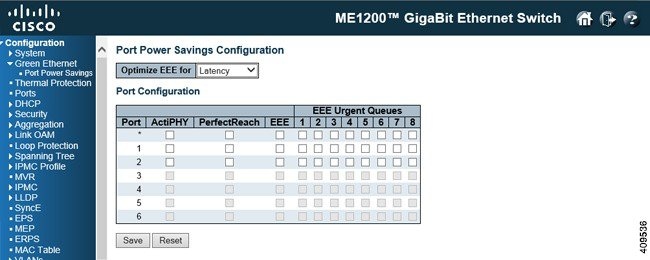
Use the Optimize EEE for option to optimize EEE for either best power saving or least traffic latency.
-
Port: The switch port number of the logical port.
-
ActiPHY: Link down power savings enabled. ActiPHY works by lowering the power for a port when there is no link. The port is power up for short moment in order to determine if cable is inserted.
-
PerfectReach: Cable length power savings enabled. PerfectReach works by determining the cable length and lowering the power for ports with short cables.
-
EEE: Controls whether EEE is enabled for this switch port. For maximizing power savings, the circuit is not started at once transmit data is ready for a port, but is instead queued until a burst of data is ready to be transmitted. This will give some traffic latency.
If desired, it is possible to minimize the latency for specific frames, by mapping the frames to a specific queue (done with QOS), and then mark the queue as an urgent queue. When an urgent queue gets data to be transmitted, the circuits will be powered up at once and the latency will be reduced to the wakeup time.
-
EEE Urgent Queues: Queues set will activate transmission of frames as soon as data is available. Otherwise the queue will postpone transmission until a burst of frames can be transmitted.
 Feedback