- Preface
- Basic Functionality
- Basic Configurations
- Configuring System
- Configuring Green Ethernet
- Configuring Thermal Protection
- Configuring Ports
- Configuring Security
- Configuring Aggregation
- Configuring Link OAM
- Configuring Loop Protection
- Configuring Spanning Tree
- Configuring MVR
- Configuring LLDP
- Configuring SyncE
- Configuring EPS
- Configuring MEP
- Configuring ERPS
- Configuring MAC Table
- Configuring VLANs
- Configuring VLAN Translation
- Configuring Ethernet Services
- Configuring Performance Monitor
- Configuring QoS
- Configuring HQoS
- Configuring Mirroring
- Configuring PTP
- Configuring sFlow
- Configuring Traffic Test
- Configuring Traffic Test Loops
- Configuring DDMI
- Configuring UDLD
- Configuring Flex Links
- Monitoring System
- Monitoring Green Ethernet
- Monitoring Thermal Protection
- Monitoring Ports
- Monitoring Link OAM
- Monitoring Security
- Monitoring Aggregation
- Monitoring Loop Protection
- Monitoring Spanning Tree
- Monitoring MVR
- Monitoring LLDP
- Monitoring Ethernet Services
- Monitoring Performance Monitor
- Monitoring PTP
- Monitoring MAC Table
- Monitoring VLANs
- Monitoring sFlow
- Monitoring DDMI
- Monitoring UDLD
- Monitoring Flex Links
- Diagnostics
- Maintenance
- Use Cases
Monitoring
PTP
PTP Clock Monitor
This option allows you
to inspect the current PTP clock settings.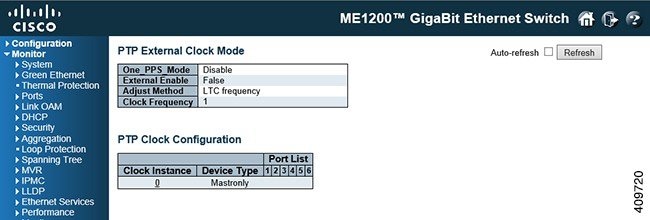
-
One_PPS_Mode: Shows the current One_pps_mode configured. -
Enable: Shows the current External clock output configuration. -
Method: Shows the current Frequency adjustment configuration. - LTC frequency : Local Time Counter (LTC) frequency control.
- SyncE-DPLL : SyncE DPLL frequency control, if allowed by SyncE.
- Oscillator : Oscillator independent of SyncE for frequency control, if supported by the HW.
- LTC phase : Local Time Counter (LTC) phase control (assumes that the frequency is locked by means of SyncE).
-
Clock Frequency: Shows the current clock frequency used by the External Clock.The possible range of values are 1 - 25000000 (1 - 25MHz).
-
Inst: Indicates the Instance of a particular Clock Instance [0..3]. Click on the Clock Instance number to monitor the Clock details.
-
ClkDom: Indicates the Clock domain used by the Instance of a particular Clock Instance [0..3].
-
Device Type: Indicates the Type of the Clock Instance. There are five Device Types. -
Port List: Shows the ports configured for that Clock Instance.
 Feedback