- Preface
- Basic Functionality
- Basic Configurations
- Configuring System
- Configuring Green Ethernet
- Configuring Thermal Protection
- Configuring Ports
- Configuring Security
- Configuring Aggregation
- Configuring Link OAM
- Configuring Loop Protection
- Configuring Spanning Tree
- Configuring MVR
- Configuring LLDP
- Configuring SyncE
- Configuring EPS
- Configuring MEP
- Configuring ERPS
- Configuring MAC Table
- Configuring VLANs
- Configuring VLAN Translation
- Configuring Ethernet Services
- Configuring Performance Monitor
- Configuring QoS
- Configuring HQoS
- Configuring Mirroring
- Configuring PTP
- Configuring sFlow
- Configuring Traffic Test
- Configuring Traffic Test Loops
- Configuring DDMI
- Configuring UDLD
- Configuring Flex Links
- Monitoring System
- Monitoring Green Ethernet
- Monitoring Thermal Protection
- Monitoring Ports
- Monitoring Link OAM
- Monitoring Security
- Monitoring Aggregation
- Monitoring Loop Protection
- Monitoring Spanning Tree
- Monitoring MVR
- Monitoring LLDP
- Monitoring Ethernet Services
- Monitoring Performance Monitor
- Monitoring PTP
- Monitoring MAC Table
- Monitoring VLANs
- Monitoring sFlow
- Monitoring DDMI
- Monitoring UDLD
- Monitoring Flex Links
- Diagnostics
- Maintenance
- Use Cases
Configuring Traffic
Test
The Traffic Test feature available on the ME 1200 Web GUI allows you to configure Traffic Test Loop instances for the ME 1200 switch.
Y.1564
Y.1564 Profile Overview
Y.1564 is an Ethernet service activation to test Ethernet Virtual Connections (EVCs). One single EVC is a collection of one or more ordered set of rules, known as ECEs. Each ECE describes matching criteria for traffic arriving at the UNI. For example, an Ethernet Virtual Private Line (EVPL) ECE matches a particular VLAN ID.
The ECE defines a set of actions. In relation to Y.1564, the most important action is the policer it maps to. Policers are configured separately, and multiple ECEs may point to the same physical policer, sharing the bandwidth set by the policer. Policers can also be attached to an EVC, and the ECE can be configured to use the EVC policer.
To execute a Y.1564 test, a set of Y.1564-specific configuration along with information about which EVC or ECE to test is needed. The Y.1564-specific configuration is independent of the EVC/ECE to test, and is called a profile. The profile can be used multiple times as input configuration to test EVCs/ECEs as they are created. The result of executing a profile is called a report. Up to 16 profiles and 10 reports can be stored on the switch.
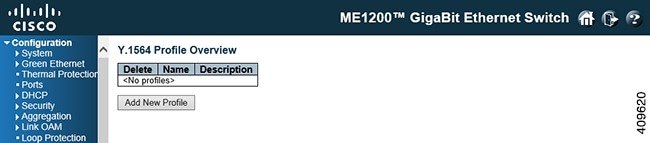
-
Delete: Click Delete to delete the profile in question.
-
Name: A unique name identifying the profile. Click the name to edit the profile.
-
Description: The profile's description as entered in the profile editor, which is activated by clicking the name of the profile.
-
Add New Profile: This button is grayed out if the maximum number of profiles is already defined.
Y.1564 Report Overview

-
Action: If a test is executed, a Stop button is shown. Clicking Stop causes a request to be sent to cancel the execution. During this cancellation, the button is disabled. At most one test can be executed at a time.
Once execution of a test is complete, the resulting report is persisted to non-volatile memory. Up to 10 reports can be persisted. New reports will replace the oldest. Only reports stored in non-volatile memory can be erased. This is done with the Delete button.
-
Save: Test reports can be downloaded and stored on the local computer with the use of the Save button. The suggested file name will be the report name concatenated with .txt.
-
Name: A unique name identifying the report.
-
Description: The description assigned to the report as entered on the test execution page, invoked with Start New Test.
-
Created: The date and time at which execution started.
-
Status: The current status of executing a test: -
Inactive: Test just initiated, but not started. This is a transitional state that is unlikely to be noticed.
-
Executing: Test is currently executing. At most one test can execute at a time.
-
Cancelling: Test has just been stopped by the user. This is a transitional state that is unlikely to be noticed.
-
Cancelled: Test was stopped by the user and report is stored in non-volatile memory.
-
Passed: Test passed successfully and report is stored in non-volatile memory.
-
Failed: Test failed execution and report is stored in non-volatile memory. Details as to why the test failed are embedded in the report.
-
RFC2544
RFC2544 Profile Overview
 Note | This switch supports the near-end functionality only (generation + check of frames). Remote end functionality (loop + MAC address swap) is not supported. |
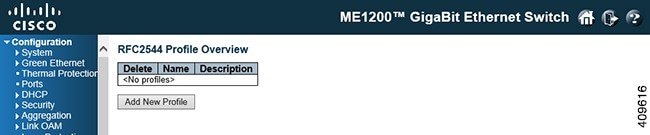
-
Delete: Delete the profile in question.
-
Name: A unique name identifying the profile.
-
Description: The profile's description as entered in the profile editor, which is activated by clicking the name of the profile.
-
Add New Profile: This button is grayed out if the maximum number of profiles is already defined.
RFC2544 Report Overview

-
Action: If a test is currently being executed, a Stop button is shown. Clicking Stop cancel the execution of the test. During this cancellation, the button will be disabled. At the most, one test can execute at a time.
-
Save: Test reports can be downloaded and stored on the local computer. The suggested file name will be the report name concatenated with ".txt".
-
Name: A unique name identifying the report.
-
Description: The description assigned to the report as entered on the test execution page, invoked with the Start New test button.
-
Created: The date and time at which execution started.
-
Status: The current status of executing a test:
-
Inactive: Test just initiated, but not started. This is a transitional state that is unlikely to be noticed.
-
Executing: Test is currently executing. At most one test can execute at a time.
-
Cancelling: Test has just been stopped by the user. This is a transitional state that is unlikely to be noticed.
-
Cancelled: Test was stopped by the user and report is stored in non-volatile memory.
-
Passed: Test passed successfully and reports is stored in non-volatile memory.
-
Failed: Test failed execution and report is stored in non-volatile memory. Details as to why the test failed are embedded in the report.
-
TT-LOOP
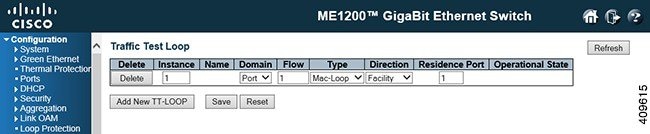
-
Delete: This box is used to mark a TT-LOOP for deletion in next Save operation.
-
Instance: The ID of the TT-LOOP. Click on the ID of a TT-LOOP to enter the configuration page.
-
Name: This is a configurable name of the instance.
-
Domain: Currently VLAN domain is not supported. -
Flow: The flow instance number related to this TT-LOOP instance - depending on the 'Domain'.
-
Type: Currently OAM Loop is only supported in EVC domain. -
Direction: Currently Terminal Loop is only supported in EVC domain. -
Residence Port: The port where TT-LOOP is resident - see 'Direction'. For an EVC TT-LOOP the port must be a port in the EVC. For a VLAN TT-LOOP the port must be a VLAN member.
-
Operational State
 Feedback