Routing Configuration Guide, Cisco IOS XE Catalyst SD-WAN Release 17.x

PDF

Transport gateways for connecting networks in Cisco SD‑WAN

Want to summarize with AI?

Log in

Overview

Explains how the transport gateways facilitate communication between routers that lack direct connectivity, such as bridging physical LANs to cloud networks.

A transport gateway is a network device that:

  • connects routers that may or may not have direct connectivity,

  • simplifies the process of providing connectivity between disjoint networks (such as between a physical LAN and a cloud-based network), and

  • enables indirect connectivity without the complexity and limitations of manual control policy configuration.

A transport gateway facilitates communication between routers that are not directly connected, often bridging networks that are physically or logically separate (for example, connecting a traditional LAN to a cloud-based network).

A transport gateway connects routers that may or may not have direct connectivity. A common use case for transport gateways is to provide connectivity between routers in disjoint networks, such as between a physical LAN and a cloud-based network.

Without a transport gateway, one method of configuring indirect connectivity for these routers is to create a control policy that configures routes through an intermediate device with connectivity to both networks. This provides indirect connectivity between the disjoint routers. This approach has the following problems:

  • Complexity: Configuring a control policy to advertise prefixes is complicated.

  • Potential unavailable traffic endpoint: The control policy cannot detect whether a device or a configured route is unavailable. This can lead to packet loss if a route becomes unavailable.

Configuring a router to operate as a transport gateway solves the same issue, but with a simpler configuration process.
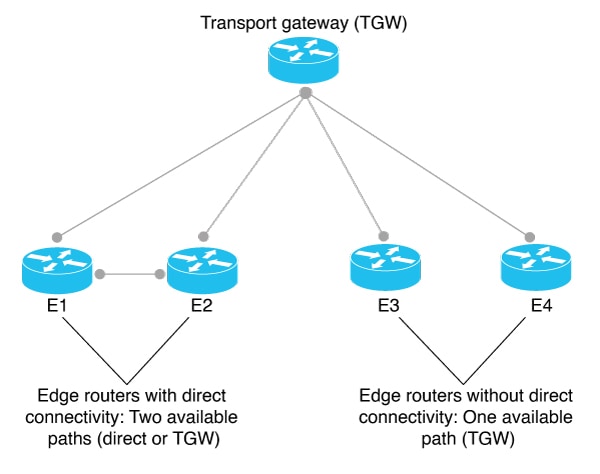
Figure 1. Transport Gateway

In the context of Cisco Catalyst SD-WAN, you can efficiently configure a hub-and-spoke routing topology by using transport gateways as hubs. This enables you to create the hub-and-spoke topology without requiring complex routing policy configuration. For information, see Hub-and-Spoke.
How a router functions as a transport gateway

Summary

Starting from Cisco Catalyst SD-WAN Manager Release 20.16.1, routes that are reoriginated from a site through the transport gateway are filtered out by the Cisco SD-WAN Controller. These reoriginated routes are not sent back to the originating site or the sites which share same site ID as the originating site. The reoriginated routes are only distributed to different sites within the Cisco Catalyst SD-WAN network.

This change in routing mechanism is also backported to Cisco Catalyst SD-WAN Manager Release 20.15.2, and Cisco Catalyst SD-WAN Manager Release 20.12.5.

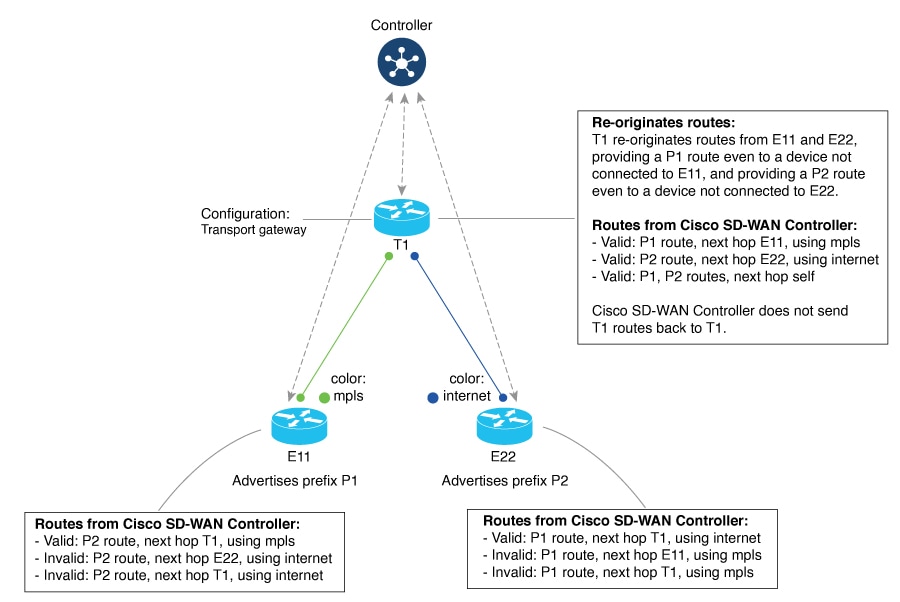
When a router is configured to function as a transport gateway, it does the following for each route that it learns from the Cisco SD-WAN Controllers:

  1. The transport gateway re-originates each route, substituting its own TLOCs as the next hop for the routes. This means that it substitutes its TLOCs as the next hop for each route.

  2. The transport gateway advertises the re-originated routes to the Cisco SD-WAN Controllers.

  3. The transport gateway attaches its own affinity attribute to routes that it re-originates. In scenarios in which routers in the network have re-originated routes available from more than one transport gateway, the routers apply affinity group preference logic to choose a route.

In the following illustration, E11 advertises prefix P1 and E22 advertises prefix P2. E11 and E22 are disjoint—they do not have direct connectivity. The transport gateway re-originates routes from E11 and E22, providing a P1 route to E22 and a P2 route to E11.

Workflow

Figure 2. Transport Gateway Re-Originating Routes

Site type

One part of configuring networks to use transport gateways is assigning a site type parameter to routers in the network. Site type helps to classify the intended function of a router, helping to define its position within the topology. Site type values include br, branch, cloud, spoke, type-1, type-2, and type-3.

After assigning site types, you can configure routers to prefer a transport gateway path only for traffic destined to a specific site type. This provides greater granularity when configuring a preference for transport gateway paths.

Site types are arbitrary, with no specific meaning, except br (border router) and spoke, which have specific uses for Multi-Region Fabric or intent-based hub-and-spoke topology, respectively.

Site Type Inheritance

Every OMP vRoute and TLOC originated from a router inherits the site type attributes of the router.

For information about configuring a site type for a router, see Configure the Site Type for a Router Using Cisco SD-WAN Manager.


OMP best path logic and transport gateway path preference

In general, when multiple paths are available between two routers, the overlay management protocol (OMP) applies best path selection logic to choose the best path. The best path selection logic is biased toward paths with fewer hops.

Summary

When you have configured a transport gateway, you can configure routers to apply a specific preference for transport-gateway-re-originated paths, if available. This alters the OMP best path calculation to include the transport gateway, according to the details of the configuration, as described below.

For information about configuring the preference for transport-gateway-re-originated paths, see Configure the Transport Gateway Path Preference.

Workflow

This table describes the best path logic.

  1. Router Configuration Resulting Best Path Behavior
    Transport Gateway Path Behavior Specify Site Type(s)
    Not configured Not applicable (This is the default behavior.) Prefer a direct path.
    Prefer Transport Gateway Path No Prefer a transport-gateway path over a direct path.
    Prefer Transport Gateway Path Yes

    For a transport-gateway path that matches a specified site type, prefer a transport-gateway path over a direct path.

    For a transport-gateway path that does not match a specified site type, prefer a direct path over a transport-gateway path.

    Do ECMP Between Direct and Transport Gateway Paths No Treat a direct path and a transport-gateway path as equal.
    Do ECMP Between Direct and Transport Gateway Paths Yes

    For a transport-gateway path that matches a specified site type, treat a direct path and a transport-gateway path as equal.

    For a transport-gateway path that does not match a specified site type, prefer a direct path over a transport-gateway path.

    As described earlier, a transport gateway attaches its own affinity attribute to paths that it re-originates. In scenarios in which routers in the network have re-originated paths available from more than one transport gateway, the routers apply affinity group preference logic to choose a path.

How the transport gateway configuration works

Summary

  1. To configure a router to function as a transport gateway, use a System feature template or CLI add-on template. See Configure a Router as a Transport Gateway Using Cisco SD-WAN Manager.

  2. To configure routers to use the transport gateway path, use an OMP feature template or CLI add-on template. See Configure the Transport Gateway Path Preference Using Cisco SD-WAN Manager. You can configure the OMP logic as follows:

    • Prefer a transport gateway path over a direct path.

    • Prefer a transport gateway path only for specific traffic, according to the site type attribute. See Configure the Site Type for a Router Using Cisco SD-WAN Manager.

    • Consider direct paths and transport gateway paths as equal.

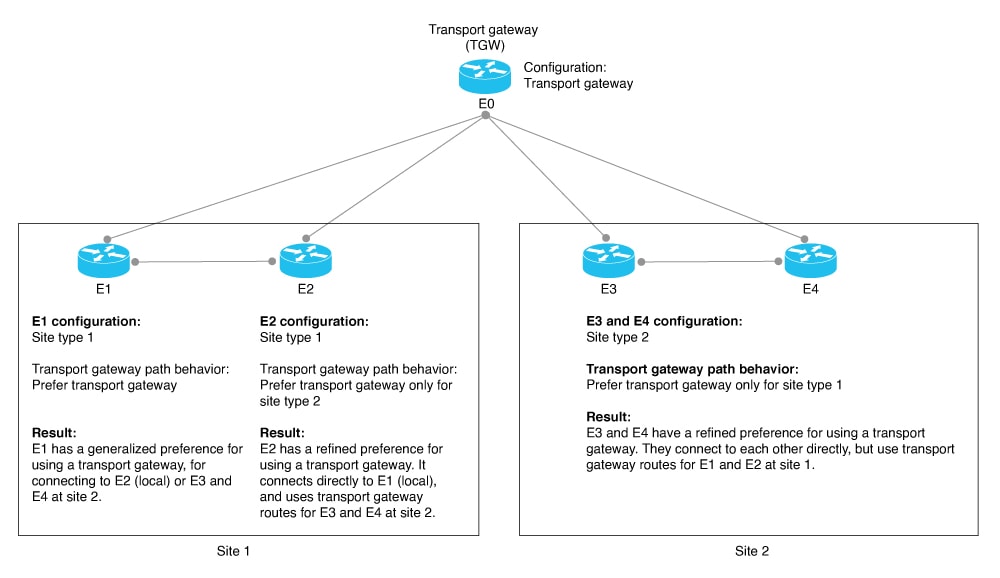
The following figure shows how routers in a network can operate with a transport gateway, preferentially directing all traffic or specific traffic through transport gateway routes.

Workflow

Figure 3. Edge Routers and Transport Gateway Path Preference

The devices in the illustration are configured as follows:

  1. Device Configuration
    E0
    1. Configure as a transport gateway.
      • By feature template: In a Cisco System template, use the Transport Gateway field.
      • By CLI add-on template:
        system transport-gateway enable
    E1
    1. Configure the site type as type-1.
      • By feature template: In a Cisco System template, use the Site Type field.
      • By CLI add-on template:
        system site-type type-1
    2. For best path, configure a preference for transport gateway routes.
      • By feature template: In an OMP template, use the Transport Gateway Path Behavior field. Choose the Prefer Transport Gateway Path option.
      • By CLI add-on template:
        omp best-path transport-gateway prefer
    E2
    1. Configure the site type as type-1.
      • By feature template: In a Cisco System template, use the Site Type field.
      • By CLI add-on template:
        system site-type type-1
    2. For best path, configure a preference for transport gateway routes for traffic to type-2 devices.
      • By feature template: In an OMP template, use the Transport Gateway Path Behavior field. Choose the Prefer Transport Gateway Path option. In the Site Types field, choose type-2.
      • By CLI add-on template:
        omp best-path transport-gateway prefer transport-gateway-settings type-2
    E3 and E4
    1. Configure the site type as type-2.
      • By feature template: In a Cisco System template, use the Site Type field.
      • By CLI add-on template:
        system site-type type-2
    2. For best path, configure a preference for transport gateway routes for traffic to type-1 devices.
      • By feature template: In an OMP template, use the Transport Gateway Path Behavior field. Choose the Prefer Transport Gateway Path option. In the Site Types field, choose type-1.
      • By CLI add-on template:
        omp best-path transport-gateway prefer transport-gateway-settings type-1

Use cases for transport gateways

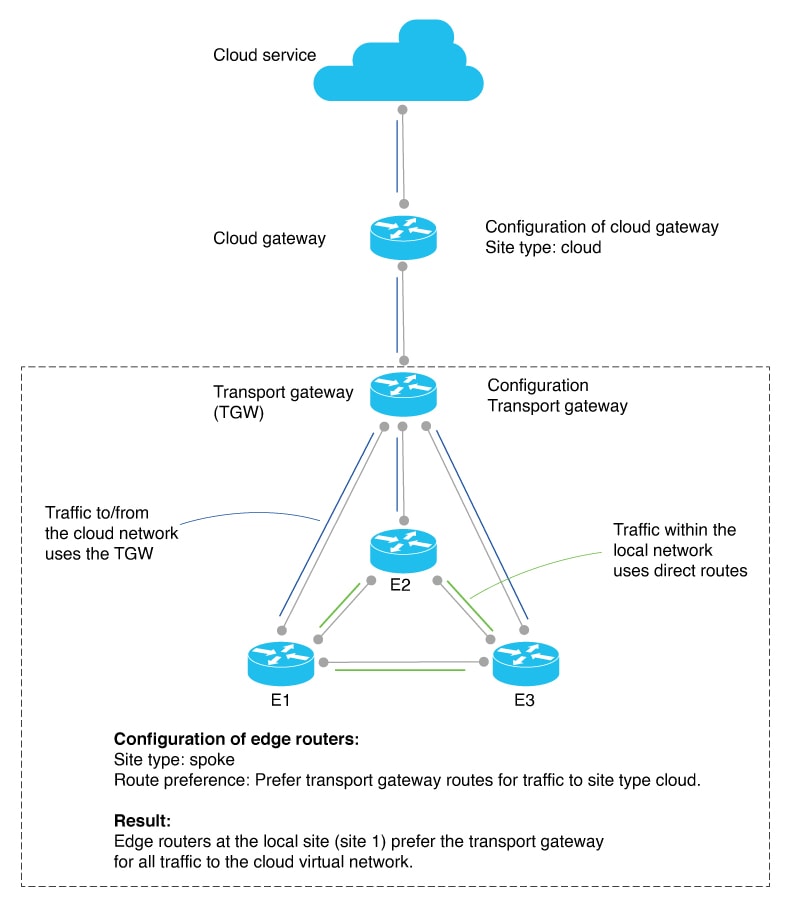
In this use case, an organization needs to bridge a local network with a cloud services network, such as Azure or AWS. Edge routers in the local and cloud networks lack direct connectivity.

To create a transport gateway to bridge the local and cloud networks, network administrators configure the devices as follows:

Intent Devices to Configure Configuration
Configure the cloud gateway router with site type cloud. Cloud gateway router
  1. Configure the site type as cloud.

    • By feature template: In a Cisco System template, use the Site Type field.

    • By CLI template:

      system site-type cloud
Deploy a transport gateway to operate as a hub for cloud-destined traffic from devices in a local network. The transport gateway attracts the cloud-destined traffic and routes it to the cloud gateway for the cloud-based network. Transport gateway router
  1. Enable as a transport gateway.

    • By feature template: In a Cisco System template, use the Transport Gateway field.

    • By CLI template:

      system transport-gateway enable
Traffic within the local network uses direct routes, not transport gateway routes. Traffic from the local network to the cloud uses a transport gateway route. Edge routers in the local network
  1. Use a transport gateway route for all cloud-destined traffic.

    • By feature template: In an OMP template, use the Transport Gateway Path Behavior field. Choose the Prefer Transport Gateway Path option.

    • By CLI template:

      omp best-path transport-gateway prefer transport-gateway-settings cloud
  2. Configure the site type as spoke.

    • By feature template: In a Cisco System template, use the Site Type field.

    • By CLI template:

      system site-type spoke

The following illustration shows the topology and configuration:

Figure 4. Transport Gateway Topology and Configuration

Restrictions for transport gateways

Restriction Description
Resource demands of transport gateway functionality Because of the resource demands of transport gateway functionality, we recommend enabling this only on a high-performance device with CPU and memory resources to handle the additional load. The specific resource requirements depend on your networking environment.
Multiple transport gateways: best path If you enable transport gateway functionality on multiple devices, edge routers apply best path selection logic to determine the best path. This may include multiple transport gateway paths.
Multiple transport gateways: preventing routing loops If you enable transport gateway functionality on multiple devices within network, the Cisco SD-WAN Controllers for the network do the following to avoid creating routing loops: When a Cisco SD-WAN Controller receives a route re-originated by one transport gateway, it does not advertise the route to another transport gateway. Avoiding advertising a transport gateway route to another transport gateway prevents routing loops.
On-demand tunnels You cannot configure dynamic on-demand tunnels for a device configured as a transport gateway. However, edge routers that are not operating as transport gateways can use on-demand tunnels. For information about dynamic on-demand tunnels, see Dynamic On-Demand Tunnels in the Cisco SD-WAN Systems and Interfaces Configuration Guide, Cisco IOS XE Release 17.x.